I want to pay for my Apple Music?
I missed my Apple Music payment and I want to pay it before it expires
iPhone 12 Pro Max, iOS 16
I missed my Apple Music payment and I want to pay it before it expires
iPhone 12 Pro Max, iOS 16
Greetings haliot,
Thanks for posting in the Apple Support Communities.
If you missed a renewal payment for Apple Music, you'll want to be sure you've updated the payment method information. Check out the following information for assistance with how to do this: If your payment method is declined in the App Store or iTunes Store - Apple Support
If a payment method can’t be charged
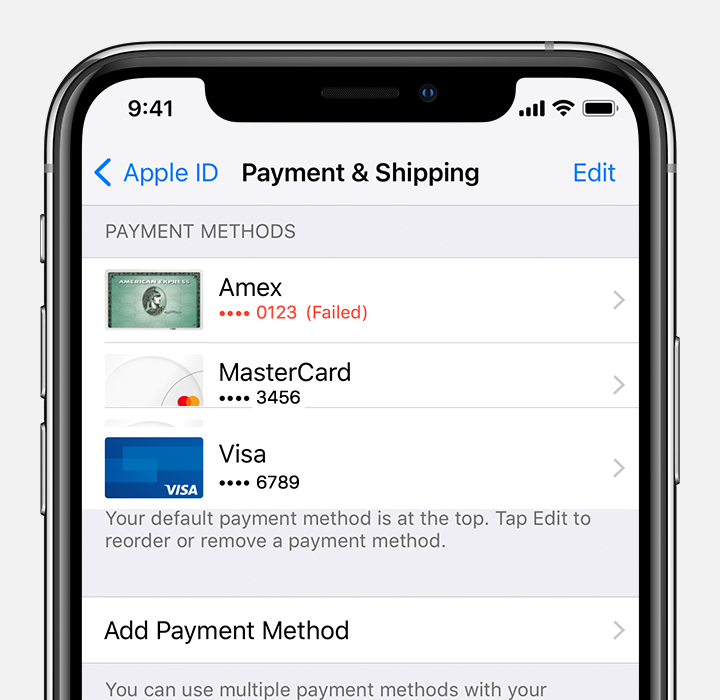
1. Use your device to check your payment information. You might see red text that explains why the payment method can't be charged.
2. If your card was declined, add a new payment method or update your payment information. You can add multiple payment methods to your Apple ID.
3. Your payment method will be charged for the unpaid balance. Then you can make other purchases and update your apps, including free apps.
If you use Family Sharing and Purchase Sharing is turned on, the family organizer must update their billing information or add a new payment method. If you're not the family organizer, you can't change the payment method.
See which payment methods are accepted in your country or region.
If you're unsure if the date has passed, you can check your active subscriptions to see if you may need to subscribe again. For assistance with this, check out the steps for an iPhone in the following resource. If you see the subscription shows an expiration message in red, or if "Cancel Subscription" isn't shown, this would mean you need to resubscribe: How to switch to a different subscription plan - Apple Support
We hope that's able to help.
Have a great day!
Greetings haliot,
Thanks for posting in the Apple Support Communities.
If you missed a renewal payment for Apple Music, you'll want to be sure you've updated the payment method information. Check out the following information for assistance with how to do this: If your payment method is declined in the App Store or iTunes Store - Apple Support
If a payment method can’t be charged
1. Use your device to check your payment information. You might see red text that explains why the payment method can't be charged.
2. If your card was declined, add a new payment method or update your payment information. You can add multiple payment methods to your Apple ID.
3. Your payment method will be charged for the unpaid balance. Then you can make other purchases and update your apps, including free apps.
If you use Family Sharing and Purchase Sharing is turned on, the family organizer must update their billing information or add a new payment method. If you're not the family organizer, you can't change the payment method.
See which payment methods are accepted in your country or region.
If you're unsure if the date has passed, you can check your active subscriptions to see if you may need to subscribe again. For assistance with this, check out the steps for an iPhone in the following resource. If you see the subscription shows an expiration message in red, or if "Cancel Subscription" isn't shown, this would mean you need to resubscribe: How to switch to a different subscription plan - Apple Support
We hope that's able to help.
Have a great day!
I want to pay for my Apple Music?