
How do I pay my bill
How do I pay my bill for my apple card
How do I pay my bill for my apple card
read here - How to make Apple Card payments
How to make payments
You can set up recurring scheduled payments or make a one-time payment in the Wallet app with just a few taps. If you don't have an eligible iPhone or iPad, you can make an Apple Card payment online at card.apple.com.
For Apple Card Family, account owners and co-owners are responsible for all payments on the shared Apple Card account. On a co-owned account, each co-owner can make payments on the account and can add a bank account. Before making or scheduling a payment on a shared Apple Card account, co-owners should verify that the correct bank account is selected.3
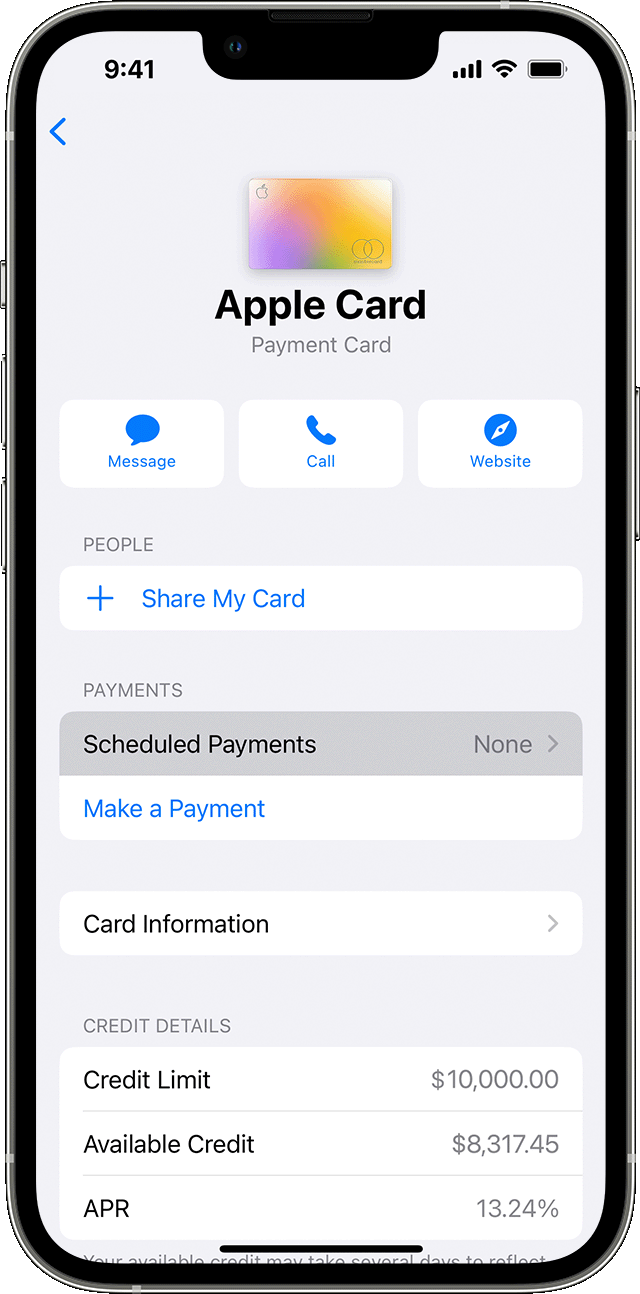
Set up scheduled payments for Apple Card
 , tap Card Details
  , tap Scheduled Payments, then tap Continue.
If you want to change your scheduled payment, you need to first cancel your current scheduled payment. Just tap the More button , tap Card Details , then tap your scheduled payment under Scheduled Payments. Tap Cancel Payments and tap Cancel Payments again to confirm your choice.
Make a one-time payment
Watch the video to learn how to make a one-time payment on your Apple Card balance >
On your iPhone in the Wallet app, you can make an immediate one-time payment or you can schedule a one-time payment.
Pay now
To make an immediate one-time payment:
Pay later
To schedule a one-time payment:

If you set up Apple Cash and verified your identity, you can use Apple Cash or your bank account to make an immediate one-time payment.
Make additional payments on your Apple Card Monthly Installments
If you pay your minimum payment due each month, you're automatically paying your Apple Card Monthly Installment for that month. To make an additional payment or pay off your installment balance, you need to pay your Maximum Payment for all other Apple Card purchases before additional payments can be applied to your installment balance.
Learn how to pay extra towards your Apple Card Monthly Installments.
Apple Card Monthly Installments are interest-free and all other purchases you make with your Apple Card have a variable APR.2 When you pay toward your Apple Card balance first, you can reduce or eliminate interest charges.
If you pay more towards your installment balance, you might reduce the number of payments, but you're still required to pay your installment the next month.
If your iPhone or iPad is unavailable
If your iPhone is missing or stolen, you can contact Apple Support to make a payment. You can also ask an Apple Card specialist to help you set up scheduled payments so you don't miss a payment.
If you added your Apple Card to another iPhone, you can make a payment or set up scheduled payments in the Wallet app on that iPhone. If you added your Apple Card to your iPad, you can go to Settings > Wallet & Apple Pay > Apple Card, then tap Make a Payment or set up Scheduled Payments.
read here - How to make Apple Card payments
How to make payments
You can set up recurring scheduled payments or make a one-time payment in the Wallet app with just a few taps. If you don't have an eligible iPhone or iPad, you can make an Apple Card payment online at card.apple.com.
For Apple Card Family, account owners and co-owners are responsible for all payments on the shared Apple Card account. On a co-owned account, each co-owner can make payments on the account and can add a bank account. Before making or scheduling a payment on a shared Apple Card account, co-owners should verify that the correct bank account is selected.3
Set up scheduled payments for Apple Card
, tap Card Details , tap Scheduled Payments, then tap Continue.If you want to change your scheduled payment, you need to first cancel your current scheduled payment. Just tap the More button , tap Card Details , then tap your scheduled payment under Scheduled Payments. Tap Cancel Payments and tap Cancel Payments again to confirm your choice.
Make a one-time payment
Watch the video to learn how to make a one-time payment on your Apple Card balance >
On your iPhone in the Wallet app, you can make an immediate one-time payment or you can schedule a one-time payment.
Pay now
To make an immediate one-time payment:
Pay later
To schedule a one-time payment:
If you set up Apple Cash and verified your identity, you can use Apple Cash or your bank account to make an immediate one-time payment.
Make additional payments on your Apple Card Monthly Installments
If you pay your minimum payment due each month, you're automatically paying your Apple Card Monthly Installment for that month. To make an additional payment or pay off your installment balance, you need to pay your Maximum Payment for all other Apple Card purchases before additional payments can be applied to your installment balance.
Learn how to pay extra towards your Apple Card Monthly Installments.
Apple Card Monthly Installments are interest-free and all other purchases you make with your Apple Card have a variable APR.2 When you pay toward your Apple Card balance first, you can reduce or eliminate interest charges.
If you pay more towards your installment balance, you might reduce the number of payments, but you're still required to pay your installment the next month.
If your iPhone or iPad is unavailable
If your iPhone is missing or stolen, you can contact Apple Support to make a payment. You can also ask an Apple Card specialist to help you set up scheduled payments so you don't miss a payment.
If you added your Apple Card to another iPhone, you can make a payment or set up scheduled payments in the Wallet app on that iPhone. If you added your Apple Card to your iPad, you can go to Settings > Wallet & Apple Pay > Apple Card, then tap Make a Payment or set up Scheduled Payments.
How do I pay my bill
