
My phone keeps doing this buzzing noise
The phone is an iPhone 14 pro max and when I restart it stops doing it but I’m scared this will ruin the phone phone brand new and no water damage or anything
iPhone 14 Pro Max
The phone is an iPhone 14 pro max and when I restart it stops doing it but I’m scared this will ruin the phone phone brand new and no water damage or anything
iPhone 14 Pro Max
Hello Kevinthomas1203,
Thank you for reaching out to Apple Support Communities, and we'll be happy to help in any way we can. We understand you're having issues with XXXX. Have you tried restarting your iPhone? This simple step resolves a multitude of issues: Restart your iPhone - Apple Support
"How to restart your iPhone X, 11, 12, or 13
Press and hold either volume button and the side button until the power-off slider appears.
Drag the slider, then wait 30 seconds for your device to turn off. If your device is frozen or unresponsive, force restart your device.
To turn your device back on, press and hold the side button (on the right side of your iPhone) until you see the Apple logo."
If that doesn't resolve the issue, does your iPhone needs updating to iOS 16.0.2? Do you have a recent backup for the data in your iPhone in iCloud or your computer? If not, we recommend that you create one as described here: How to back up your iPhone, iPad, and iPod touch - Apple Support
Then update your iOS as outlined here: Update your iPhone or iPad - Apple Support
"If the update doesn't appear on your device, use your computer to update your device manually. Learn how to update your device manually if you're using a Mac with macOS Catalina or later, or if you're using a Mac with macOS Mojave or earlier or a Windows PC.

Update your iPhone, iPad, or iPod touch wirelessly

iPadOS 16.1 coming in October
If you get an alert when updating wirelessly
Learn what to do if you see an alert message while trying to update your device wirelessly.
Some software updates aren't available wirelessly. VPN or proxy connections might prevent your device from contacting the update servers.
If you need more space when updating wirelessly
If a message asks to temporarily remove apps because the software needs more space for the update, tap Continue to allow apps to be removed. After installation is complete, those apps are automatically reinstalled. If you tap Cancel instead, you can delete content manually from your device to add more space.
Customize automatic updates
Your device can update automatically overnight while it's charging.
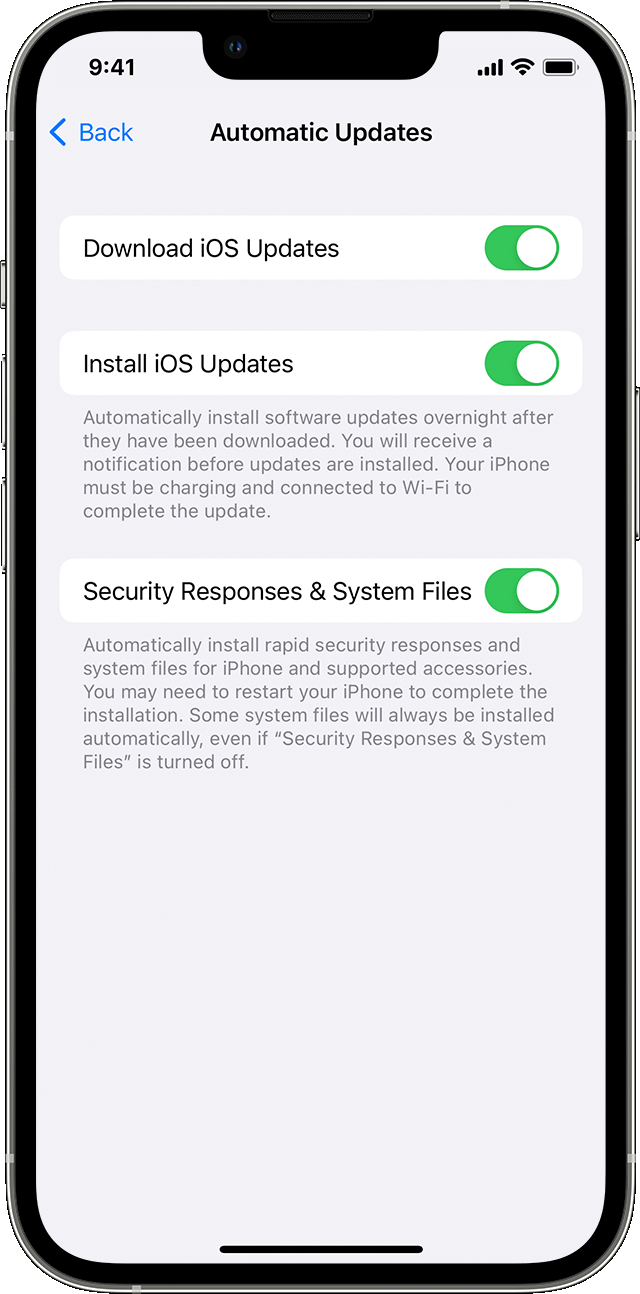
Turn on automatic updates
We hope this helps.
Cheers!
My phone keeps doing this buzzing noise

