Hi there Durian1000,
If you're seeing a message indicating the verification code you entered was incorrect, start by paying close attention to the entry fields for your Apple ID and the verification code. Make sure the Apple ID email address is correct and you're entering the code in the correct field.
Also, you'll want to be sure you've tried these steps to get a verification code and sign in with your Apple ID:
From your iPhone, iPad, or iPod touch
If your device is online:
1. Go to Settings > [your name].
2. Tap Password & Security > Get Verification Code.
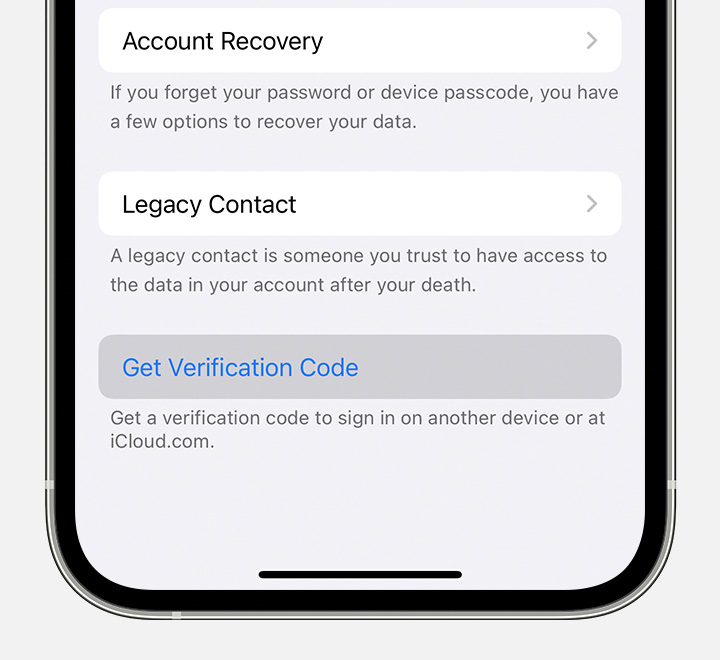
If your device is offline:
1. Go to Settings > [your name].
2. Tap Password & Security.
3. A message says "Account Details Unavailable." Tap Get Verification Code.
You'll find those steps here: Get a verification code and sign in with two-factor authentication - Apple Support
If you're still having difficulty signing into the iTunes Store, try signing in to your Apple ID account page to ensure you're not prompted to update any information and there aren't any sign-in issues there. You can try signing in here: Manage Your Apple ID
If you continue running into issues signing in because the verification code is incorrect, you'll want to reach out to Apple Support directly for more help. This link will help you get started: Contact - Official Apple Support
Take care.


