How do I use debit card in Apple ID for gas
How do I use my debit card on Apple ID for gas
iPhone 13, iOS 15
How do I use my debit card on Apple ID for gas
iPhone 13, iOS 15
Hello McClain46,
Thank you for reaching out in Apple Support Communities. If we're understanding correctly, you're referring to using Apple Pay to purchase gas. In this you want to make sure that the gas station accepts Apple Pay. Here's how:
Learn where to use Apple Pay
You can use Apple Pay in stores, within apps, on the web in Safari, for transit in some countries and regions, and in Message Apple.1, 2
In stores
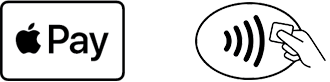
Use Apple Pay wherever you see one of these symbols.3 Or search for Apple Pay in Maps to see nearby stores that accept Apple Pay.
In China mainland, use Apple Pay wherever you see one of these symbols.
In Japan, use Apple Pay wherever you see one of these symbols.
In the United States, you can use Apple Pay to send and receive money with friends and family. And you can make payments to participating businesses in Message Apple on your iPhone, iPad, or iPod touch.
That information is outlined here: Learn where to use Apple Pay - Apple Support
If the gas station accepts Apple Pay, you can follow these steps for purchasing gas on your iPhone:
Pay with your iPhone
1. To use your default card:
- If your iPhone has Face ID, double-click the side button. If prompted, authenticate with Face ID or enter your passcode to open Apple Wallet.
- If your iPhone has Touch ID, double-click the Home button.
2. To use a different card, tap your default card to see your other cards. Tap a new card and authenticate.
3. Hold the top of your iPhone near the contactless reader until Done and a checkmark appear on the display.
These steps are outlined here: Make purchases using Apple Pay - Apple Support
Kind regards.
Hello McClain46,
Thank you for reaching out in Apple Support Communities. If we're understanding correctly, you're referring to using Apple Pay to purchase gas. In this you want to make sure that the gas station accepts Apple Pay. Here's how:
Learn where to use Apple Pay
You can use Apple Pay in stores, within apps, on the web in Safari, for transit in some countries and regions, and in Message Apple.1, 2
In stores
Use Apple Pay wherever you see one of these symbols.3 Or search for Apple Pay in Maps to see nearby stores that accept Apple Pay.
In China mainland, use Apple Pay wherever you see one of these symbols.
In Japan, use Apple Pay wherever you see one of these symbols.
In the United States, you can use Apple Pay to send and receive money with friends and family. And you can make payments to participating businesses in Message Apple on your iPhone, iPad, or iPod touch.
That information is outlined here: Learn where to use Apple Pay - Apple Support
If the gas station accepts Apple Pay, you can follow these steps for purchasing gas on your iPhone:
Pay with your iPhone
1. To use your default card:
- If your iPhone has Face ID, double-click the side button. If prompted, authenticate with Face ID or enter your passcode to open Apple Wallet.
- If your iPhone has Touch ID, double-click the Home button.
2. To use a different card, tap your default card to see your other cards. Tap a new card and authenticate.
3. Hold the top of your iPhone near the contactless reader until Done and a checkmark appear on the display.
These steps are outlined here: Make purchases using Apple Pay - Apple Support
Kind regards.
How do I use debit card in Apple ID for gas