Apple Watch outlook message has no content

For the last couple of weeks, when I get a notification on my Apple Watch for outlook email it comes up as “this message has no content”. I have tried killing the app on the watch and phone, uninstalling the app and reinstalling on the watch, turning on/off both my phone and watch, resetting the mail account on outlook via my phone and making sure software is up to date. Nothing seems to correct the issue. Is there a fix for this? Thanks!

Apple Watch Series 6

Posted on Oct 1, 2022 8:54 PM

Reply
2 replies

Oct 3, 2022 12:45 PM in response to rurban4277

Hello rurban4277,


Welcome to Apple Support Communities!

We want to help so these emails are showing as expected on your Apple Watch.

If they're showing as expected on your iPhone, use these steps to see if they start showing correctly on the Apple Watch.

"Choose which mailboxes appear on Apple Watch

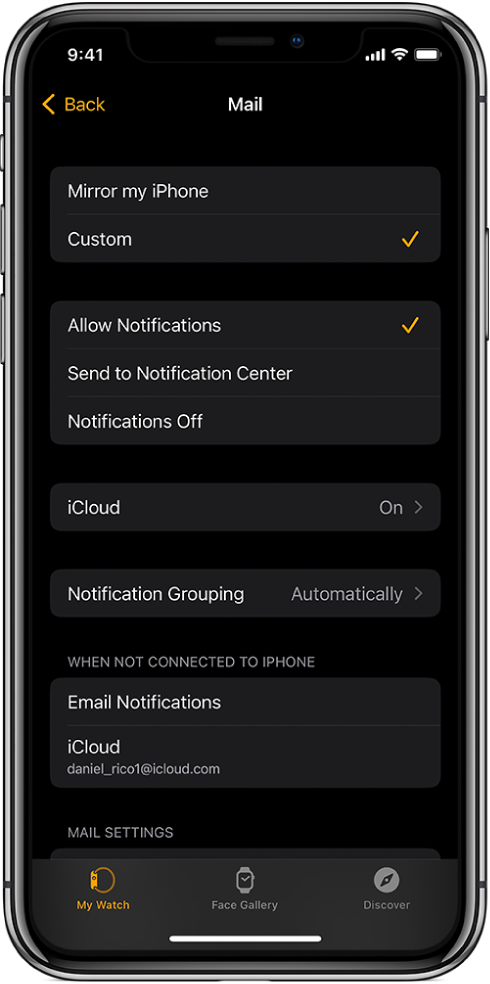
Mail settings in the Apple Watch app showing settings for notifications and email accounts.

  1. Open the Apple Watch app on your iPhone.
  2. Tap My Watch, then go to Mail > Include Mail.
  3. Tap the accounts you want to see on your Apple Watch under Accounts. You can specify multiple accounts—for example, iCloud and the account you use at work.
  4. If you want, tap an account, then tap specific mailboxes to see their contents on your Apple Watch."


This Apple Support page has the full details: Manage mail on Apple Watch - Apple Support

If the issue remains, to help us further isolate the cause, does this only happen with Outlook mail, or other accounts as well?


We hope this helps to resolve the issue so you can check these emails.

Cheers!


This thread has been closed by the system or the community team. You may vote for any posts you find helpful, or search the Community for additional answers.

Apple Watch outlook message has no content

Welcome to Apple Support Community
A forum where Apple customers help each other with their products. Get started with your Apple Account.