Apple Music Loud Static Noise

Why is there STILL very loud static noise sometimes on Apple Music?

- I personally have had this occur in the car, to my AirPods, to JBL ControlX Bluetooth speakers, across at least 2 iOS releases. I've had it happen streaming; can't be sure about downloaded files.

  • I've also had it happen from a 2015 MacBook Air and a brand new 2022 M2 MacBook Air, into a Denon 2312Ci receiver via AirPlay*

- A search of this site reveals many threads,* indicating an ongoing problem for over a year across iPhones, MacBooks, and a variety of playback devices, never with 100% resolution for all users.

  • It's loud enough to damage your ears, and burn out tweeters

What the heck is going on?


*Indicating this is an APPLE MUSIC issue, NOT a hardware or settings issue. Unfortunately silo'd because to post this stuff we have to choose "what device is this about" and "what topic" even though the issue crosses devices

iPhone 13

Posted on Oct 3, 2022 11:30 AM

Reply

Similar questions

1 reply

Oct 5, 2022 9:42 AM in response to head_unit

Hello head_unit,


Thank you for reaching out to Apple Support Communities, and we'll be happy to help in any way we can. We understand you're having issues with Apple Music. Does this also occur when you play directly from the iPhone itself? Does this only happen with certain songs? It would also be helpful to know if this also occurs with downloaded music. Would you please test that as well? We'd like to isolate this as much as we can.


If it does occur on the iPhone itself, try the steps listed here to see if they resolve the issue: If you hear no sound or distorted sound from your iPhone, iPad, or iPod touch speaker - Apple Support


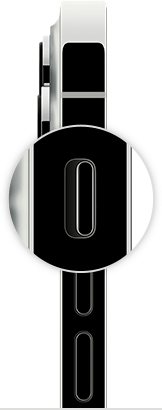
  1. "If your device has a Ring/Silent switch, move the switch forward—toward the device's display—so that orange isn't showing. If you're using an iPad, you can also swipe down from the top-right corner to open Control Center and make sure that Silent Mode is off. 
  2. iPhone ring/silent switch
  3. Open Settings > Focus > Do Not Disturb and make sure that Do Not Disturb is off.

Contact Apple Support

If you checked the sound settings and your device still has sound issues, contact Apple Support to discuss service options.


If you want to try more steps on your own

If you prefer, here are some more steps you can try on your own. After following these steps, you might still need to contact Apple Support to discuss service options.

  1. Remove all screen protectors, films, or cases from your device. 
  2. Check the speaker opening to see if it's blocked or dirty. On iPhone only, make sure that the receiver isn't blocked or dirty. 
  3. If necessary, clean the speaker or receiver opening with a small, soft-bristled brush. Make sure that the brush is clean and dry.
  4. Go to Settings > Sounds (or Settings > Sounds & Haptics), and drag the Ringer and Alerts slider back and forth a few times. If you don't hear any sound, or if your speaker button on the Ringer and Alerts slider is dimmed, your speaker might need service.
  5. If you hear sound, try making a call with your iPhone and turn on speakerphone. On iPad or iPod touch, make a FaceTime call. If you still can't hear, or hear static or crackling, then your network or reception could be the issue. Try to call again later, or from a different location."


We hope this helps.


Cheers!


This thread has been closed by the system or the community team. You may vote for any posts you find helpful, or search the Community for additional answers.

Apple Music Loud Static Noise

Welcome to Apple Support Community
A forum where Apple customers help each other with their products. Get started with your Apple Account.