Extremely slow SSD speed (iMac late 2015 27" 5K)

I want to use this iMac for music production (logic pro) but it's so slow it can't even do simple tasks like web browsing or messaging, it's useless. Disk (internal SSD) write speed is 13 MB/s, read speed is 40 MB/s. For some reason, if I let it run idle for like an hour it becomes somewhat useable. Here's what I've tried so far (none of these helped a bit):


  • did a clean install of macOS Monterey
  • took it to a repair shop (they were useless, they couldn't find a solution to my problem)
  • Enabled TRIM
  • Installed macOS on an external SSD (it was even slower than with the internal SSD)
  • Checked SSD health: no issues found, it's at 100%
  • Ran apple diagnostics: no problems found


Specs:

  • iMac late 2015 27" 5K
  • 32GB RAM1867 MHz DDR3
  • 3.2 GHz Quad-Core Intel Core i5
  • Graphics: AMD Radeon R9 M380 2 GB
  • 500 GB SPCC SSD


Is there a fix for this? Thanks in advance!


iMac 27″, macOS 12.6

Posted on Oct 4, 2022 8:11 AM

Reply
Question marked as Top-ranking reply

Posted on Oct 5, 2022 6:22 PM

Your SSD:


Drives:

disk0 - SPCC Solid State Disk 512.11 GB (Solid State - TRIM: Yes)

Internal SATA 6 Gigabit Serial ATA


is SATA, not the faster NVME Express interface. Your max possible speeds are about 500MB/sec ±. Still fat better than what you have.


I suspect you have an SSD that is not fully Mac compatible. Best results seem to come with the Crucial MX (not "BX") series and OWC SSD/s I have a OWC 2.5-inch SATA 6 SSD in an older Macbook Pro and it happily does 500MB/sec.


Did the iMac originally have a Fusion drive.If so, you have a faster interface available.


Similar questions

17 replies
Question marked as Top-ranking reply

Oct 5, 2022 6:22 PM in response to Attila139

Your SSD:


Drives:

disk0 - SPCC Solid State Disk 512.11 GB (Solid State - TRIM: Yes)

Internal SATA 6 Gigabit Serial ATA


is SATA, not the faster NVME Express interface. Your max possible speeds are about 500MB/sec ±. Still fat better than what you have.


I suspect you have an SSD that is not fully Mac compatible. Best results seem to come with the Crucial MX (not "BX") series and OWC SSD/s I have a OWC 2.5-inch SATA 6 SSD in an older Macbook Pro and it happily does 500MB/sec.


Did the iMac originally have a Fusion drive.If so, you have a faster interface available.


Oct 6, 2022 11:55 AM in response to Attila139

Attila139 wrote:

I’m using a USB2 enclosure because for some reason I just couldn’t install macOS using a USB3 enclosure with a USB3 cable. I got the crossed circle screen every single time.

At a max of 480MB/sec burst, USB2 is far slower than even an under-spec SATA 3 mech hard drive on the internal interface. If the USB2 drive was the boot volume when you did the EtreCheck run, then the gawd-awful drive scores are probably due to that.


Did you copy or clone the old drive to the external? Cloning is NOT optional. I use Carbon Copy Cloner. I have no idea why a USB3 enclosure would error unless it were faulty.


Have you tried the USB3 on another computer? Did you format it as APFS?

Oct 5, 2022 7:32 PM in response to Attila139

Atilla139 wrote:

Installed macOS on an external SSD (it was even slower than with the internal SSD)


What is the external SSD and more importantly, what enclosure is it in & how is it connected to your iMac (USB2, USB3 (and if it's USB3 are you using a USB3 cable), Thunderbolt, Thunderbolt/Firewire, etc. ?


If both your internal AND external drives are giving equally poor performance it would not seem to indicate a problem with the drives themselves, but something that affects drive/system performance overall.

Oct 6, 2022 7:40 AM in response to Attila139

Belated noticed this:


    • Enabled TRIM


If TRIM has not been engaged, simply activating it will not cause an immediate change in speed. I learned this through experience with my Macbook Pro with aftermarket SSD.


Start in Safe Mode and let it "soak." I found I needed several safe boots left standing for 30 mins to 2 hrs to finally get my SSD back up to its original speed. The gives Safe Mode time to address drive issues.


But there is the "however."....


However, when not having TRIM engaged has allowed the drive to slow, it typically only effects the Write speeds. Both your Writes and Reads are severely depressed.


Still, the multiple SAFE Mode restarts should be tried if you only recent activated TRIM.

Oct 7, 2022 7:45 AM in response to Allan Jones

Ok so, I switched enclosures this morning and it seems like the other one was faulty. I could install macOS on this one and I get proper read and write speeds, too (150mb/s write, 400mb/s read). However, the boot up time became extremely slow, almost as slow as an HDD. I don't mind this, since the mac finally performs as it should, it's just weird. I just wish I knew what's causing the internal SSD to fail.

Oct 4, 2022 4:00 PM in response to Attila139

Download and run Etrecheck.  Copy and paste the results into your reply. Etrecheck is a diagnostic tool that was developed by one of the most respected users here in the ASC and recommended by Apple Support  to provide a snapshot of the system and help identify the more obvious culprits that can adversely affect a Mac's performance.


Copy the report


and use the Additional Text button to paste the report in your reply.


Then we can evaluate the report to see if we can determine the cause of the problem.


Oct 5, 2022 10:10 AM in response to Attila139

It appears that you have a failing drive in the iMac:

  Write speed: 14 MB/s
  Read speed: 89 MB/s

That's worse than a 5400 rpm HDD. Make sure you have a full and current backup of your drive.


The read and write speeds should be in the neighborhood like mine are:

   Write speed: 1890 MB/s
    Read speed: 2401 MB/s


Whaat I would do is get an eternal SSD, clone your current internal boot drive to it and boot and run from the external. I get these type of speeds from a very basic external SSD setup:
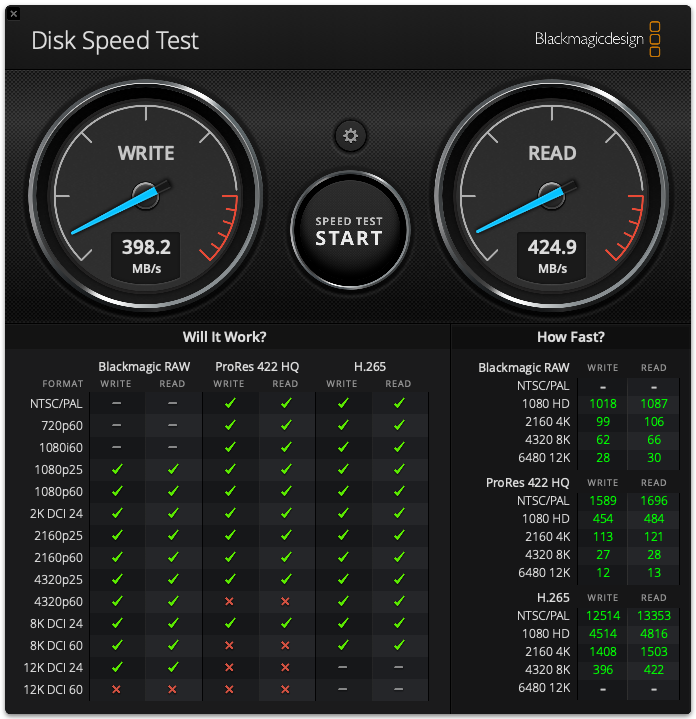


which is far from being optimal.


My recommendation of to contact Customer Support at OWC (MacSales.com) and get their recommendation for which of their many offerings would be best for your particular Mac and budget. OWC is considered by many as the primer 3rd party hardware provider for Macs.


Also First, there is no reason to ever install or run any 3rd party "cleaning", "optimizing", "speed-up", anti-virus, VPN or security apps on your Mac.  This user tip describes what you need to know and do in order to protect your Mac: Effective defenses against malware and other threats - Apple Community.  


There are no known viruses, i.e. self propagating, for Macs.  There are, however, adware and malware which require the user to install although unwittingly most of the time thru sneaky links, etc.   


Anti Virus developers try to group all types as viruses into their ad campaigns of fear.  They do a poor job of the detecting and isolating the adware and malware.  Since there are no viruses these apps use up a lot of system resources searching for what is non-existent and adversely affect system and app performance.


There is one app, Malwarebytes, which was developed by a long time contributor to these forums and a highly respected member of the computer security community, that is designed solely to seek out adware and known malware and remove it.  The free version is more than adequate for most users.  


PACE Anti-Piracy falls into this category. Uninstall it according to the developer's instructions. Additionally, your AdGuard ad blocking app is running in the background all the time. I would remove it also and use one that is only runs with Safari, i.e. AdBlock or Ghostery. Neither are resource hogs like AdGuard is.




This thread has been closed by the system or the community team. You may vote for any posts you find helpful, or search the Community for additional answers.

Extremely slow SSD speed (iMac late 2015 27" 5K)

Welcome to Apple Support Community
A forum where Apple customers help each other with their products. Get started with your Apple Account.

