How to transfer old family DVD movies, including intro & chapters, in mp4 format via Handbrake

I have old family movies created on iMovie & iDVD back in the days and saved on DVD's. I've downloaded Handbrake to transfer the DVD's onto my hard drive in mp4 file. I have no problems transferring the content, however some of my DVD's contain multiple chapters (I created the intro and chapters back then in iDVD). How can I transfer the full DVD as it is (containing intro & chapters as they are played on the original DVD) to my hard drive rather than transferring each chapter separately, ending up with multiple files? Sorry it's a bit hard to explain but hope there's someone who can stir me in the right direction.

Any advice welcome.

MacBook Pro 15″, macOS 10.13

Posted on Oct 4, 2022 9:41 PM

Reply
Question marked as Top-ranking reply

Posted on Oct 6, 2022 1:22 AM

As you have discovered, HandBrake does not deal with the menu ( intro) that is created within iDVD.


Rich is correct when he says that there is a VOB file that includes the menu.

However, if this is converted in HandBrake then it will not be interactive like the menu in iDVD is.


If you bring back your Mp4 files from HandBrake with chapter markers into iMovie then I do not believe that iMovie will see these chapter markers. So trying to merge a Handbrake converted intro VOB with these files in iMovie would mean you would have to re-insert all the chapter markers again before export. Could be a big job.


Obviously having the Mp4 files from HandBrake enables you to play back your movies on your Mac and other devices.

If you were only wanting to play back the DVDs from your Mac without having to insert the DVD into an optical drive, then you could create a disc image of that DVD by using Disk Utility which is on your Mac.

The disc image is a copy of the DVD on your hard drive ,complete with menu,and is played back just like a DVD in DVD Player.

To make a disc image of a DVD put DVD in optical drive and close DVD Player if it opens.

Open Disk Utility and point to your inserted DVD.Then File>New Image> Image From DVD.

Set Format to DVD/CD Master and Encryption to None.

When you have created the image double click on it to mount it and then open DVD Player to test.


If you want to preserve your home DVDs then it is a good idea to create an image in any case.You can burn a copy onto a DVD from the disc image using Disk Utility at a later date if required.


Similar questions

16 replies
Question marked as Top-ranking reply

Oct 6, 2022 1:22 AM in response to lpcarroll

As you have discovered, HandBrake does not deal with the menu ( intro) that is created within iDVD.


Rich is correct when he says that there is a VOB file that includes the menu.

However, if this is converted in HandBrake then it will not be interactive like the menu in iDVD is.


If you bring back your Mp4 files from HandBrake with chapter markers into iMovie then I do not believe that iMovie will see these chapter markers. So trying to merge a Handbrake converted intro VOB with these files in iMovie would mean you would have to re-insert all the chapter markers again before export. Could be a big job.


Obviously having the Mp4 files from HandBrake enables you to play back your movies on your Mac and other devices.

If you were only wanting to play back the DVDs from your Mac without having to insert the DVD into an optical drive, then you could create a disc image of that DVD by using Disk Utility which is on your Mac.

The disc image is a copy of the DVD on your hard drive ,complete with menu,and is played back just like a DVD in DVD Player.

To make a disc image of a DVD put DVD in optical drive and close DVD Player if it opens.

Open Disk Utility and point to your inserted DVD.Then File>New Image> Image From DVD.

Set Format to DVD/CD Master and Encryption to None.

When you have created the image double click on it to mount it and then open DVD Player to test.


If you want to preserve your home DVDs then it is a good idea to create an image in any case.You can burn a copy onto a DVD from the disc image using Disk Utility at a later date if required.


Oct 5, 2022 12:19 AM in response to lpcarroll

Hi, lpcarroll,


The usual procedure for ripping a DVD is to copy out the VOB files from the contents folder of the DVD, and then convert the VOB movies to Mp4 with Handbrake. Then you import the converted files into an iMovie project, edit them as desired, and export the project out to an Mp4 movie file on the desktop. The VOB files would not have the DVD chapters embedded in them as I recall. Nor does iMovie have a feature for creating chapters. The chapters would need to be added to the exported Mp4 file. I have seen the app Subler recommended for adding chapters, but have not used it myself. If you want to check it out you can click on their website link here:


https://subler.org/


Another app you might check out for adding chapters is MetaDoctor that is sold in the online app store. However, it has limitations, as a recent poster on this forum has said that it does not work to add independent chapters to a standalone movie. That is, it can add chapters but the only way to read the chapters in the standalone movie is through the MetaDoctor app.


iMovie 6 and iMovie 9 had the capability of adding chapters, but iMovie eliminated that feature. So, if you have a workable iMovie 6 or iMovie 9 version on your Mac, you could import the Mp4 movie into one of them and add chapters there. I think also you can add chapters with version 6 of Garageband (but not the newer version 10).


Perhaps others on this forum who have done what you are attempting will chime in with other suggestions.


As a possible workaround you might be able to play the DVD on your Mac and make a screen recording (Command-Shift-5) of the movie on full screen as it plays. It would then include the theme, title page, introduction, etc. and other edit features that were embedded in the DVD. The chapters would not be interactive. You could put the screen recording into iMovie and edit and save those features.


You could also make a copy of the DVD itself with the Disk Utility feature on your Mac. At least, I am pretty sure that that can be done. Handbrake or VLC may also be able to do it.


-- Rich


Oct 5, 2022 12:08 PM in response to Rich839

Hi Rich

I am not a big user of HandBrake so am not familiar with all it can do.

On reading this post I decided to have a play with it.

I got 2 very short clips ( 25 to 30 seconds long) and for each of them I added 5 chapter markers in iMovie ver 9 and exported them. So 2 separate videos, both with 5 chapter markers.

Then opened iDVD and dragged the 2 videos in.

This gave me 2 items in the menu, i.e. 2 Titles.


I then created a disk image of the DVD.

For test purposes I usually burn to a DVD-RW, but it was at this point that I discovered that my optical burner was non functional., so it had to be a disc image.

So, then onto HandBrake.

I have used HandBrake before and deal directly with the DVD itself rather than doing anything with the Vob files.

So the source is the DVD ( or in my case here the disc image) rather than copying the Vob files to the desktop.


I hadn't played around with the options until today regarding chapters but could see that chapter info could be displayed if indeed chapter markers were present. I noted that if you did not want the chapter markers to be present in the output file then you could turn this to OFF.

I selected chapter markers to be present.

You have to select which menu item ( video) on the DVD that you want to deal with, i.e. the title number., as you can only deal with one at a time.

If you have say, 7 separate menu items then you will have 7 "titles ".

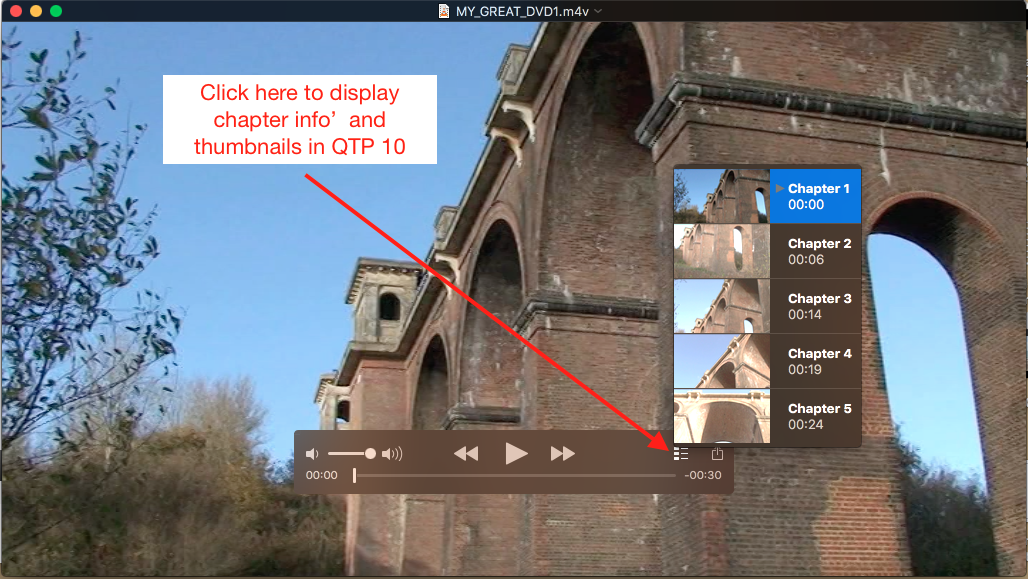
The m4v obtained contained, as expected, the chapter markers that are visible when played in QT10 and 7.


I have not played the file in anything else so don't know if those chapters are visible in anything else

I think that we know that chapter markers will not show up in all apps, so can be unpredictable .


When I said "full title" I meant the whole title or whole or complete movie( or all chapters even if they have chapters)


When playing the HandBrake output in QTP you can see the chapters( if they were present originally on the DVD) and you get a thumbnail of a scene to indicate the content.In my example the chapters were numbered 1,2,3 etc but what I can't remember, as I type this , is if in iMovie 9 when you create the chapters, you can give the chapter a description ,say Christmas Party, in place of a number 1,2 etc.

As I said before, I haven't really played around much with HandBrake or chapter markers, so would need to revisit this at some time.
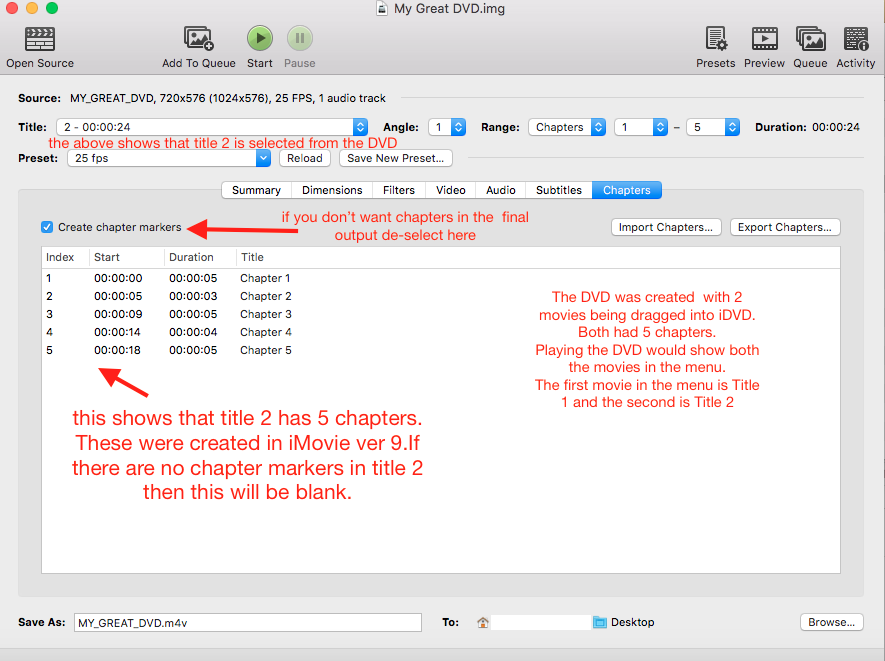





Oct 5, 2022 1:32 AM in response to lpcarroll

Can you send screen shot of what you see in HandBrake?

This is what I see in version 1.1.1

Screen shot below shows all 5 chapters selected from Title number 2 on the DVD.

I obtain one file with all 5 chapters combined.

If you want the chapter markers in your final file you can select or de-select in the chapter menu.

I have used a Disc image of the DVD, but would be the same if the DVD had been used.

Oct 6, 2022 10:19 AM in response to thesurreyfriends

thesurreyfriends,


Good analysis by you, as usual. I hadn't considered that iMovie wouldn't be able to read or preserve the chapters on export.


However, instead of using iMovie to merge the intro and main movie, what might work is to convert the VOB of the intro to Mp4. Then import it into QuickTimePlayer, and then drag into QT the Mp4 main movie with the chapter markers that you got from the disc image with Handbrake. Then export the clips as one movie with intro and chapters. The scene selection menu might not be interactive but at least the title page would be displayed and the chapter markers should be interactive, through QT since they were previously with QT. I'm just not sure whether the interactive chapter markers would carry over on the export, but I would think that they would.


Actually, I hadn't realized before now that one could drag additional clips into QuickTimePlayer. In QuickTimePlayer I clicked on View/Show Clips and dragged the second clip into the clip display line at the bottom.


-- Rich


Oct 5, 2022 6:20 PM in response to lpcarroll

I am not familiar enough with the DVD features of Handbrake to know for sure, but I suspect that if Handbrake could have copied the intro that it would have done so. Perhaps thesurreyfriends has some input on the question.


Check the VOB files and see if one of them includes the intro. If so, you could convert it to Mp4, import it into iMovie together with your movie that you copied from the DVD, and then export to merge them together. Or, you could make a screen recording of the intro and import that into iMovie for export.


—Rich


Oct 6, 2022 6:54 PM in response to thesurreyfriends

thesurreyfriends,


O.K. I did some experimenting. I dragged the VOB intro file (the title page) from the disc image and opened it in QT. It played fine, including the animations in the title page. Then I dragged into QT the M4v file with chapters that I had previously copied from the disc image with Handbrake. The chapters did not carry over into QT, however. I exported it anyway to see what would happen. When I exported, the two clips indeed were joined together in a .mov file. Unfortunately, the chapters did not carry over to the exported .mov file. Puzzling.


If you have time, let us know if you got a different result. Or maybe we can just leave it there. You've spent a lot of time on this already.


-- Rich

Oct 5, 2022 8:30 AM in response to thesurreyfriends

Hi, thesurreyfriends,


I had a vague recollection that Handbrake had some feature relating to chapters. I never had occasion to try it or understand how it worked.


So, if you have time, how actually does it work? Here's how I am envisioning it. We start with a DVD that has interactive chapters that the viewer can utilize as entry points into the movie. One then opens the DVD or disc image in Handbrake and uses the Filters item to select the range of chapters, as you show on the screen shot that you posted. Then Handbrake converts the DVD into an Mp4. Presumably the Mp4 now has the DVD chapters embedded in it. Are these chapters interactive so when the viewer plays the Mp4, say on Handbrake, the viewer can view the video from different entry points? How does the viewer know where the chapters are and to what subject matter they refer? How are the chapters activated by the viewer? What do you mean when you refer to the "full title".


Sorry to bombard you with all these questions. The chapters issue is something I have been meaning to look into, as several posters over the years have inquired about chapters.


Best,

Rich


Oct 5, 2022 4:27 PM in response to Rich839

Thank you guys, you've been very very helpful.

I've worked out the chapters and I can copy every DVD via Handbrake and quality is great. However there's one more question left.

After I had created the movies including chapters in iMovie back in 2015, I uploaded it to iDVD to create an intro with a theme and music etc. Below is the intro of the movie (the picture is a moving video and there's background music). You can choose to "Play movie" or "Scene selection". (This is the original DVD btw, not converted via Handbrake yet)

The next image is after I've chosen the "Scene Selection" where you can see the different scenes (or chapter names). You click on one of them and it will play that scene (chapter). Or you can go back to the intro clicking on the left pointing arrow in the bottom left corner.


My follow up question is; how come that the movie and it chapters gets copied to mp4 version via Handbrake but the intro disappears which is the best part of the iMovie? Well it's a nicer way to start the movie.

This is how I copied it in Handbrake.


The image below is after I have converted the DVD to mp4 via Handbrake. I can still choose the chapters via the two right pointing arrows but again the intro did not get copied. The movie starts playing straight away (no intro no scene selection).

It seems that the original iMovie gets copied but not the things created in iDVD?


Is there a way to have the original DVD copied as is, intro included?

It's ok if it is what it is but interesting to find out.

Thank you

This thread has been closed by the system or the community team. You may vote for any posts you find helpful, or search the Community for additional answers.

How to transfer old family DVD movies, including intro & chapters, in mp4 format via Handbrake

Welcome to Apple Support Community
A forum where Apple customers help each other with their products. Get started with your Apple Account.