I have 2 phone numbers, one for iMessage and FaceTime and one for calls and regular messaging how do I transfer iMessage to one number
How do I have change the number I receive IMessage and FaceTime on
iPhone 14, iOS 16
How do I have change the number I receive IMessage and FaceTime on
iPhone 14, iOS 16
Hello 1592_,
If we understand correctly, you are looking to change your iMessage and FaceTime phone number. Is that correct? If so, we recommend the steps in this article that can help: Add or remove your phone number in Messages or FaceTime - Apple Support
Once you click and open the link, please read through and complete the steps in the section titled "Remove your phone number."
Set up your phone number
On your iPhone:
1) Go to Settings > Messages and make sure that iMessage is on. You might need to wait a moment for it to activate.
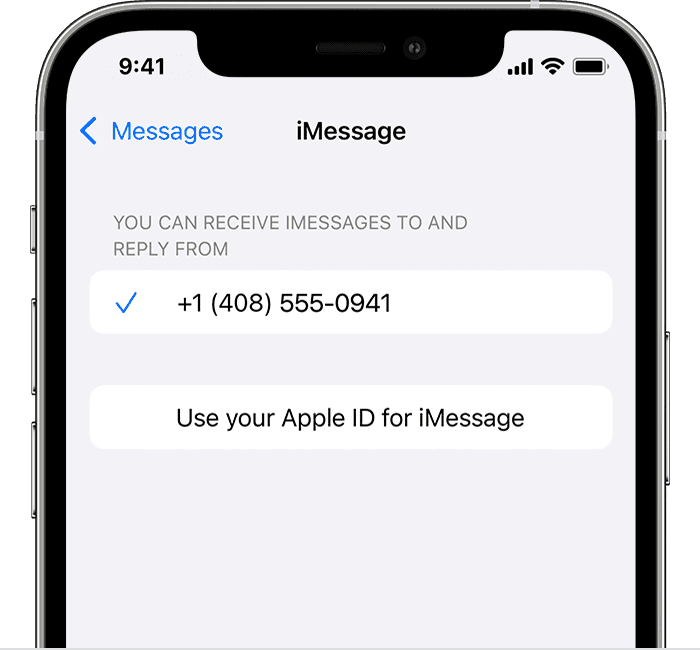
2) Tap Send & Receive. If you see “Use your Apple ID for iMessage,” tap it and sign in with the same Apple ID that you use on your Mac, iPad, and iPod touch.
3) In the "You can receive iMessages to and Reply From" section, make sure that your phone number and Apple ID are selected.
4) Go to Settings > FaceTime and make sure that your phone number and Apple ID are selected in the "You can be reached by FaceTime at" section.
On your other devices, you can now turn on the phone number that you just set up:
*Turn on your phone number for your Mac
*Turn on your phone number for your iPad or iPod touch
If you use this feature and share your Apple ID with someone, you can't prevent them from seeing your conversations. Instead of using the same Apple ID as someone else, set up Family Sharing.
Remove your phone number
If you don't want calls or messages for your iPhone on your iPad, iPod touch, or Mac, you can remove your phone number. There are two ways to do this:
*On your iPhone, go to Settings > Messages > Send & Receive. Select your Apple ID at the bottom of the screen and tap Sign Out. Then go to Settings > FaceTime, select your Apple ID and tap Sign Out.
*If the phone number that you want to remove belongs to an iPhone that you can't access, change your Apple ID password. This removes all phone numbers from your iPad, iPod touch, and Mac. Calls or messages for the removed numbers won't appear on those devices anymore.
We recommend the steps above because they will show you how to use the phone number of your iPhone with Messages and FaceTime.
Post back if you still have problems after working through the steps in the link above.
Thanks for using the Apple Support Communities.
Cheers!
Hello 1592_,
If we understand correctly, you are looking to change your iMessage and FaceTime phone number. Is that correct? If so, we recommend the steps in this article that can help: Add or remove your phone number in Messages or FaceTime - Apple Support
Once you click and open the link, please read through and complete the steps in the section titled "Remove your phone number."
Set up your phone number
On your iPhone:
1) Go to Settings > Messages and make sure that iMessage is on. You might need to wait a moment for it to activate.
2) Tap Send & Receive. If you see “Use your Apple ID for iMessage,” tap it and sign in with the same Apple ID that you use on your Mac, iPad, and iPod touch.
3) In the "You can receive iMessages to and Reply From" section, make sure that your phone number and Apple ID are selected.
4) Go to Settings > FaceTime and make sure that your phone number and Apple ID are selected in the "You can be reached by FaceTime at" section.
On your other devices, you can now turn on the phone number that you just set up:
*Turn on your phone number for your Mac
*Turn on your phone number for your iPad or iPod touch
If you use this feature and share your Apple ID with someone, you can't prevent them from seeing your conversations. Instead of using the same Apple ID as someone else, set up Family Sharing.
Remove your phone number
If you don't want calls or messages for your iPhone on your iPad, iPod touch, or Mac, you can remove your phone number. There are two ways to do this:
*On your iPhone, go to Settings > Messages > Send & Receive. Select your Apple ID at the bottom of the screen and tap Sign Out. Then go to Settings > FaceTime, select your Apple ID and tap Sign Out.
*If the phone number that you want to remove belongs to an iPhone that you can't access, change your Apple ID password. This removes all phone numbers from your iPad, iPod touch, and Mac. Calls or messages for the removed numbers won't appear on those devices anymore.
We recommend the steps above because they will show you how to use the phone number of your iPhone with Messages and FaceTime.
Post back if you still have problems after working through the steps in the link above.
Thanks for using the Apple Support Communities.
Cheers!
I have 2 phone numbers, one for iMessage and FaceTime and one for calls and regular messaging how do I transfer iMessage to one number