Error 0xE8000015
iPhone 6s, iOS 15
iPhone 6s, iOS 15
Thanks for reaching out, prithvee81.
It looks like you're receiving an error message when using iTunes on your Windows PC. We can help.
As a first step, try connecting your iPhone with a different computer running iTunes or Finder, and see if there is any change. This will let us know if the issue is with your computer or the iPhone.
If there isn't any change, you can try putting your device in Recovery Mode and seeing if that resolves the issue: If you can't update or restore your iPhone or iPod touch.
1. Make sure that your Mac is up to date. If you're using iTunes, make sure you have the latest version of iTunes.
2. On a Mac with macOS Catalina or later, open Finder. On a Mac with macOS Mojave or earlier, or on a PC, open iTunes. If iTunes is already open, close it, then open it again. Find out which macOS your Mac is using.
3. Keep your device connected and wait until the recovery mode screen appears:
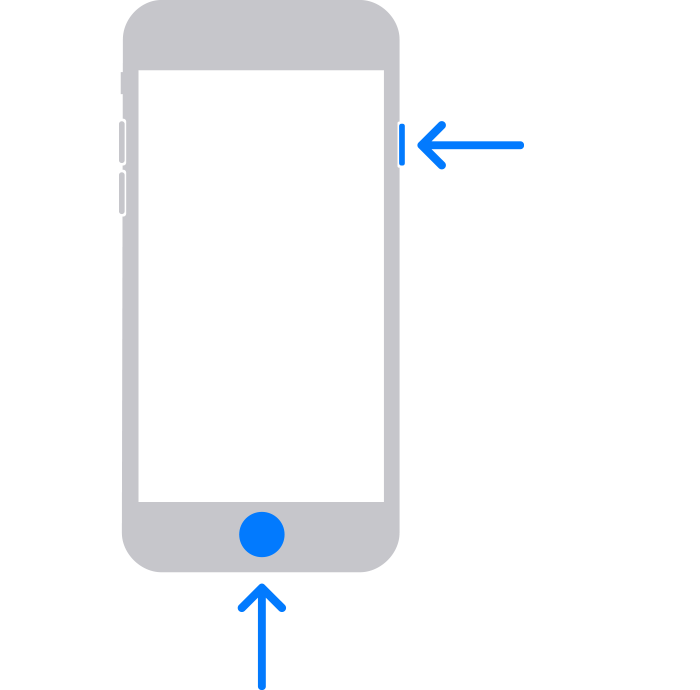
iPhone 6s or earlier, including iPhone SE (1st generation), and iPod touch (6th generation) or earlier: Press and hold both the Home and the top (or side) buttons at the same time. Keep holding them until you see the recovery mode screen.
4. Locate your device on your computer. When you see the option to Restore or Update, choose Update. Your computer will try to reinstall the software without erasing your data. Wait while your computer downloads the software for your device. If the download takes more than 15 minutes and your device exits the recovery mode screen, let the download finish, then repeat step 3.
5. After the Update or Restore completes, set up your device.
If not, your next best option would be to Contact Apple for support and service.
Hope that helps.
Take care.
Thanks for reaching out, prithvee81.
It looks like you're receiving an error message when using iTunes on your Windows PC. We can help.
As a first step, try connecting your iPhone with a different computer running iTunes or Finder, and see if there is any change. This will let us know if the issue is with your computer or the iPhone.
If there isn't any change, you can try putting your device in Recovery Mode and seeing if that resolves the issue: If you can't update or restore your iPhone or iPod touch.
1. Make sure that your Mac is up to date. If you're using iTunes, make sure you have the latest version of iTunes.
2. On a Mac with macOS Catalina or later, open Finder. On a Mac with macOS Mojave or earlier, or on a PC, open iTunes. If iTunes is already open, close it, then open it again. Find out which macOS your Mac is using.
3. Keep your device connected and wait until the recovery mode screen appears:
iPhone 6s or earlier, including iPhone SE (1st generation), and iPod touch (6th generation) or earlier: Press and hold both the Home and the top (or side) buttons at the same time. Keep holding them until you see the recovery mode screen.
4. Locate your device on your computer. When you see the option to Restore or Update, choose Update. Your computer will try to reinstall the software without erasing your data. Wait while your computer downloads the software for your device. If the download takes more than 15 minutes and your device exits the recovery mode screen, let the download finish, then repeat step 3.
5. After the Update or Restore completes, set up your device.
If not, your next best option would be to Contact Apple for support and service.
Hope that helps.
Take care.
Error 0xE8000015