Unable to activate

How to fix unable to activate activation server can not be reached after resetting it I've tried different steps like changing WiFi networks, connecting to my PC etc really confusing.

Please how to?

iPad Pro 10.5-inch, Wi-Fi, Cellular

Posted on Oct 10, 2022 8:55 PM

Reply
Question marked as Top-ranking reply

Posted on Oct 12, 2022 7:18 AM

Hello archibaldjarbee,


These steps from If you can't activate your iPhone or iPad (Wi-Fi + Cellular) should help you activate the iPad:


Follow these steps 
1. Restart your iPhone or iPad.
2. If you're using a cellular-data connection, connect to a reliable Wi-Fi network instead.
3. If you get an error message on your iPhone or iPad that says the activation server is temporarily unavailable or cannot be reached when trying to activate, wait a few minutes, then repeat the previous steps.

If you still can't activate your iPhone or iPad, try again using your computer instead:

1. Make sure that you have the latest version of macOS or the latest version of iTunes.
2. Check that your computer has an internet connection.
3. With the cable that came with your iPhone or iPad, connect your iPhone or iPad to your computer. Locate your device on your computer.
4. Wait while your computer detects and activates your iPhone or iPad: 
• If an alert appears that says "Set up as New" or "Restore from Backup," it means your iPhone or iPad is activated.
• If you get an error message on your computer that says that the SIM card isn't compatible or is invalid, contact your carrier.
• If you get an error message that says the "activation information was invalid" or "activation information could not be obtained from the device," use recovery mode to restore your iPhone or iPad.

If you still can't activate your iPhone or iPad, contact Apple Support.


Have a good day.

2 replies
Question marked as Top-ranking reply

Oct 12, 2022 7:18 AM in response to archibaldjarbee

Hello archibaldjarbee,


These steps from If you can't activate your iPhone or iPad (Wi-Fi + Cellular) should help you activate the iPad:


Follow these steps 
1. Restart your iPhone or iPad.
2. If you're using a cellular-data connection, connect to a reliable Wi-Fi network instead.
3. If you get an error message on your iPhone or iPad that says the activation server is temporarily unavailable or cannot be reached when trying to activate, wait a few minutes, then repeat the previous steps.

If you still can't activate your iPhone or iPad, try again using your computer instead:

1. Make sure that you have the latest version of macOS or the latest version of iTunes.
2. Check that your computer has an internet connection.
3. With the cable that came with your iPhone or iPad, connect your iPhone or iPad to your computer. Locate your device on your computer.
4. Wait while your computer detects and activates your iPhone or iPad: 
• If an alert appears that says "Set up as New" or "Restore from Backup," it means your iPhone or iPad is activated.
• If you get an error message on your computer that says that the SIM card isn't compatible or is invalid, contact your carrier.
• If you get an error message that says the "activation information was invalid" or "activation information could not be obtained from the device," use recovery mode to restore your iPhone or iPad.

If you still can't activate your iPhone or iPad, contact Apple Support.


Have a good day.

Oct 12, 2022 7:19 AM in response to archibaldjarbee

Start here >>> If you can't activate your iPhone or iPad (Wi-Fi + Cellular) - Apple Support


If you are experiencing difficulties with (re)activation of your iPad, you may have more success if you connect your iPad to a PC (with iTunes installed) or a Mac (with iTunes or Finder - as appropriate for the installed version of macOS). Once connected to your computer, your iPad will be detected - and you should be able to activate using iTunes.


  1. Make sure that you have the latest version of macOS or the latest version of iTunes.
  2. Check that your computer has an Internet connection.
  3. With the cable that came with your iPad, connect your iPad to your computer. Locate your device on your computer.
  4. Wait while your computer detects and activates your iPad:
  • If you see an alert that shows "Set up as New" or "Restore from Backup", it means your iPad is activated.
  • If you get an error message that says the "activation information was invalid" or "activation information could not be obtained from the device", use recovery mode to restore your iPhone.


A restart of your WiFi Router and/or a change of DNS settings may also be helpful.


To restart you home router, disconnect power - then wait at least 30 seconds before restarting. When you router has rebooted (which may take several minutes), force-restart your iPad:


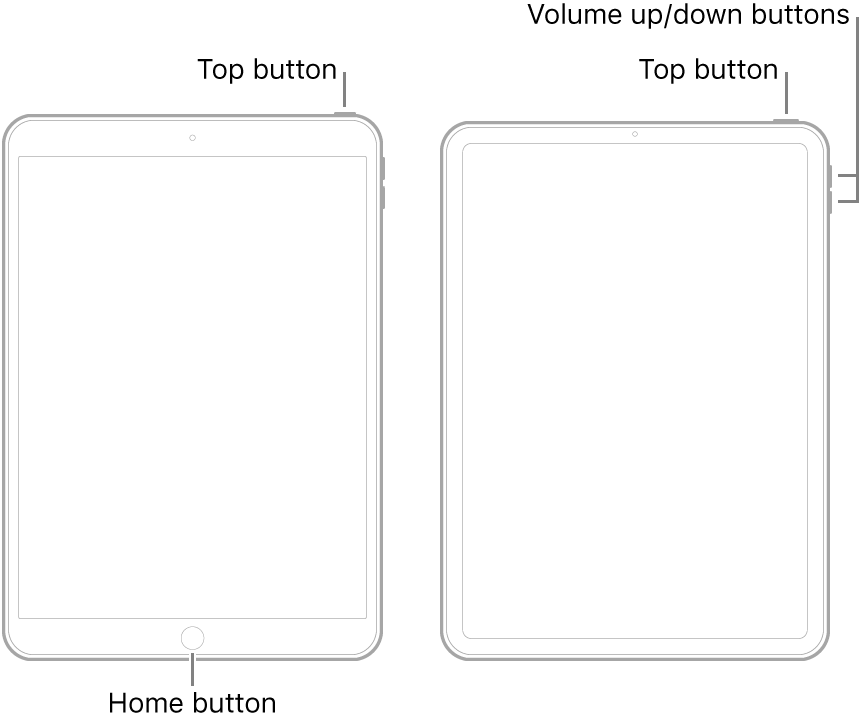
  • On an iPad with a Home button: Press and hold the top button and the Home button at the same time. When the Apple logo appears, release both buttons.
  • On an iPad with Face ID: Press and quickly release the volume up button, press and quickly release the volume down button, then press and hold the top button. When the Apple logo appears, release the button.


For recommended DNS servers (configured at your home router and/or your iPad), you might choose one of the following Recursive DNS Providers (IPv4 and IPv6 addresses included below):


Quad9

9.9.9.9

149.112.112.112

2620:fe::fe

2620:fe::9


OpenDNS

208.67.222.222

208.67.220.220

2620:0:ccc::2

2620:0:ccd::2


Cloudflare+APNIC

1.1.1.1

1.0.0.1

2606:4700:4700::1111

2606:4700:4700::1001


Should it be necessary to escalate your issue to Apple Support, the quickest route to engaging with Apple Support will be via the  Get Support link at top-right of this page.


This thread has been closed by the system or the community team. You may vote for any posts you find helpful, or search the Community for additional answers.

Unable to activate

Welcome to Apple Support Community
A forum where Apple customers help each other with their products. Get started with your Apple Account.

