Hey there, and welcome to Apple Support Communities DaveBrereton,
We can certainly understand your concern and can help provide some insight.
We recommend checking out these steps about Photographic Styles, QuickTake, Action mode, the Ultra Wide camera, and other camera features on your iPhone.
"Lock in your look with Photographic Styles
With Photographic Styles on iPhone 13, iPhone SE (3rd generation), and later, you can personalize the look of your images in the Camera app. Choose a preset — Rich Contrast, Vibrant, Warm, or Cool — and if you want, fine-tune it even further by adjusting the Tone and Warmth settings. Set your style once to use your preferred style setting every time you take a photo in Photo mode.
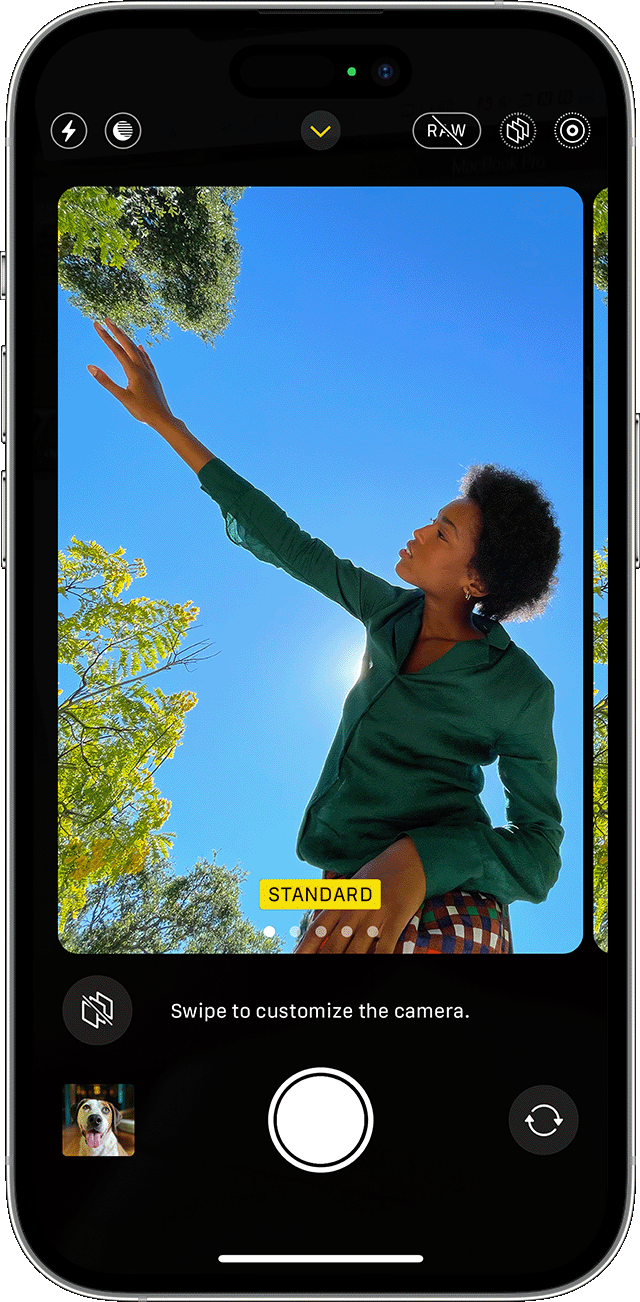
Set up a Photographic Style
When you open the Camera app for the first time, tap Set Up to choose your Photographic Style. Swipe through the different styles and tap Use [Style Name] on the preset that you like.
Make sure to set your style before you start taking photos — you can't add your Photographic Style to a photo after you've already taken it.
Change your Photographic Style
Want to change the Photographic Style that you set? Just open the Camera app, tap the arrow  , and tap Photographic Styles
  . Standard is the default, balanced style that's true to life and can't be customized, but you can swipe left to view other preset styles that are customizable. Tap Customize
  to adjust the Tone and Warmth of the style that you've chosen.
Adjust your focus and exposure
Before you take a photo, the camera automatically sets the focus and exposure, and face detection balances the exposure across many faces. You can use Exposure Compensation Control to precisely set and lock the exposure for upcoming shots.
Just tap the arrow , then tap  and adjust your exposure level. The exposure locks until the next time you open the Camera app.
Exposure Compensation Control is available on iPhone 11, iPhone 11 Pro, and later with iOS 14 or later. "
For additional information, check out this link: About the Camera features on your iPhone - Apple Support
Kindest regards!


