Missing Custom LUT

Hello,

I'm editing a documentary project going from my iMac to MacbookPro, the clips that have a custom LUT applied will say [missing custom LUT] or it will say offline in the Inspector. Both computers have the exact same LUTs in the exact same location in the [Movies] folder. Same OSX Monterrey. Its super frustrating.

iMac 21.5″ 4K, macOS 12.6

Posted on Oct 13, 2022 12:01 PM

Reply
Question marked as Top-ranking reply

Posted on Oct 13, 2022 1:25 PM

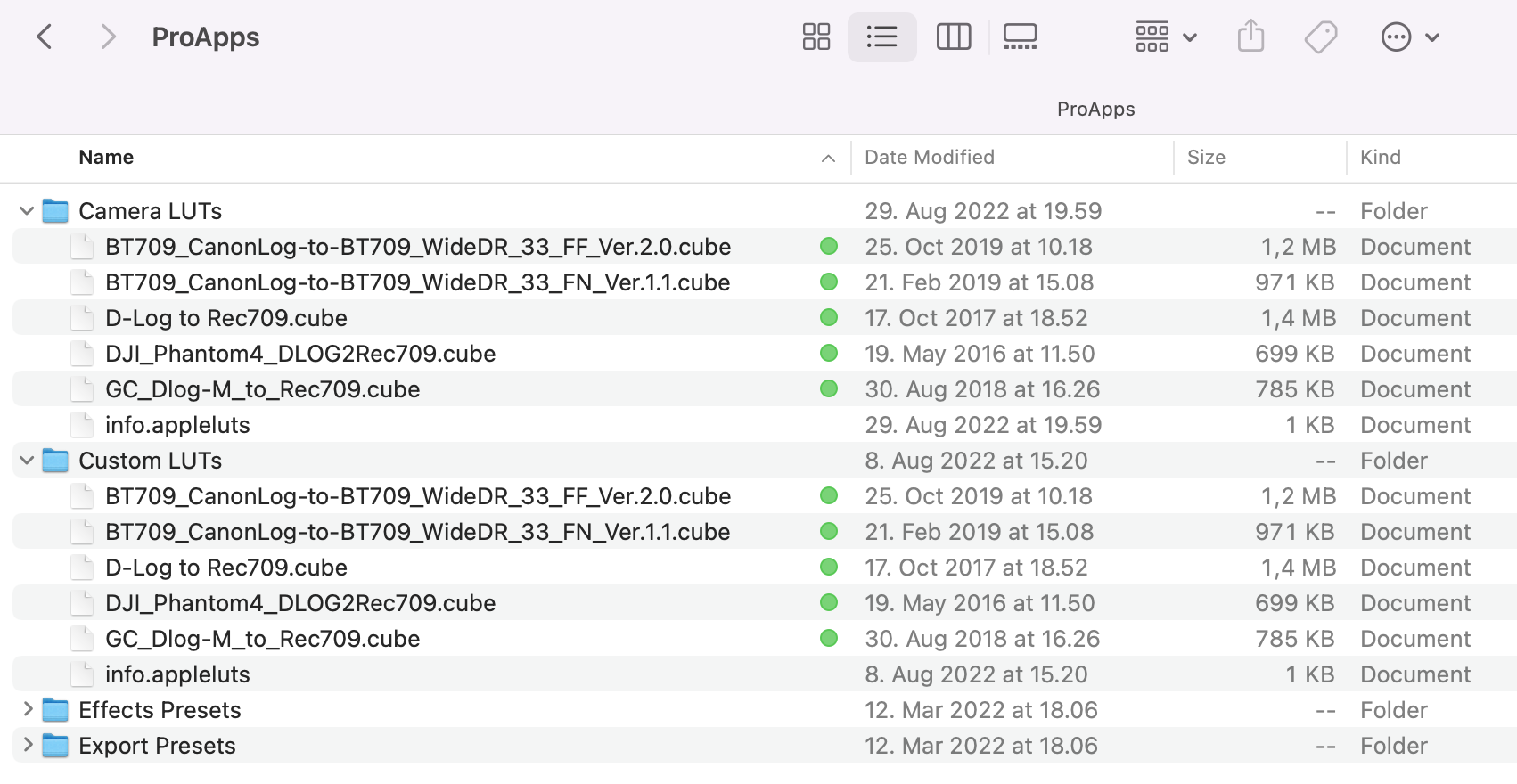
The LUT's in the wrong place. When it's used by Custom LUT it's stored in the user Library/Application Support/ProApps/Custom LUTs. If you use the menu for the offline LUT and select Reveal in Finder it will show you the file path to where it should be.

Similar questions

19 replies

Oct 14, 2022 8:55 AM in response to ibopwebop

I tested it again like this. I put a library with external media in a folder on an external drive. It had a project with a dozen clips, each with a Custom LUT effect with a separate LUT. I copied the Custom LUTs folder from ProApps into the folder with the library. I took the drive to another machine, opened the library, and reconnected the media. All the project clips had Missing LUTs icons. I put the contents of the Custom LUTs folder from the external drive into the Custom LUTs folder in ProApps in the user Library of the new computer. When I switched back to FCP all the project clips were populated with the correct applied LUTs.

Oct 14, 2022 12:11 AM in response to ibopwebop

My cookbook memo for the FCP LUTs. I guess it should then work with different Macs?


- LUT for the project:


[select a clip in the timeline] > Window > Show in Workspace > Inspector [cmd-4] > Show Info Inspector [i at the upper right Info Inspector] > General/Extended/Settings [at the lower right] > Camera LUT > [at middle right] Add/Select Custom Camera LUT... > [select LUT(s)]


- LUT for a clip with Mix 0-1:


Window > Show in Workspace > Effects [cmd-5] > Custom LUT [drag to clip]

Window > Show in Workspace > Inspector [cmd-4] > Show Video Inspector [film strip at the upper right] > Custom LUT [at upper right] > Choose/Select Custom LUT... > [select LUT(s)]


To remove imported LUT from the pop-up menu, choose Reveal in Finder and drag the LUT files to the Trash, and reopen Final Cut Pro.


~/Library/Application Support/ProApps is then something like this:

Oct 13, 2022 2:46 PM in response to Tom Wolsky

here is my folder path. Alex Chapman from Sony who designed those LUTs wrote that they should be put in the exact folder. In fact everytime i get a LUT the creator say to put in that folder. According to your what folder should the LUTs be in?


I can't show the missiing LUt in inspector because i went thru my whole timeline and re-link all the missing LUts.

Oct 15, 2022 10:32 AM in response to Tom Wolsky

Tom,

thank you for taking the time to do this. Once i'm back home i will double check that the LUTs on the ProApps folder are the same on my iMac & MacbookPro. To my memory, they should be. But what is strange is what is further confusing is that this issue does not impact every clip that has a LUT. I'm using the same LUTs series on all the clips yet in some cases there is no issue and in other cases its goes missing.

This thread has been closed by the system or the community team. You may vote for any posts you find helpful, or search the Community for additional answers.

Missing Custom LUT

Welcome to Apple Support Community
A forum where Apple customers help each other with their products. Get started with your Apple Account.


