Remove from family but keep shared albums
How can I remove from a family, but keep access to shared albums?
iPhone XS, iOS 15
How can I remove from a family, but keep access to shared albums?
iPhone XS, iOS 15
Hi ALW423,
Thanks for posting in Apple Communities.
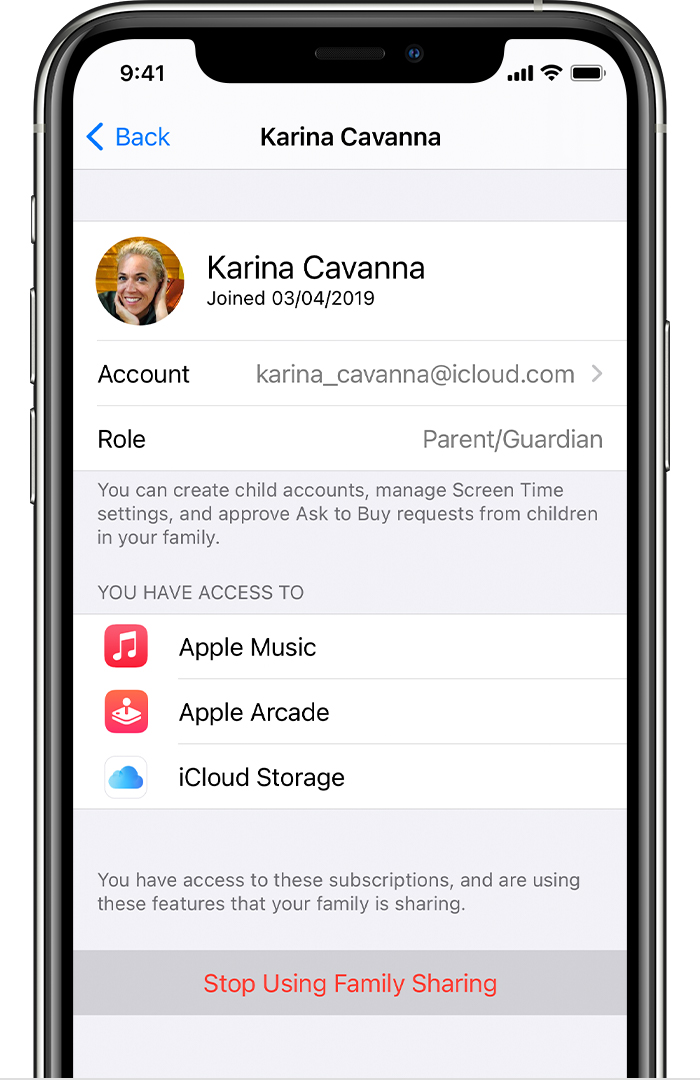
We understand that you want to remove yourself from Family Sharing. You can remove your self from the family group directly from your iPhone.
1. Go to Settings.
2. Tap your name, then tap Family Sharing.
3. Tap your name.
4. Tap Stop Using Family Sharing.
You can find these steps and more in Leave Family Sharing.
Your Shared Albums will remain intact if you have Shared albums enabled in Settings > [your name] > iCloud > Photos.
How to share albums in Photos on your iPhone, iPad, and Mac
Regards.
Hi ALW423,
Thanks for posting in Apple Communities.
We understand that you want to remove yourself from Family Sharing. You can remove your self from the family group directly from your iPhone.
1. Go to Settings.
2. Tap your name, then tap Family Sharing.
3. Tap your name.
4. Tap Stop Using Family Sharing.
You can find these steps and more in Leave Family Sharing.
Your Shared Albums will remain intact if you have Shared albums enabled in Settings > [your name] > iCloud > Photos.
How to share albums in Photos on your iPhone, iPad, and Mac
Regards.
Remove from family but keep shared albums