Why doesn’t the radar show whe my weather opens
Why doesn’t the radar Show when weather opens
iPhone 7 Plus, iOS 15
Why doesn’t the radar Show when weather opens
iPhone 7 Plus, iOS 15
Hello 3902vineyard,
Thanks for posting in the Apple Support Communities.
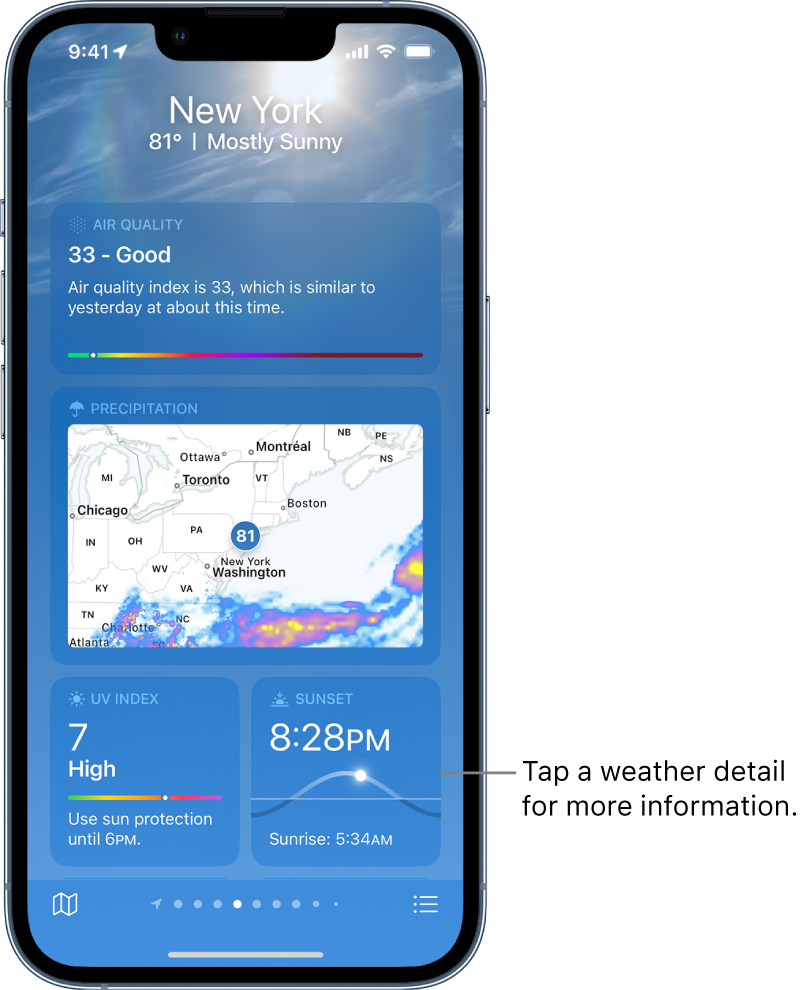
It sounds like you're referring to the map showing Precipitation in the Weather app, right?
If we're on the same page as you, check if this is shown in all locations to see if if this isolated or not. If it doesn't appear with some locations, that could be related to this as it may not be available everywhere. Check out the following information on this, and let us know what you find: Check the weather on iPhone - Apple Support
Check the local forecast and conditions
When you open Weather, the details for your current location are shown. If you don’t see them, tap, then tap My Location.
Scroll down to view weather details such as:
• Hourly forecast: Swipe the hourly display left or right.
• 10-day forecast: View weather conditions, chance of precipitation, and high and low temperatures for the coming days.
Tip: Tap a day in the 10-day forecast to see that day’s hourly temperature forecast, high and low temperatures, and more. Tapto change the displayed weather condition.
• Severe weather alerts: View updates for weather events such as winter storms and flash floods (not available in all countries or regions). Tap the alert to read the full government-issued alert.
• Air quality: View air quality information; tap to view details about health information and pollutants (not available in all countries or regions).
Note: The air quality scale appears above the hourly forecast when air quality reaches a particular level for that location. For some locations, the air quality scale always appears above the hourly forecast.
• Maps: View a map of temperature, precipitation, or air quality in the area. Tap the map to view it in full screen or to change the map view between temperature, precipitation, and air quality. See View weather maps on iPhone.
• Additional details: Scroll down to see additional weather information such as the UV index, sunrise, sunset, wind, precipitation, and more. Tap a weather detail for the extended forecast, daily summary, and data specific to that detail.
Tip: Some weather details include interactive features; drag your finger over the chart to see data values at specific times, tap a day to see data values for that day, or tap
If you aren't able to see this at all times, be sure you have the latest iOS version installed on your iPhone. If you need assistance with backing up or updating your iPhone, use this resource: Update your iPhone or iPad - Apple Support
Have a great day!
Hello 3902vineyard,
Thanks for posting in the Apple Support Communities.
It sounds like you're referring to the map showing Precipitation in the Weather app, right?
If we're on the same page as you, check if this is shown in all locations to see if if this isolated or not. If it doesn't appear with some locations, that could be related to this as it may not be available everywhere. Check out the following information on this, and let us know what you find: Check the weather on iPhone - Apple Support
Check the local forecast and conditions
When you open Weather, the details for your current location are shown. If you don’t see them, tap
Scroll down to view weather details such as:
• Hourly forecast: Swipe the hourly display left or right.
• 10-day forecast: View weather conditions, chance of precipitation, and high and low temperatures for the coming days.
Tip: Tap a day in the 10-day forecast to see that day’s hourly temperature forecast, high and low temperatures, and more. Tap
• Severe weather alerts: View updates for weather events such as winter storms and flash floods (not available in all countries or regions). Tap the alert to read the full government-issued alert.
• Air quality: View air quality information; tap to view details about health information and pollutants (not available in all countries or regions).
Note: The air quality scale appears above the hourly forecast when air quality reaches a particular level for that location. For some locations, the air quality scale always appears above the hourly forecast.
• Maps: View a map of temperature, precipitation, or air quality in the area. Tap the map to view it in full screen or to change the map view between temperature, precipitation, and air quality. See View weather maps on iPhone.
• Additional details: Scroll down to see additional weather information such as the UV index, sunrise, sunset, wind, precipitation, and more. Tap a weather detail for the extended forecast, daily summary, and data specific to that detail.
Tip: Some weather details include interactive features; drag your finger over the chart to see data values at specific times, tap a day to see data values for that day, or tap
If you aren't able to see this at all times, be sure you have the latest iOS version installed on your iPhone. If you need assistance with backing up or updating your iPhone, use this resource: Update your iPhone or iPad - Apple Support
Have a great day!
Why doesn’t the radar show whe my weather opens