Hulu live only showing a black screen with audio on Macbook Air

This happened one other time and I was able to finally get it to work. Everything I have seen says to clear your browsing history. I have done that 5 times and still it doesn't work on Chrome. Nothing is fixed on different browsers either.


This is obviously a Mac issue. Maddening and makes me want to throw my Macbook in the trash and get a Lenova.


[Re-Titled by Moderator]


MacBook Air Apple Silicon

Posted on Oct 15, 2022 1:39 PM

Reply
Question marked as Top-ranking reply

Posted on Oct 15, 2022 2:28 PM

No, it isn't a Mac problem. I've streamed Hulu successfully on the Mac before. What you need to do is isolate is the problem happening strictly on WiFi, or hard wired with ethernet. WiFI networks are notoriously unreliable with too many devices on the same WiFi, over 150 feet away, or under 5 feet from the WiFi router. Pipes and cabinets with lots of papers can also obstruct wifi signal.


I would also check that you don't have too many web browser tabs open simultaneously. Each individual webpage that is open will affect streaming audio.


The black screen effect can also be if you have an external display attached, it is going to the external display. If you have Airplay, it may be going to a TV as well. If you have an iPad or iPhone, make sure Sidecar isn't sending the signal to the iPhone or iPad. Note on the image below, how the control-center is selected, and in the control center is screen mirroring. Make sure there is nothing selected on screen mirroring. And go into Apple menu -> System Preferences to make sure Sidecar is not enabled.
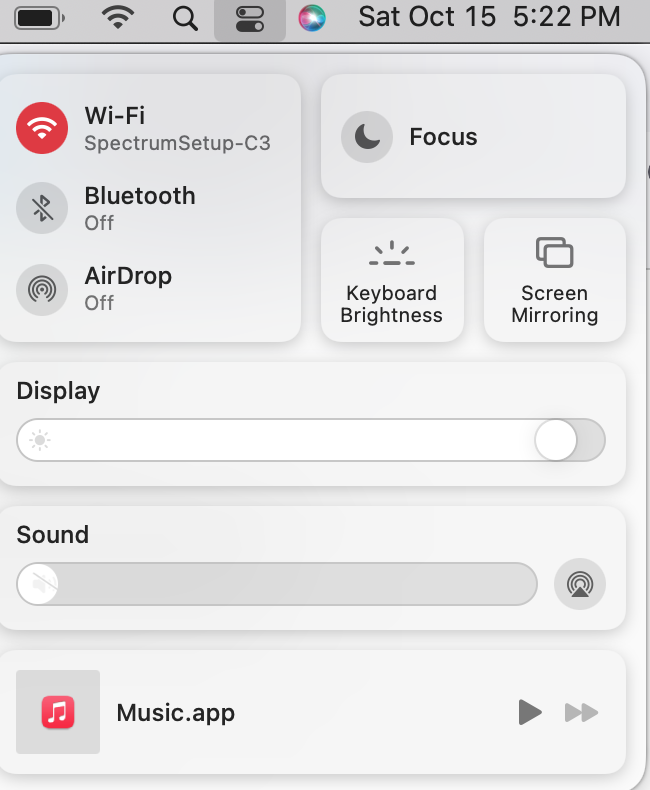

Lastly when you go to a Hulu video, see when you hit the Escape key if the video controls come on your Mac. \

The square with the triangle indicates that the video of Hulu is not going to play on your Mac, but rather an AppleTV or other Airplay capable device and why the video is blank on your Mac. You need to turn off Airplay to see the video on your Mac.


1 reply
Question marked as Top-ranking reply

Oct 15, 2022 2:28 PM in response to KTHDurhamburger7

No, it isn't a Mac problem. I've streamed Hulu successfully on the Mac before. What you need to do is isolate is the problem happening strictly on WiFi, or hard wired with ethernet. WiFI networks are notoriously unreliable with too many devices on the same WiFi, over 150 feet away, or under 5 feet from the WiFi router. Pipes and cabinets with lots of papers can also obstruct wifi signal.


I would also check that you don't have too many web browser tabs open simultaneously. Each individual webpage that is open will affect streaming audio.


The black screen effect can also be if you have an external display attached, it is going to the external display. If you have Airplay, it may be going to a TV as well. If you have an iPad or iPhone, make sure Sidecar isn't sending the signal to the iPhone or iPad. Note on the image below, how the control-center is selected, and in the control center is screen mirroring. Make sure there is nothing selected on screen mirroring. And go into Apple menu -> System Preferences to make sure Sidecar is not enabled.


Lastly when you go to a Hulu video, see when you hit the Escape key if the video controls come on your Mac. \

The square with the triangle indicates that the video of Hulu is not going to play on your Mac, but rather an AppleTV or other Airplay capable device and why the video is blank on your Mac. You need to turn off Airplay to see the video on your Mac.

This thread has been closed by the system or the community team. You may vote for any posts you find helpful, or search the Community for additional answers.

Hulu live only showing a black screen with audio on Macbook Air

Welcome to Apple Support Community
A forum where Apple customers help each other with their products. Get started with your Apple Account.