Metric units for Elevation?

Hi, I’ve just updated my iPhone to iOS 16.0.3 and Watch 6 to WatchOS 9.0.2 and noticed that my watch now displays elevation in feet, whereas previously it was in meters. I am UK based.


Looking in to this, I note that Apple have moved the units settings in iOS and I have selected UK (as opposed to US or metric).


On my iPhone, the Compass app shows elevation in meters and in Maps, distance in miles (same as it was in iOS 15.7). My watch is set to mirror the iPhone settings yet elevation remains in Feet, and the Maps app show miles.


I use my watch elevation reading when out hiking, and as many UK based folk will know, the Ordnance Survey mapping have shown elevation contours and spot heights in meters since the 1970s.


Is there a way to get my watch compass app to show elevation in Meters same as the iPhone? Thnx.

Apple Watch Series 6

Posted on Oct 16, 2022 12:39 AM

Reply

Similar questions

4 replies

Oct 17, 2022 11:23 AM in response to sneal

Hello sneal,


To help us get a better understanding of the issue, we’d like to confirm some information.


Just to clarify, does the correct region show as being selected for your Apple Watch?


Please check out the "Choose language or region" part of this link, which explains how to check, and goes over how to update that setting if needed: Change language and orientation on Apple Watch


Choose language or region

If you’ve set up your iPhone to use more than one language, you can choose the language that appears on your Apple Watch.

1. Open the Apple Watch app on your iPhone.
2. Tap My Watch, go to General > Language & Region, tap Custom, then choose a language.


Please also check out the following link, which has more information about using the Compass app on Apple Watch, and may be helpful: Use the Compass app on Apple Watch


See your bearings, elevation, incline, and coordinates

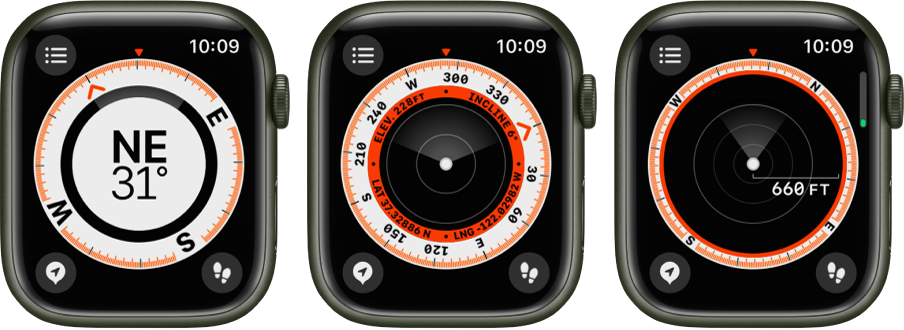
Your bearing is shown at the center of the watch face. Scroll the Digital Crown to see your incline, elevation, and coordinates in the inner ring of the compass. Continue scrolling to show the location of waypoints you created.

To see details in a list in any compass view, tap the List button at the top left.

1. Open the Compass app the Compass icon on your Apple Watch.
2. To add a bearing, tap the List button, scroll down, tap Bearing, turn the Digital Crown to the bearing, then tap Done.

To edit the bearing, tap the List button, scroll down, tap Bearing, turn the Digital Crown to the new bearing, then tap Done.
3. To clear the bearing, tap the List button, scroll down, then tap Clear Bearing, then tap Done.

Note: Coordinates may not be available in all regions.
The Compass app, showing the views that appear as you turn the Digital Crown. The first image shows your bearing. The second screen shows your elevation, incline, and coordinates in an inner ring. The third screen shows waypoints. Each screen shows the Details button at the top left, the Waypoints button at the bottom left, and the Trackback button at the bottom right.


Thanks!

Oct 17, 2022 2:49 PM in response to Brittany1416

Thank you. Checked the language settings in the iPhone watch app:

  • Custom
  • Language: English (UK)
  • Region: United Kingdom


If I change this to ‘Mirror my iPhone’ it makes no difference; elevation is in feet.


Interestingly, when I record a workout (e.g. hiking or outdoor walk) both distance and elevation change are shown in km and meters.

This thread has been closed by the system or the community team. You may vote for any posts you find helpful, or search the Community for additional answers.

Metric units for Elevation?

Welcome to Apple Support Community
A forum where Apple customers help each other with their products. Get started with your Apple Account.