Notes disappeared on iPad after I turned on notes iCloud sync

i Had 15 to 16 notes on my iPad and all disappeared the moment I clicked sync to iCloud and started getting old iCloud notes back.

I want to get back my recent notes.


The moment I clicked and turned on the notes icon the new notes disappeared.


there are no traces of mg previous files and I don’t know what to do.


The save on iPad option in notes is turned off by default.

Is there any way to get the files back!!

iPad Pro 12.9-inch Wi-Fi

Posted on Oct 20, 2022 11:05 AM

Reply
1 reply

Oct 22, 2022 1:38 PM in response to Vshasi

Hello Vshasi,


This page here can help out with issues where the notes seem to be missing: If you're missing notes on your iPhone, iPad, or iPod touch - Apple Support


First, update all of your devices to the latest version of iOS, iPadOS, or macOS to make sure that the issue isn't related to previous software. Then try the following steps.
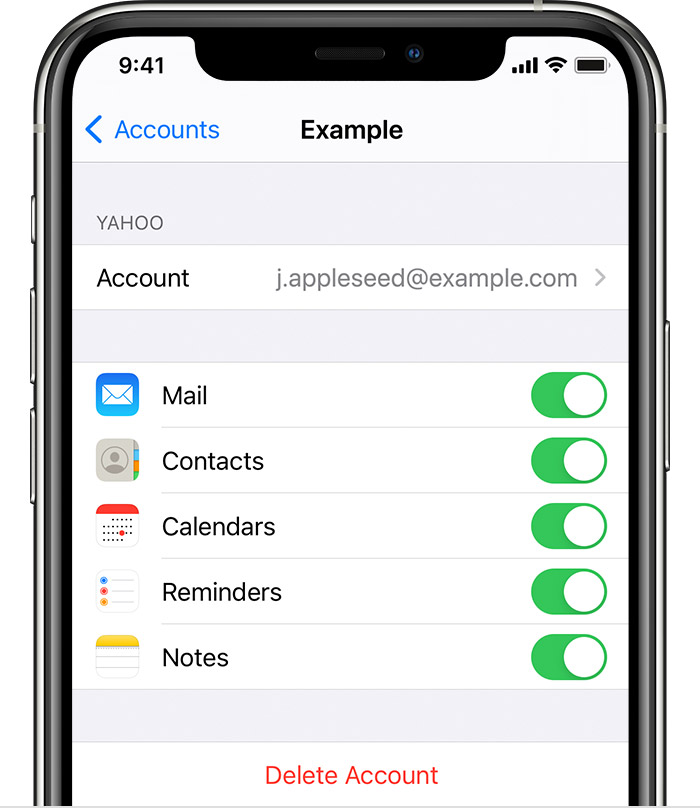
To make sure your Notes work is associated with an email account, find the email settings screen located at Settings > Mail > Accounts.
Check your account settings
If you store your notes with a third-party account or email service, like Gmail or Yahoo, check your settings:
1. In the Settings app, tap Mail.
2. Tap Accounts, then tap the email account that you want to check.
3. Make sure that Notes is on.
If you use Notes with more than one email account, just repeat the steps for each account. If your account is missing, learn how to add an email account to your device.


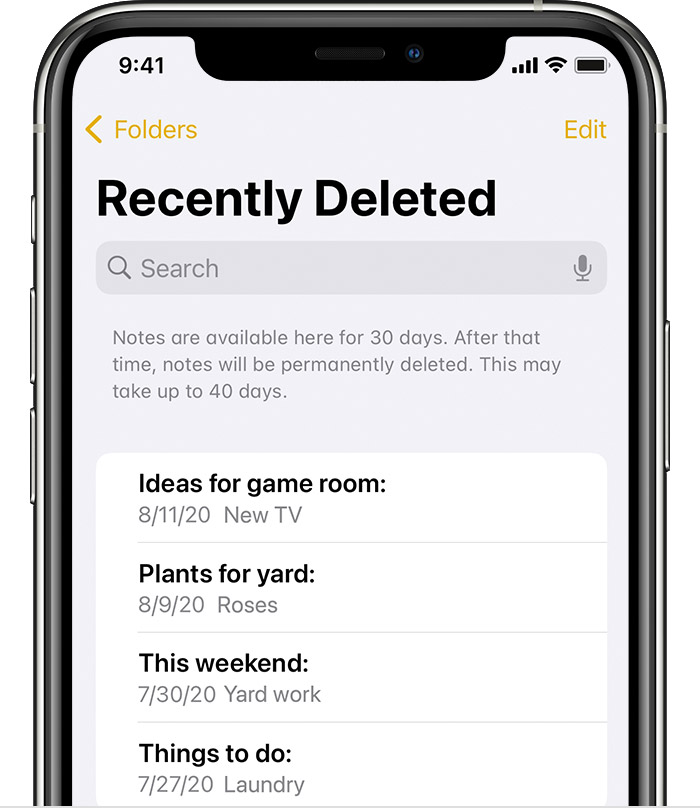
The recently deleted folder in Mail holds recently deleted notes for 30 days.
Check your Recently Deleted folder
If you store your notes on iCloud, check your Recently Deleted folder:
1. Open Notes, then tap the back icon Tap the arrow icon until you see your Folders list.
2. Tap Recently Deleted and search for your note.

If you find your note in Recently Deleted or in another folder, you can move it:
1. In the Notes list, tap Edit.
2. Select the note that you want to move.
3. Tap Move, then select the folder you want to move it to.

If you use notes with another service, like Gmail or Yahoo, check the Trash folder of that account in the Mail app. If you delete a note from the Notes app, your third-party account will usually keep it in the Trash folder. To recover a note from the Trash folder, you need to copy and paste the note to a new note in the Notes app.


If the notes were stored in a recent backup, you may also explore restoring from that: Restore your iPhone, iPad, or iPod touch from a backup - Apple Support


Cheers.

This thread has been closed by the system or the community team. You may vote for any posts you find helpful, or search the Community for additional answers.

Notes disappeared on iPad after I turned on notes iCloud sync

Welcome to Apple Support Community
A forum where Apple customers help each other with their products. Get started with your Apple Account.