I am in Egypt now. I want to use my Visa card belongs to the Egyptian National bank in Cairo . Egypt. I left Kuwait where I lived and worked . Now I have been living in Egypt . How can I do my purchases through the online connection any application

How can I do my purchases online using my Visa card which belongs to Egypt . The National Egyptian Bank . I want to use my Visa card instead of the old method Inused while I was living in Kuwait about 5 years ago. Now I have been living in my own country .

iPad Air 2, iPadOS 14

Posted on Oct 25, 2022 9:23 PM

Reply
1 reply

Oct 28, 2022 11:01 AM in response to amigo129

Greetings amigo129,


You'll need to update the country associated with your Apple ID if you have a payment method from a different country you'd like to use. Check out those steps here:


Change your Apple ID country or region - Apple Support


"Use your iPhone or iPad to change your region


  1. Open the Settings app. 
  2. Tap your name, then tap Media & Purchases.
  3. Tap View Account. You might be asked to sign in.
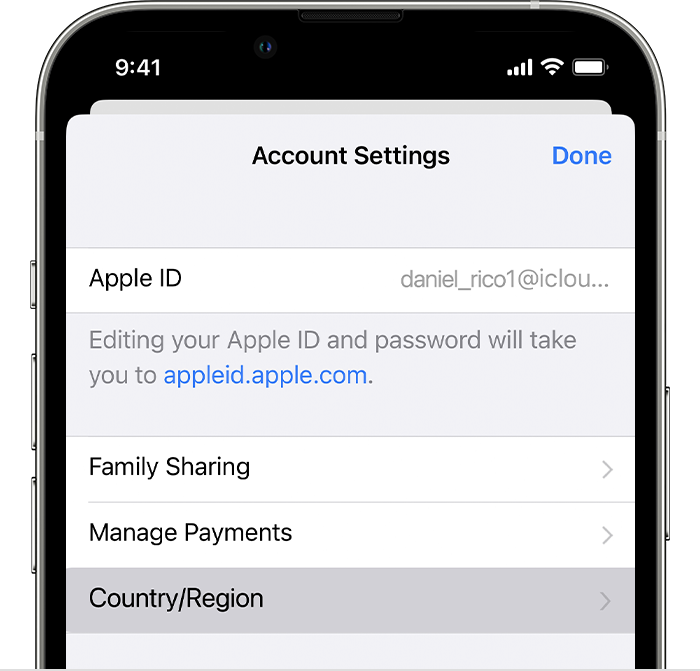
  4. Tap Country/Region.
  5. iPhone showing Country/Region in Account Settings.
  6. Tap Change Country or Region.
  7. Tap your new country or region, then review the Terms & Conditions.
  8. Tap Agree in the upper-right corner, then tap Agree again to confirm.
  9. Select a payment method and enter your new payment information and billing address, then tap Next. You must enter a valid payment method for your new country or region.*"


Let us know if you have any additional questions.


Kind regards.

This thread has been closed by the system or the community team. You may vote for any posts you find helpful, or search the Community for additional answers.

I am in Egypt now. I want to use my Visa card belongs to the Egyptian National bank in Cairo . Egypt. I left Kuwait where I lived and worked . Now I have been living in Egypt . How can I do my purchases through the online connection any application

Welcome to Apple Support Community
A forum where Apple customers help each other with their products. Get started with your Apple Account.