File sharing

I've tried unsuccessfully to file share using iCloud. The addressees are not getting a notice or link to the folder I've shared. What am I doing wrong? I've followed the instruction from online sources including Apple's support instructions.

MacBook Air 13″, macOS 12.6

Posted on Oct 27, 2022 12:57 PM

Reply
Question marked as Top-ranking reply

Posted on Oct 30, 2022 8:59 AM

Hello Staynavytom,


Thanks for updating us.


As you mention the invitation or link isn't being received, could you clarify how you're sending this invitation? In addition, be sure the file or folder is stored in iCloud Drive with the recipients using supported software.


We'll include the details needed for the recipient to be able to collaborate with the files below, and they're also located in the previous resource we provided: Use iCloud to share and collaborate on files and folders - Apple Support


Note: To use iCloud Drive folder sharing, your computer or device must have macOS version 10.15.4 or later, iOS version 13.4 or later, or iCloud for Windows version 11.1 or later.

Note: To collaborate with others on a file or folder, it must be in iCloud Drive.


If you need assistance with adding the file to iCloud Drive, check out the steps below. You can also locate more details on this here: Add your Desktop and Documents files to iCloud Drive - Apple Support


Turn on Desktop and Documents

Turn on Desktop and Documents on every Mac that you want to use with iCloud Drive.

1. From your Mac, choose Apple menu  > System Preferences. Click Apple ID, then click iCloud. In macOS Mojave or earlier, choose Apple menu  > System Preferences, then click iCloud.

2. Make sure that iCloud Drive is turned on.

3. Next to iCloud Drive, click Options.

4. Choose Desktop & Documents Folders.
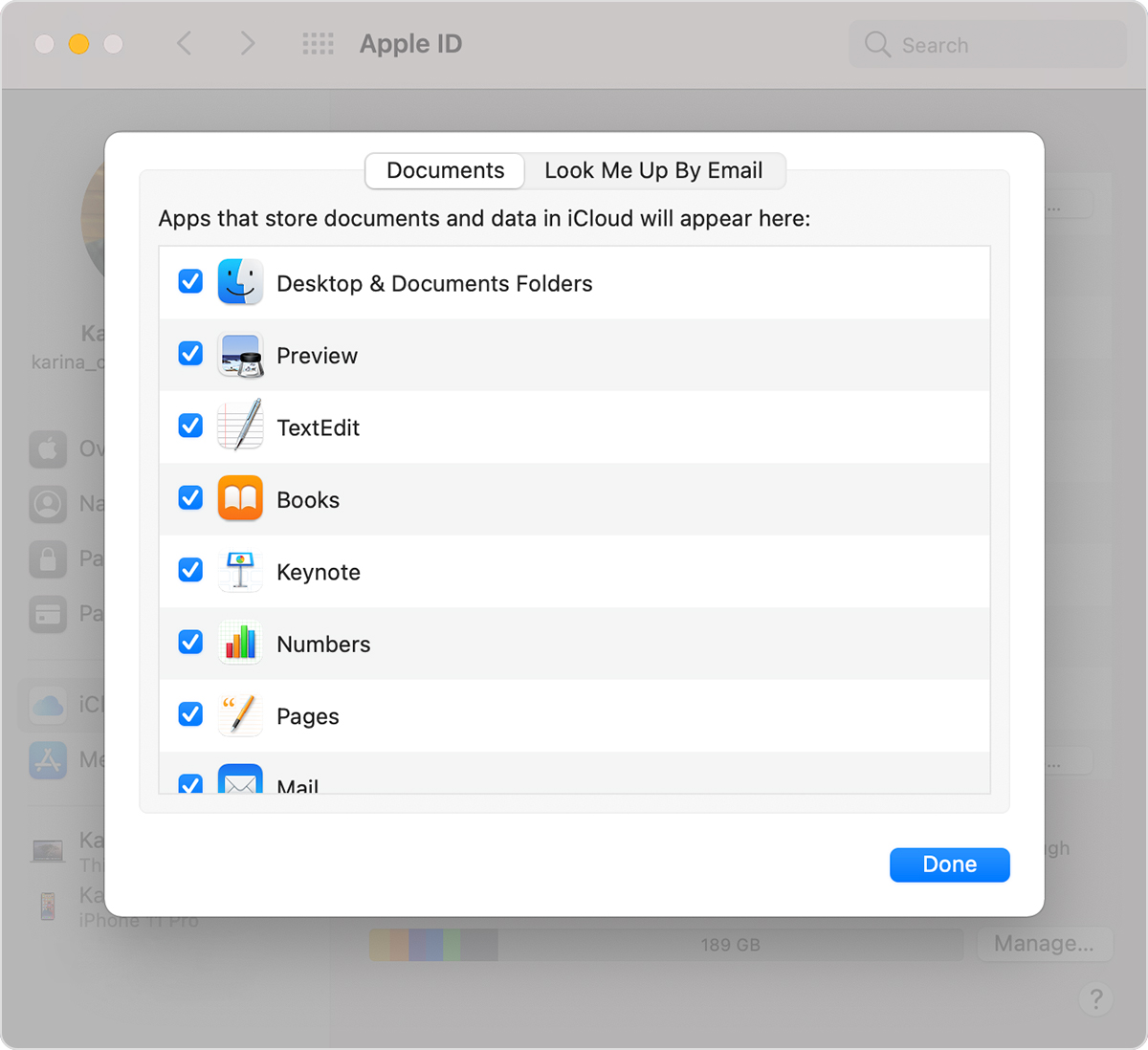
iCloud Drive Options screen on a Mac that shows the Desktop & Documents Folders option selected.

5. Click Done.

If you want to store your files in iCloud Drive and another cloud storage service, you can keep copies of your files in both, but you can't keep folders from a third-party cloud service in iCloud Drive. You can keep your other cloud service folders in a different place on your Mac, like the home folder.


Let us know if that helps out, and confirm the requested information if you still need assistance. Any additional details you can include for us to understand this clearer, feel free to include them.


Have a great day!

3 replies
Question marked as Top-ranking reply

Oct 30, 2022 8:59 AM in response to Staynavytom

Hello Staynavytom,


Thanks for updating us.


As you mention the invitation or link isn't being received, could you clarify how you're sending this invitation? In addition, be sure the file or folder is stored in iCloud Drive with the recipients using supported software.


We'll include the details needed for the recipient to be able to collaborate with the files below, and they're also located in the previous resource we provided: Use iCloud to share and collaborate on files and folders - Apple Support


Note: To use iCloud Drive folder sharing, your computer or device must have macOS version 10.15.4 or later, iOS version 13.4 or later, or iCloud for Windows version 11.1 or later.

Note: To collaborate with others on a file or folder, it must be in iCloud Drive.


If you need assistance with adding the file to iCloud Drive, check out the steps below. You can also locate more details on this here: Add your Desktop and Documents files to iCloud Drive - Apple Support


Turn on Desktop and Documents

Turn on Desktop and Documents on every Mac that you want to use with iCloud Drive.

1. From your Mac, choose Apple menu  > System Preferences. Click Apple ID, then click iCloud. In macOS Mojave or earlier, choose Apple menu  > System Preferences, then click iCloud.

2. Make sure that iCloud Drive is turned on.

3. Next to iCloud Drive, click Options.

4. Choose Desktop & Documents Folders.

iCloud Drive Options screen on a Mac that shows the Desktop & Documents Folders option selected.

5. Click Done.

If you want to store your files in iCloud Drive and another cloud storage service, you can keep copies of your files in both, but you can't keep folders from a third-party cloud service in iCloud Drive. You can keep your other cloud service folders in a different place on your Mac, like the home folder.


Let us know if that helps out, and confirm the requested information if you still need assistance. Any additional details you can include for us to understand this clearer, feel free to include them.


Have a great day!

This thread has been closed by the system or the community team. You may vote for any posts you find helpful, or search the Community for additional answers.

File sharing

Welcome to Apple Support Community
A forum where Apple customers help each other with their products. Get started with your Apple Account.