How can I really change or recover my Apple password
How can I really change or recover my Apple password
iPhone 12 Pro Max, iOS 16
How can I really change or recover my Apple password
iPhone 12 Pro Max, iOS 16
Hello Danbotnick,
There are processes for both recovering a Apple ID password, and for changing an Apple ID password.
These steps for reseting your Apple ID password can be found at If you forgot your Apple ID password:
Reset your Apple ID password on your iPhone or other trusted Apple device
1. Go to Settings.
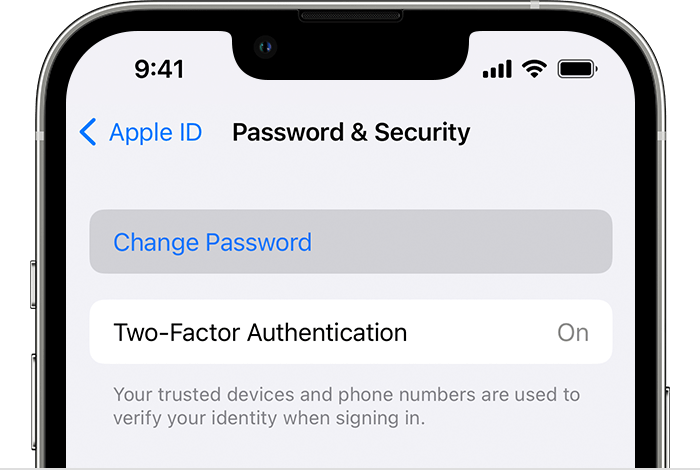
2. Tap your name > Password & Security > Change Password.
3. Follow the onscreen instructions to reset your password.
You can also follow this process on a trusted iPad, iPod touch, or Apple Watch.
To reset your password on your trusted Mac, choose Apple menu > System Settings (or System Preferences) > Sign in with your Apple ID (or Apple ID). Then click Password & Security, Change Password, and follow the onscreen instructions.
There are other methods outlined there also.
As for changing your Apple ID password, follow these steps found at Change your Apple ID password:
Change your Apple ID password on your iPhone, iPad, iPod touch, or Apple Watch
1. Tap Settings > your name > Password & Security.
2. Tap Change Password.
3. Enter your current password or device passcode, then enter a new password and confirm the new password. Forgot your password?
4. Tap Change or Change Password.
You may also want to take a look at the information outlined here: What to do after you change your Apple ID or password
Have a good day.
Hello Danbotnick,
There are processes for both recovering a Apple ID password, and for changing an Apple ID password.
These steps for reseting your Apple ID password can be found at If you forgot your Apple ID password:
Reset your Apple ID password on your iPhone or other trusted Apple device
1. Go to Settings.
2. Tap your name > Password & Security > Change Password.
3. Follow the onscreen instructions to reset your password.
You can also follow this process on a trusted iPad, iPod touch, or Apple Watch.
To reset your password on your trusted Mac, choose Apple menu > System Settings (or System Preferences) > Sign in with your Apple ID (or Apple ID). Then click Password & Security, Change Password, and follow the onscreen instructions.
There are other methods outlined there also.
As for changing your Apple ID password, follow these steps found at Change your Apple ID password:
Change your Apple ID password on your iPhone, iPad, iPod touch, or Apple Watch
1. Tap Settings > your name > Password & Security.
2. Tap Change Password.
3. Enter your current password or device passcode, then enter a new password and confirm the new password. Forgot your password?
4. Tap Change or Change Password.
You may also want to take a look at the information outlined here: What to do after you change your Apple ID or password
Have a good day.
How can I really change or recover my Apple password