
Screenrecording does not capture sound
The computer sound is not recorded with the recordings of the screen. I cannot remember any earlier recording without sound. Is there something new with Monterey 12.6?
The computer sound is not recorded with the recordings of the screen. I cannot remember any earlier recording without sound. Is there something new with Monterey 12.6?
Hi Yarramalong,
The following steps address what you're describing specifically, and should provide a solution:
"Before starting your recording, you can click the arrow next to the Record button  to change the recording settings:
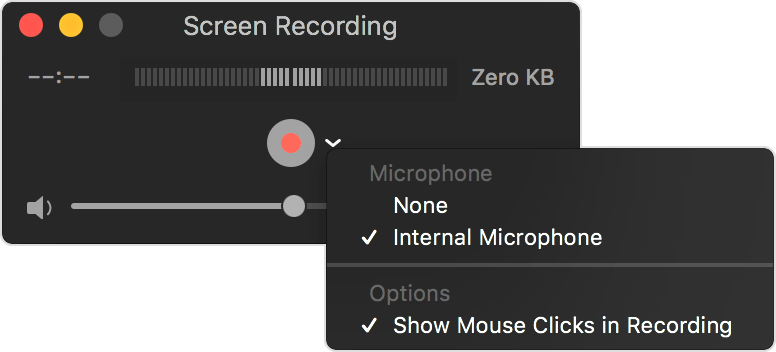 To record your voice or other audio with the screen recording, choose a microphone. To monitor that audio during recording, adjust the volume slider. If you get audio feedback, lower the volume or use headphones with a microphone."
You can find these steps in the resource linked to your post: How to record the screen on your Mac
If you have followed the steps correctly and you still have the issue, let us know if you get any specific alerts or error messages when trying, as those may help us determine what might be causing the issue. It may also be helpful to let us know which apps you are recording because if they are playing back copy protected media, this may prevent audio from being recorded as well.
Cheers!
Screenrecording does not capture sound

