Beat flex not turning off and not connecting

My Beats Flex had the white power light remain on after hitting the power button. I heard the sound signaling that it powered down & it disconnected from my phone. The white light remained on and then I tried powering up and was able to. It was low battery so I plugged it in & the white light remained instead of turning the usual red to signal it is charging. After removing it, I can no longer power it on or off nor connect to my phone. I factory reset it and the white light still on

Posted on Nov 5, 2022 10:57 AM

Reply
Question marked as Top-ranking reply

Posted on Nov 7, 2022 11:39 AM

Hello shidof99,


You mentioned factory resetting the Beats Flex. Do you mean they were reset using these steps: Reset your Beats earphones - Apple Support


Reset Beats Flex

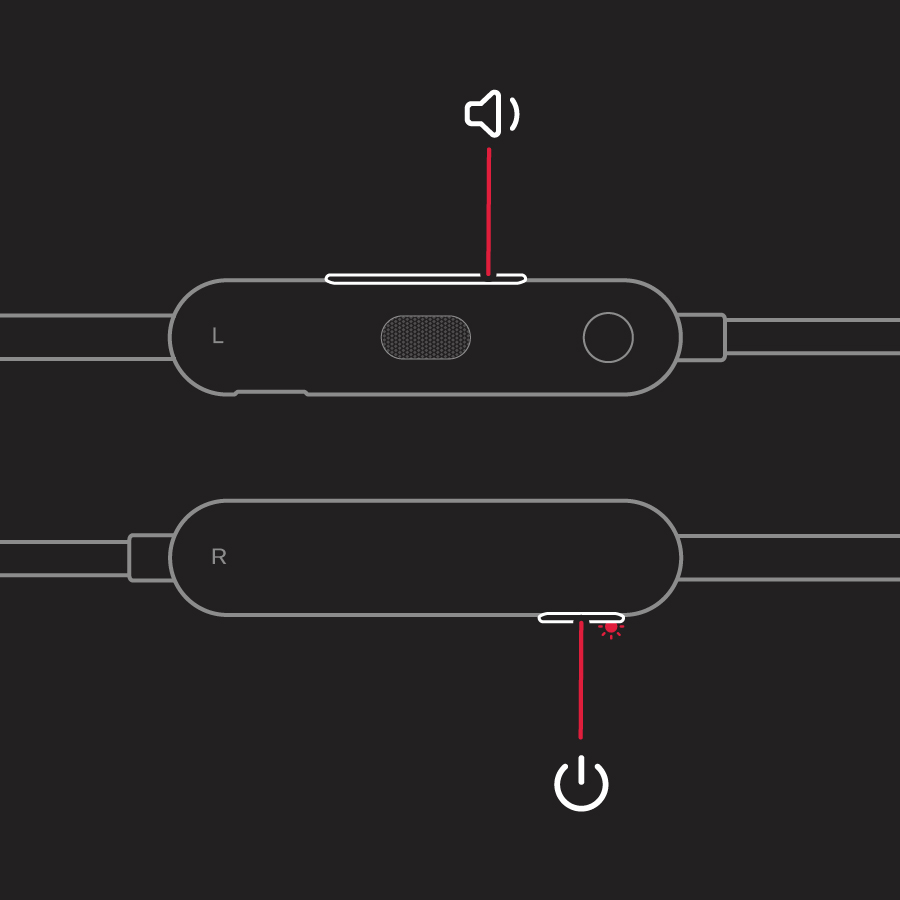
1. Hold down both the power button and the volume down button for 15 seconds.

diagram with callout lines to volume down and power buttons

2. When the LED indicator light flashes, release the buttons. Your earphones are now reset and ready to be set up with your devices again.


If so, did you also check for any firmware updates? It's important that the Beats are updated in order to work properly. Learn how to check and get that installed, if available: About Beats Updater - Apple Support


For issues connecting them to your device, see related steps in: If you can't connect to your wireless Beats product - Apple Support


Can you pair them with another device? That will tell us if the issue only happens when trying to connect to a specific device or if it occurs with multiple devices: Set up and use your Beats Flex earphones after service - Apple Support


Let us know how it goes, take care.

1 reply
Question marked as Top-ranking reply

Nov 7, 2022 11:39 AM in response to shidof99

Hello shidof99,


You mentioned factory resetting the Beats Flex. Do you mean they were reset using these steps: Reset your Beats earphones - Apple Support


Reset Beats Flex

1. Hold down both the power button and the volume down button for 15 seconds.

diagram with callout lines to volume down and power buttons

2. When the LED indicator light flashes, release the buttons. Your earphones are now reset and ready to be set up with your devices again.


If so, did you also check for any firmware updates? It's important that the Beats are updated in order to work properly. Learn how to check and get that installed, if available: About Beats Updater - Apple Support


For issues connecting them to your device, see related steps in: If you can't connect to your wireless Beats product - Apple Support


Can you pair them with another device? That will tell us if the issue only happens when trying to connect to a specific device or if it occurs with multiple devices: Set up and use your Beats Flex earphones after service - Apple Support


Let us know how it goes, take care.

This thread has been closed by the system or the community team. You may vote for any posts you find helpful, or search the Community for additional answers.

Beat flex not turning off and not connecting

Welcome to Apple Support Community
A forum where Apple customers help each other with their products. Get started with your Apple Account.