iTunes music sharing
i just got a new phone and my music didn’t crossover to my new phone. How can I get my music back. My mom has shared music.
iPhone 11, iOS 16
i just got a new phone and my music didn’t crossover to my new phone. How can I get my music back. My mom has shared music.
iPhone 11, iOS 16
Hi Helplessteenager,
Welcome to Apple Support Communities. We understand that you're having an issue with getting your music on your new iPhone. We'd like to help.
Tell us more about where your music was prior to this. Did you have another iPhone? Are you a subscriber to Apple Music? You can either have an individual, student or family sharing subscription. If you're not a subscriber, How was your music stored and played on your device? Was it using the Apple Music app or another app?
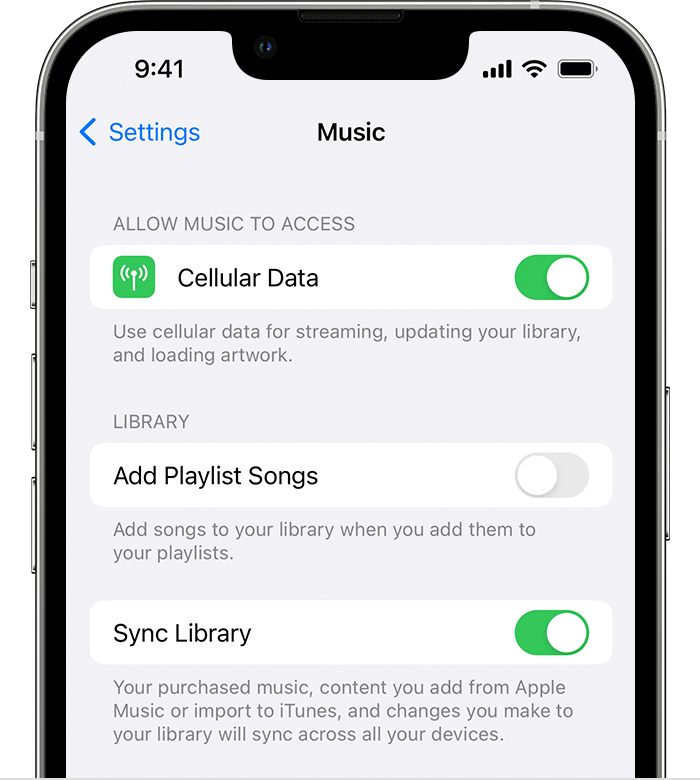
If you were using Apple Music, and you were using your own Apple ID on the device, you should be able to Use Sync Library to access your music library across your devices
How to turn on Sync Library on your iPhone or iPad
Make sure that your iPhone or iPad is signed in with the same Apple ID that you use with your Apple Music subscription.
1. Go to Settings.
2. Tap Music.
3. Turn on Sync Library.
4. Turn on Sync Library on your other devices.
Let us know if that helps. If you need additional assistance, provide us with the answers to the questions above and we'll continue to help.
Cheers!
iTunes music sharing