Is my iPhone have been repaired before
Is my iPhone have been repaired before
iPhone 11 Pro Max, iOS 16
Is my iPhone have been repaired before
iPhone 11 Pro Max, iOS 16
Hello kayode278,
Thanks for choosing the Apple Support Communities. This article can help determine if your iPhone has previously been repaired: iPhone parts and service history - Apple Support
Check your device's parts and service history
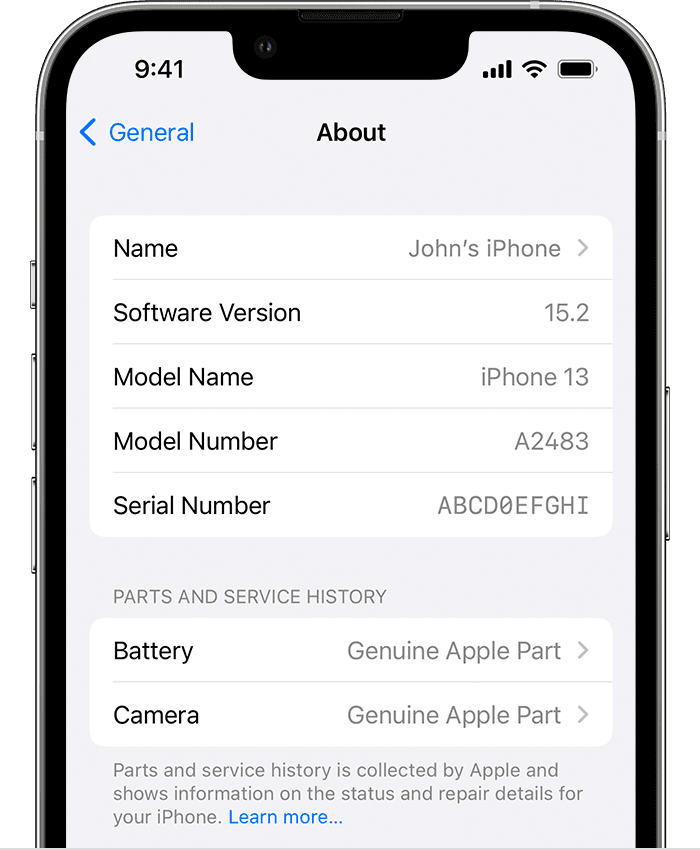
With iOS 15.2 and later, you can go to Settings > General > About to check the parts and service history of your iPhone.
• For iPhone XR, XS, XS Max, and later, including iPhone SE (2nd generation), you can check if the battery has been replaced.
• For iPhone 11 models, you can check if the battery or display has been replaced.
• For iPhone 12 models, iPhone 13 models, and iPhone 14 models, you can check if the rear system, TrueDepth camera, battery, display, or rear cameras have been replaced.
If you’d like to check further, you can always contact Apple Support: Get Support
Cheers!
Hello kayode278,
Thanks for choosing the Apple Support Communities. This article can help determine if your iPhone has previously been repaired: iPhone parts and service history - Apple Support
Check your device's parts and service history
With iOS 15.2 and later, you can go to Settings > General > About to check the parts and service history of your iPhone.
• For iPhone XR, XS, XS Max, and later, including iPhone SE (2nd generation), you can check if the battery has been replaced.
• For iPhone 11 models, you can check if the battery or display has been replaced.
• For iPhone 12 models, iPhone 13 models, and iPhone 14 models, you can check if the rear system, TrueDepth camera, battery, display, or rear cameras have been replaced.
If you’d like to check further, you can always contact Apple Support: Get Support
Cheers!
Is my iPhone have been repaired before