Using focus without messing up everything on your iPhone/iPad

I set up work focus on my iPhone, and the apps I use for work wouldn't add to the home screen without me deleting the app and redownloading it. When I did, and I turned off focus, the apps were no longer on my non-focused home screen, and when I went to add them back, iOS wouldn't give me the option. Am I only going to be able have them on one or the other? This is beyond frustrating. Home Page layout has been frustrating enough with automatically shifting apps to the first home page, to now add this. As much as I love my Apple products, each new "improved" iOS, iPadOS, and MacOS seem to have issues that negate the "improvements."

iPhone 13 Pro Max

Posted on Nov 8, 2022 8:14 AM

Reply
3 replies

Nov 10, 2022 8:27 AM in response to mcnsu1997

Hello mcnsu1997,


Thanks for choosing the Apple Support Communities. We have a few steps that may help you with your Focus Home Screens.


  1. Update to the latest iOS version (16.1.1) - Update your iPhone, iPad, or iPod touch - Apple Support
  2. Follow the steps noted below.


"Connect Home Screen pages to Focus

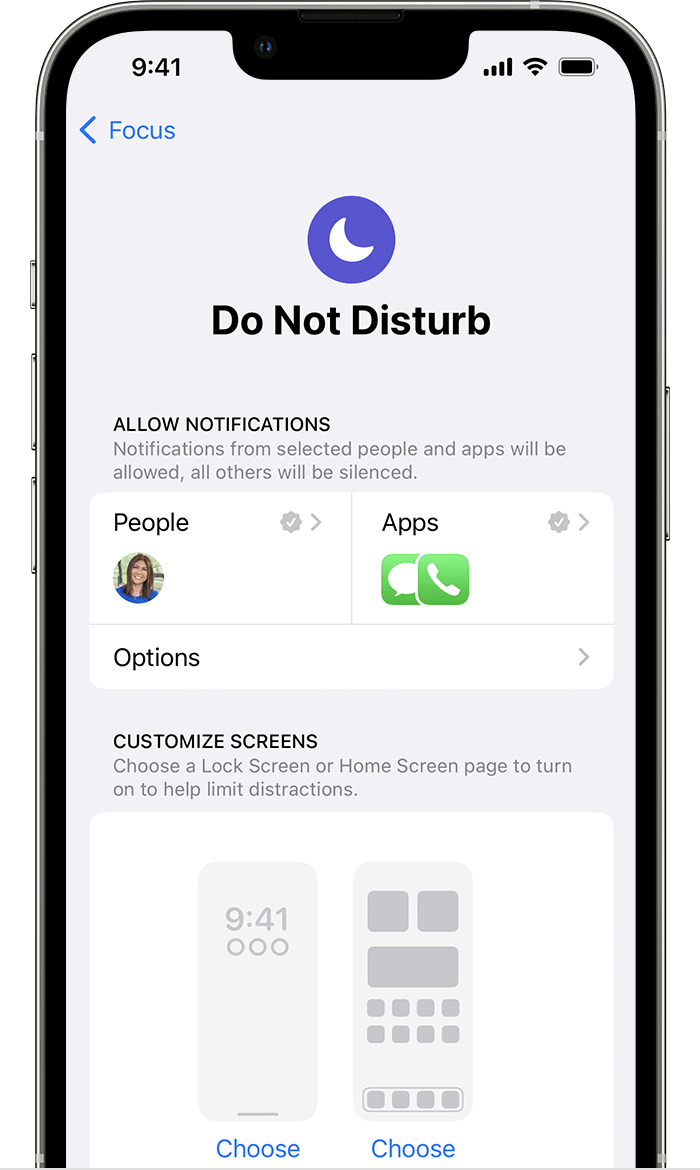
After you set up Focus, you can silence notifications or allow only notifications from the people and apps that match your Focus. You can also customize a Home Screen page that has only apps related to your Focus and make that page the only one accessible during the time you have the Focus enabled.

iPhone screen showing the settings for Do Not Disturb Focus. 

  1. Go to Settings > Focus.
  2. Select the Focus that you want to customize, then choose the Home Screen.
  3. Create a new Home Screen page, select an existing Home Screen page, or select multiple pages that you want to connect to this Focus.
  4. Tap Done.

From here, you can also tap Options and turn on Hide Notification Badges, which hides notifications on your Home Screen apps.


Connect your Lock Screen to Focus

  1. Go to Settings > Focus.
  2. Select the Focus that you want to customize, then choose the Lock Screen.
  3. Create a new Lock Screen, select an existing Lock Screen, or select multiple Lock Screens that you want to connect to this Focus.
  4. Tap Done."


More info on using Focus can be found here: Use Focus on your iPhone or iPad - Apple Support


Cheers!


This thread has been closed by the system or the community team. You may vote for any posts you find helpful, or search the Community for additional answers.

Using focus without messing up everything on your iPhone/iPad

Welcome to Apple Support Community
A forum where Apple customers help each other with their products. Get started with your Apple Account.