iPhone contacts stuck in Lists

Updated to 16.1 and now had two problems.

1. Calendar wouldn't refresh. Had to delete and resubscribe.


  1. Contacts are stuck in Lists. Cannot get back to accessing all my addresses. Have shut phone off and on twice.

iPhone 11 Pro

Posted on Nov 9, 2022 11:15 AM

Reply
Question marked as Top-ranking reply

Posted on Sep 17, 2023 9:24 AM

Contacts are organized into “lists”. You have always had a contact list or lists. The older iOS version hid that information from you. But lists are a fact of life for all systems that support contacts. It was really frustrating, because you could see your contact lists on a Mac or Windows PC, (or even on an Android) but not on your iPhone.


In rare cases you may have only one contact list. If that is the case just tap on the name of the list ONCE, and forevermore those contacts will appear when you open the Contacts app. If you have more than one list just tap on All Contacts.


As you mentioned work, business or live in a town you can create a list for “work”, “business”, “town” or any other subject (“doctors”, “restaurants”, etc). You can then move contacts from one list to another, or even have the same contact on more than one list.


Or tap the Phone icon, then Contacts; that will always show all contacts on all of your lists.


This isn’t dumbing down. The OLD way, where you couldn’t see your lists, even though they existed and were hidden, was dumbed down.


33 replies
Question marked as Top-ranking reply

Sep 17, 2023 9:24 AM in response to Maplaw85

Contacts are organized into “lists”. You have always had a contact list or lists. The older iOS version hid that information from you. But lists are a fact of life for all systems that support contacts. It was really frustrating, because you could see your contact lists on a Mac or Windows PC, (or even on an Android) but not on your iPhone.


In rare cases you may have only one contact list. If that is the case just tap on the name of the list ONCE, and forevermore those contacts will appear when you open the Contacts app. If you have more than one list just tap on All Contacts.


As you mentioned work, business or live in a town you can create a list for “work”, “business”, “town” or any other subject (“doctors”, “restaurants”, etc). You can then move contacts from one list to another, or even have the same contact on more than one list.


Or tap the Phone icon, then Contacts; that will always show all contacts on all of your lists.


This isn’t dumbing down. The OLD way, where you couldn’t see your lists, even though they existed and were hidden, was dumbed down.

Jun 13, 2023 2:42 PM in response to charliemyboy

I learned this fix from a supervisor at Apple customer support:

Surprisingly, the “Lists” view is actually the default view of the Contacts app.


Here’s how to have your device open up to the “Contacts” view:

Go to the top of the Lists view, and touch “All Contacts”.

Next, close down the Contacts app by swiping up.

When you reopen the contacts app, it appear in “Contacts” view


Sep 19, 2023 7:12 AM in response to senlac79

senlac79 wrote:

That would be good.......... If it said "all icloud" anywhere!
Why don't I have this option anywhere in Lists or Contacts?

Because you are not using iCloud for syncing contacts. You are using some other email provider; perhaps Google, or Microsoft, Yahoo, etc. Whichever one you are using will appear at the top of the lists screen, and if you sync more than one contact source the top entry will be All Contacts.


Nov 11, 2022 2:39 PM in response to charliemyboy

Hi charliemyboy,


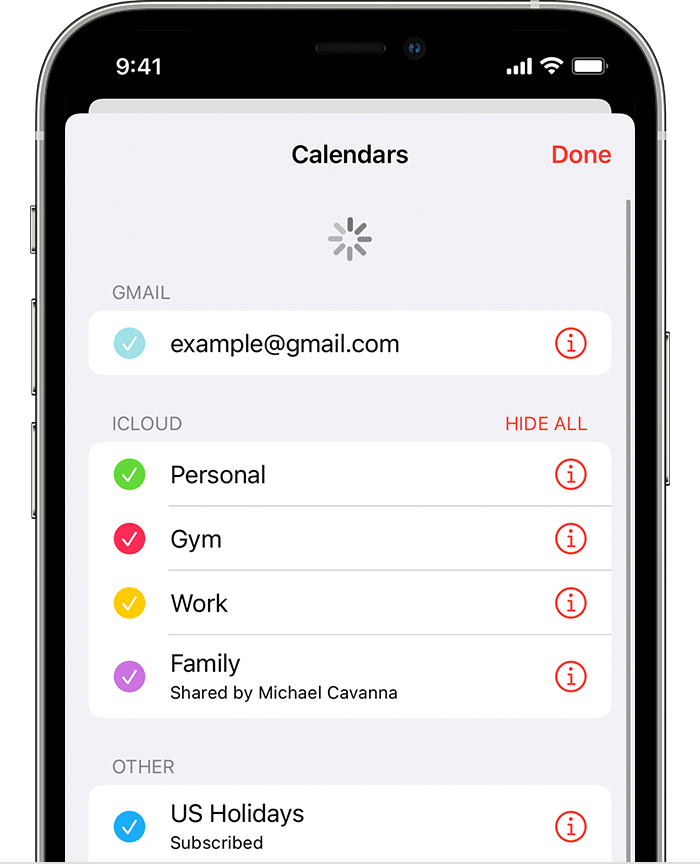
For help with regarding the iOS update and refreshing calendars, you can test the steps below found in the article here: If your iCloud Contacts, Calendars, or Reminders won’t sync


"Refresh your contacts and calendars


To refresh your contacts, open the Contacts app and swipe down on the list. To refresh your contact groups, tap Groups in the upper-left corner, then swipe down on the list. 


To refresh your calendars:

  1. Open the Calendar app.
  2. Tap the Calendars tab.
  3. Swipe down on the list to refresh your events.
  4. Refresh your iCloud calendars on iPhone"


Additionally, if you're referring to lists used with iCloud Contacts check out and test the steps for removing or editing contact groups with the links below.


Create and manage groups of contacts on iCloud.com - Apple Support

Manage and delete contacts on your iPhone or iPad - Apple Support


Cheers.

This thread has been closed by the system or the community team. You may vote for any posts you find helpful, or search the Community for additional answers.

iPhone contacts stuck in Lists

Welcome to Apple Support Community
A forum where Apple customers help each other with their products. Get started with your Apple Account.