How to change my address for my Apple ID account?

How do I update my home address?


[Re-Titled by Moderator]

Posted on Nov 17, 2022 6:38 AM

Reply
Question marked as Top-ranking reply

Posted on Nov 21, 2022 6:24 PM

Hello Mywife2021,


Thank you for reaching out to Apple Support Communities, and we'll be happy to help in any way we can. We understand you have questions about changing your address for your Apple ID. You can do this from a Mac as described here: Set up your Apple ID payment method and shipping address on Mac - Apple Support


"You use Apple ID Payment & Shipping settings to change the payment and shipping information associated with your Apple ID.


  1. On your Mac, choose Apple menu  > System Settings, then click [your name] at the top of the sidebar.
  2. If you don’t see your name, click Sign in with your Apple ID to enter your Apple ID or to create one.
  3. Click Payment & Shipping on the right, then view or change the following:
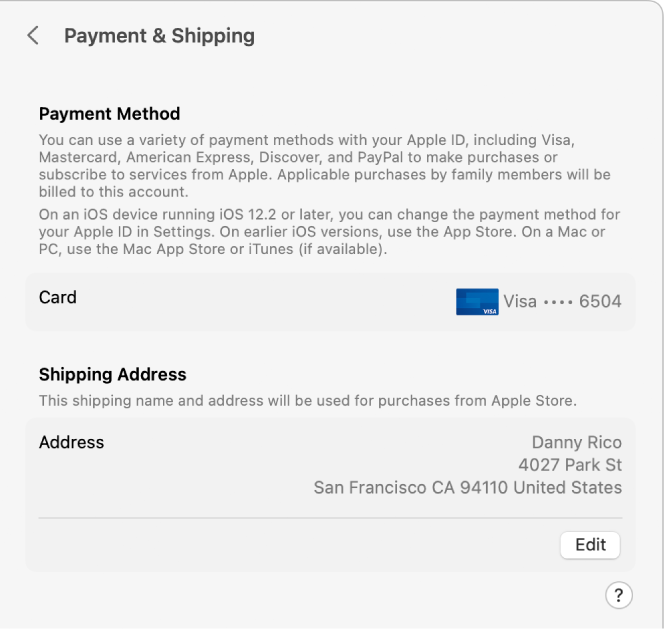
  4. Apple ID settings showing the Payment & Shipping settings for an existing account.
    • Payment Method: Shows the payment methods associated with your Apple ID. You can manage payment methods for your Apple ID in Settings on an iPhone or iPad with iOS 12.2 or later, or in the App Store on devices with earlier versions of iOS. On a Mac or PC, use the Mac App Store or iTunes (if available).
    • Apple Cash Balance: Displays your Apple Cash Balance, which you can use with any Apple Pay–capable iPhone, iPad, or Apple Watch signed in with your Apple ID.
    • Apple Card Balance: Displays your current balance (if you have Apple Card).
    • Shipping Address: Shows the name and shipping address used for purchases from the Apple Store. Click “Add a shipping address” to enter a name and mailing address for your Apple ID or click Edit to update them.

For information about changing your Apple ID account information on the Apple ID website, see your Apple ID account page.

For information about changing Apple ID account settings using an iOS or iPadOS device, see “Manage Apple ID settings” in the user guide for iPhoneiPad, or iPod touch."


Or go to : https://appleid.apple.com/


We hope this helps.


Cheers!


1 reply
Question marked as Top-ranking reply

Nov 21, 2022 6:24 PM in response to Mywife2021

Hello Mywife2021,


Thank you for reaching out to Apple Support Communities, and we'll be happy to help in any way we can. We understand you have questions about changing your address for your Apple ID. You can do this from a Mac as described here: Set up your Apple ID payment method and shipping address on Mac - Apple Support


"You use Apple ID Payment & Shipping settings to change the payment and shipping information associated with your Apple ID.


  1. On your Mac, choose Apple menu  > System Settings, then click [your name] at the top of the sidebar.
  2. If you don’t see your name, click Sign in with your Apple ID to enter your Apple ID or to create one.
  3. Click Payment & Shipping on the right, then view or change the following:
  4. Apple ID settings showing the Payment & Shipping settings for an existing account.
    • Payment Method: Shows the payment methods associated with your Apple ID. You can manage payment methods for your Apple ID in Settings on an iPhone or iPad with iOS 12.2 or later, or in the App Store on devices with earlier versions of iOS. On a Mac or PC, use the Mac App Store or iTunes (if available).
    • Apple Cash Balance: Displays your Apple Cash Balance, which you can use with any Apple Pay–capable iPhone, iPad, or Apple Watch signed in with your Apple ID.
    • Apple Card Balance: Displays your current balance (if you have Apple Card).
    • Shipping Address: Shows the name and shipping address used for purchases from the Apple Store. Click “Add a shipping address” to enter a name and mailing address for your Apple ID or click Edit to update them.

For information about changing your Apple ID account information on the Apple ID website, see your Apple ID account page.

For information about changing Apple ID account settings using an iOS or iPadOS device, see “Manage Apple ID settings” in the user guide for iPhoneiPad, or iPod touch."


Or go to : https://appleid.apple.com/


We hope this helps.


Cheers!


This thread has been closed by the system or the community team. You may vote for any posts you find helpful, or search the Community for additional answers.

How to change my address for my Apple ID account?

Welcome to Apple Support Community
A forum where Apple customers help each other with their products. Get started with your Apple Account.