I want to cancel my automatic renewal for The Apple bundle, But I’m not sure how.
I want to cancel my Disney+ auto subscription how do I go about doing this.
iPad, iPadOS 15
I want to cancel my Disney+ auto subscription how do I go about doing this.
iPad, iPadOS 15
Hi Sshrry561,
It looks like you need help with canceling your subscription and we can help.
We see you came from an article about changing adding a payment method. What you'll want to do is take these steps to cancel your subscription instead. You can do this right from your iPad Settings app:
How to cancel a subscription on your iPhone or iPad
1. Open the Settings app.
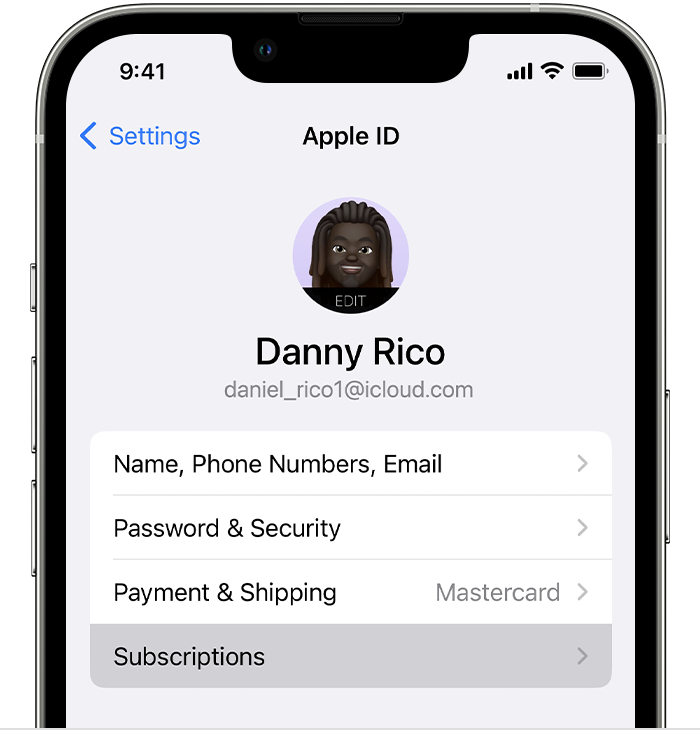
2. Tap your name.
3. Tap Subscriptions.
4. Tap the subscription.
5. Tap Cancel Subscription. You might need to scroll down to find the Cancel Subscription button. If there is no Cancel button or you see an expiration message in red text, the subscription is already canceled.
If you want to cancel a subscription from Apple
If you're not finding the subscription among your Apple subscriptions, it may be that your subscription is set up to be billed directly by Disney, and you'll need to cancel it with their steps they have listed here:
One of those sets of steps should get this subscription canceled. Let us know if that helps.
Thanks for using the Apple Support Communities.
Hi Sshrry561,
It looks like you need help with canceling your subscription and we can help.
We see you came from an article about changing adding a payment method. What you'll want to do is take these steps to cancel your subscription instead. You can do this right from your iPad Settings app:
How to cancel a subscription on your iPhone or iPad
1. Open the Settings app.
2. Tap your name.
3. Tap Subscriptions.
4. Tap the subscription.
5. Tap Cancel Subscription. You might need to scroll down to find the Cancel Subscription button. If there is no Cancel button or you see an expiration message in red text, the subscription is already canceled.
If you want to cancel a subscription from Apple
If you're not finding the subscription among your Apple subscriptions, it may be that your subscription is set up to be billed directly by Disney, and you'll need to cancel it with their steps they have listed here:
One of those sets of steps should get this subscription canceled. Let us know if that helps.
Thanks for using the Apple Support Communities.
I want to cancel my automatic renewal for The Apple bundle, But I’m not sure how.