Hello WASDwhat,
We understand that you're still receiving notifications after setting up a Focus. The following steps may be able to assist you with this issue:
- Restart your iPhone. This may seem like a simple step but can refresh your device and its settings.
1. Press and hold either volume button and the side button until the power-off slider appears.

2. Drag the slider, then wait 30 seconds for your device to turn off. If your device is frozen or unresponsive, force restart your device.
3. To turn your device back on, press and hold the side button (on the right side of your iPhone) until you see the Apple logo.
2. Update your iPhone. Completing this step may help resolve the issue and allow you to determine if the issue could be related to the software.
3. Set up a Focus using these steps:
1. Go to Settings  > Focus, then tap a Focus—for example, Do Not Disturb, Personal, Sleep, or Work.
For the Focus you select, you can set up the options described in the steps below, but you don’t have to set up all of them.
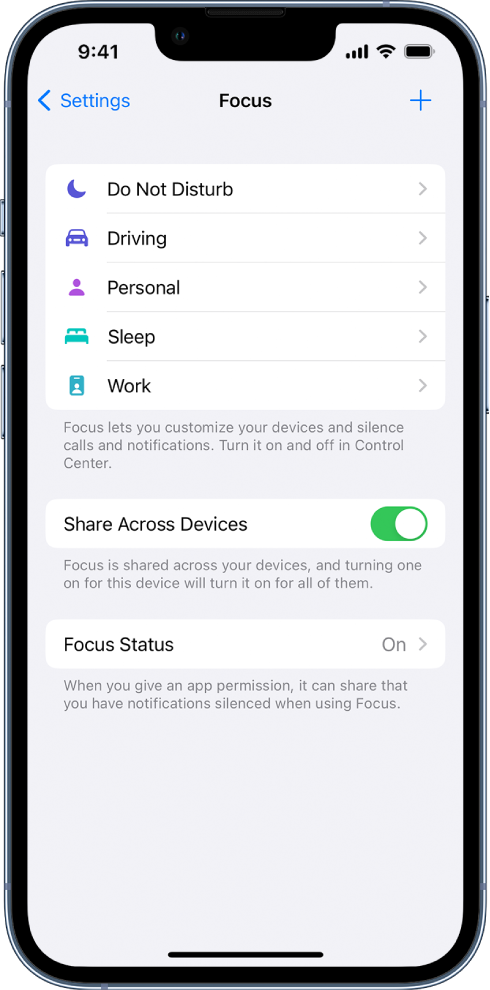
2. Specify which apps and people can send you notifications during your Focus. See Allow or silence notifications for a Focus on iPhone.
After you specify which people and apps to allow notifications from, an Options link appears.
3. Tap Options, then do any of the following:
• Show silenced notifications on the Lock Screen or send them to Notification Center: Turn Show On Lock Screen on or off.
• Darken the Lock Screen during this Focus: Turn on Dim Lock Screen.
• Hide notification badges on Home Screen apps: Turn on Hide Notification Badges.
4. When you’re finished selecting options, tap at the top of the screen.
5. To change the Lock Screen to use with this Focus, tap the Lock Screen preview below Customize Screens, select a Lock Screen, then tap Done at the top of the screen.
To choose a Home Screen page to use with this Focus, tap the Home Screen preview below Customize Screens, select a page, then tap Done.
6. The Home Screen options that appear include the apps and widgets most relevant to the Focus you’re setting up.
To make changes to the Home Screen to customize it further for your Focus, see Move apps and widgets on the Home Screen.
7. To share your Focus across your devices, tap, then turn on Share Across Devices (you must be signed in with same Apple ID on all your devices).
If you continue to experience the same behavior, we suggest reaching out to Apple directly. Depending on your location, you may be able to connect with them here: Get support
Best wishes.


