Broken switch control

There were two default recipes in switch control that I accidentally deleted. I think they were needs to function because since then, I haven’t been able to get any switched to work. All I get is Invalid configuration. Any way to fix this? The same

iPhone 7, iOS 12

Posted on Nov 19, 2022 2:34 PM

Reply
Question marked as Top-ranking reply

Posted on Nov 21, 2022 6:20 PM

Hi, ChrisD_rgv


If they're not working at all, you may need to set them up again as outlined here in this article:


"Add a switch and choose its action:

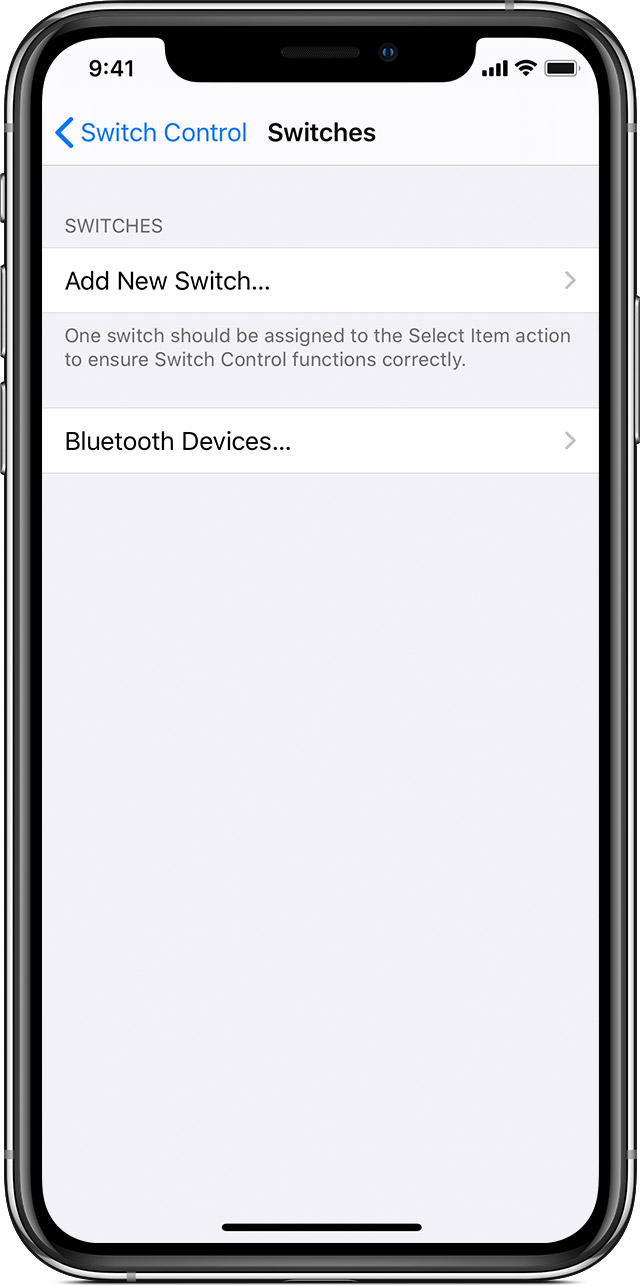
  1. Go to Settings > Accessibility > Switch Control > Switches.
  2. Tap Add New Switch and choose a source. 
  3. Follow the onscreen steps to choose how you want the switch to work. 
  4. Remember to turn on Switch Control, so you can use your new switch. 

"


Use Switch Control to navigate your iPhone, iPad, or iPod touch - Apple Support


If you need further support, reach out to Apple here: Apple Support


1 reply
Question marked as Top-ranking reply

Nov 21, 2022 6:20 PM in response to ChrisD_rgv

Hi, ChrisD_rgv


If they're not working at all, you may need to set them up again as outlined here in this article:


"Add a switch and choose its action:

  1. Go to Settings > Accessibility > Switch Control > Switches.
  2. Tap Add New Switch and choose a source. 
  3. Follow the onscreen steps to choose how you want the switch to work. 
  4. Remember to turn on Switch Control, so you can use your new switch. 

"


Use Switch Control to navigate your iPhone, iPad, or iPod touch - Apple Support


If you need further support, reach out to Apple here: Apple Support


This thread has been closed by the system or the community team. You may vote for any posts you find helpful, or search the Community for additional answers.

Broken switch control

Welcome to Apple Support Community
A forum where Apple customers help each other with their products. Get started with your Apple Account.