
Invisible ink problem
I am trying to disable the invisible ink on my iPhone 12. I have done all the steps except general and accessibility are on the same page. Please help me get rid of this.
iPhone 12, iOS 16
I am trying to disable the invisible ink on my iPhone 12. I have done all the steps except general and accessibility are on the same page. Please help me get rid of this.
iPhone 12, iOS 16
Hey Invisibleinkstink,
To clarify, are you referring the the invisible ink animation in Messages? If so, are you sending messages in invisible ink or receiving them?
If you're sending them but want to stop, long press on the send button after you've sent a message and you'll see the various effect options. By default it should just send the message, but you can confirm if you want to use an effect there.
"Animate the message bubble
Use effects to animate the message bubble: you can send a message with Slam or Loud so that it appears to pop out, or use Gentle so it arrives softly. You can also use Invisible Ink to hide the message before it’s read.
 , then tap the gray dots to preview different bubble effects. to send the message or
  to cancel the effect and return to your message.
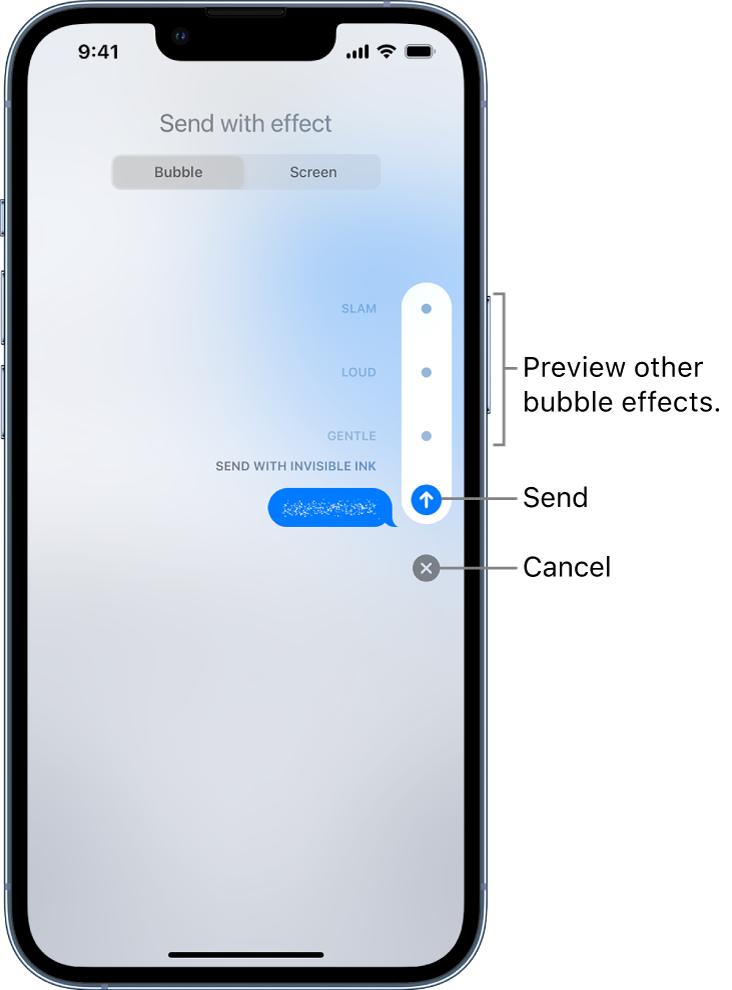 "
"If this is not the case, let us know more specifics as to where you're seeing the invisible ink.
Cheers!
Invisible ink problem

