Hey Debe25,
We understand you need help customizing the Lock Screen on your iPhone 11, and also need help adding the Weather widget to it also.
To get started, for help adding the Weather widget, check out these steps:
Add widgets to your Lock Screen
You can add widgets to your Lock Screen to get information at a glance—for example, the temperature, battery level, or upcoming calendar events.
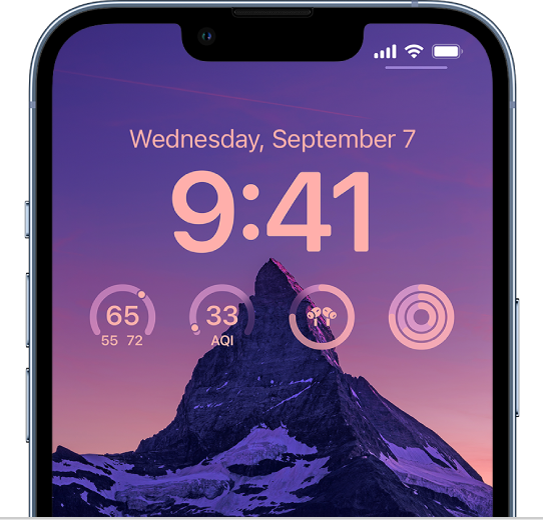
1. Touch and hold the Lock Screen until the Customize button appears at the bottom of the screen, then tap Customize.
2. Tap the box below the time to add widgets to your Lock Screen.
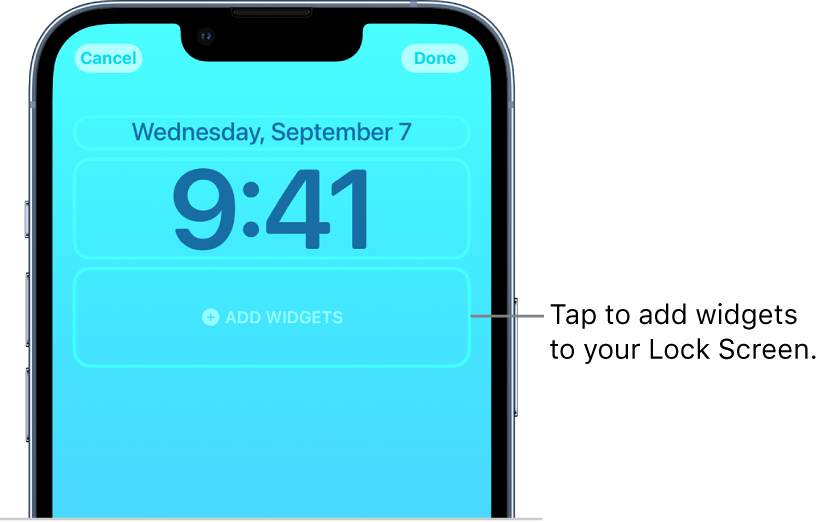
3. Tap or drag the widgets you want to add.
If there’s not enough room for a new widget, you can tap  to remove a widget and make room for a new one.
This is all outlined in more detail here: Personalize your iPhone Lock Screen - Apple Support
Here you'll also see the steps to customize the time:
Edit a Lock Screen
1. After you create a custom Lock Screen, you can make changes to it.
2. Touch and hold the Lock Screen until the Customize button appears at the bottom of the screen.
3. Swipe to the Lock Screen you want to edit, then tap  .
.
Do any of the following:
Change the style of the time: Tap Customize, tap the time, then select a font, color, and shade by tapping  .
.
We hope this information helps out.
Take care!


