Hi JayARoss,
For help with past purchases from iTunes, make sure your computer is authorized with the steps below found in the article here: Authorize or deauthorize your computer for iTunes Store purchases
"How to authorize or deauthorize your Mac
- Open the Apple Music app or Apple TV app. In the menu bar, choose Account and make sure that you're signed in with your Apple ID.
- Choose Account > Authorizations, then choose Authorize This Computer or Deauthorize This Computer.
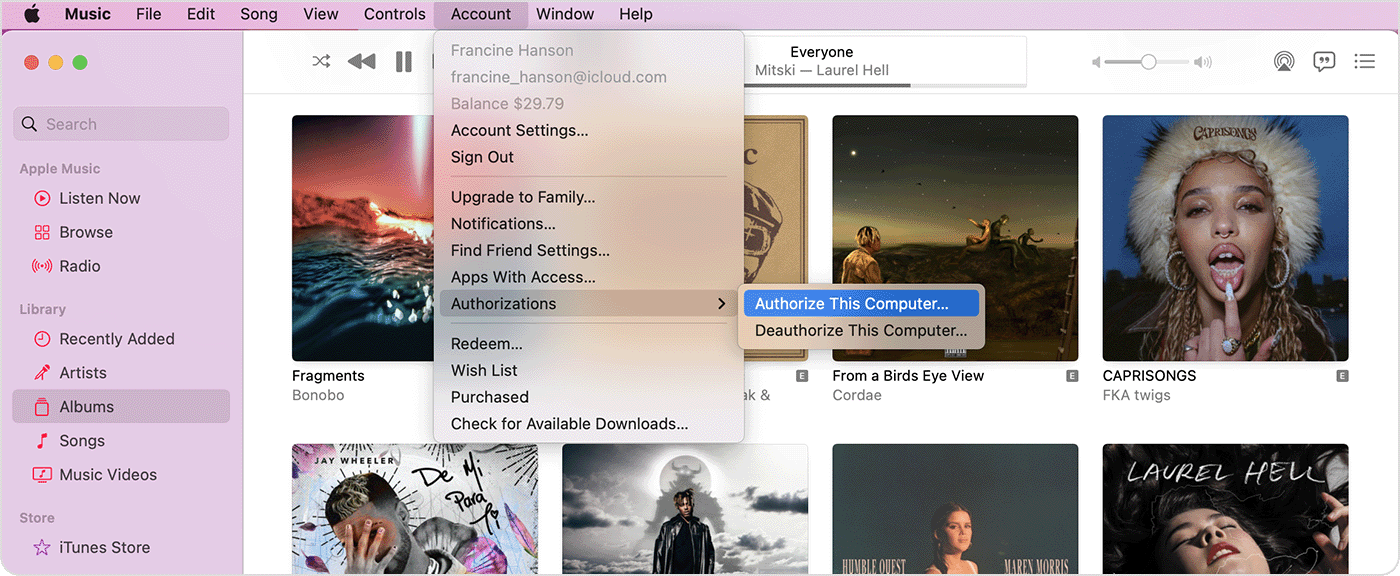
- Sign in with your Apple ID and password. Forgot your Apple ID?
- Click Authorize or Deauthorize."
If everything looks good, the resource here has some great steps that are specific to the behavior you're experiencing and can resolve this: If you can't view your iTunes Extras - Apple Support
If you're still unable to locate the content, reach out to Apple Support directly to further assist.
Contact - Official Apple Support
Contact Apple for support and service - Apple Support
Best.


