
aol mail folders not visible on ipad
Aol mail folders are not visible on Ipad, however when I load AOL app, I can see them.
Aol mail folders are not visible on Ipad, however when I load AOL app, I can see them.
Hi Dowemails,
We'd recommend resolving the issue by removing the email account and adding it back by completing the steps listed here: If you can’t send email on your iPhone, iPad, or iPod touch - Apple Support that are also below.
" Remove your email account and set it up again
" How to set up your email account automatically

3. Tap Add Account, then select your email provider.
4. Enter your email address and password.
5. If you see Next, tap Next and wait for Mail to verify your account.
6. If you see Save, tap Save.
If you don't see your email provider, tap Other to add your account manually.

How to set up your email account manually
If you need to set up your email account manually, make sure that you know the email settings for your account. If you don’t know them, you can look them up or contact your email provider. Then follow these steps:
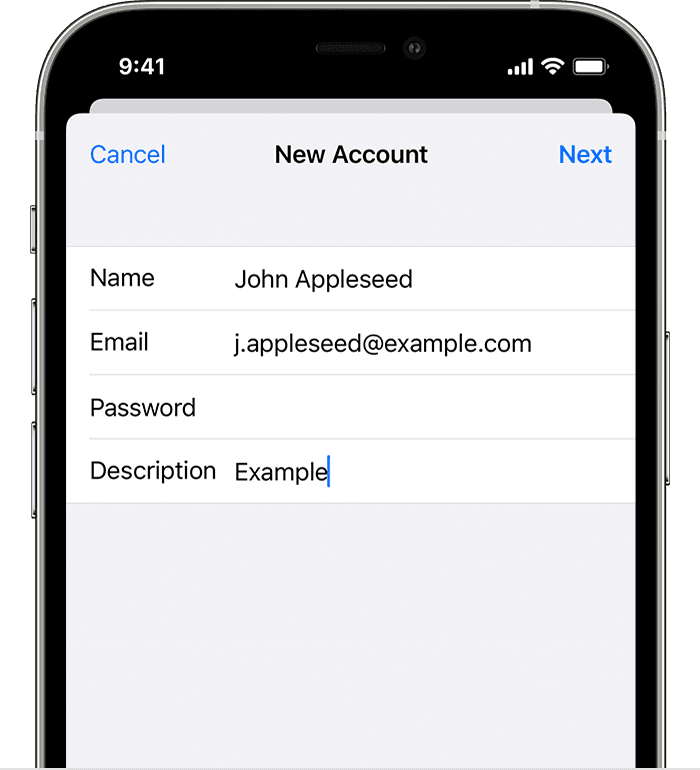
4. Tap Next. Mail will try to find the email settings and finish your account setup. If Mail finds your email settings, tap Done to complete your account setup."
You can also view the helpful information provided on AOL forum for the issue here: AOL
Hope this helps!
Hi Dowemails,
We'd recommend resolving the issue by removing the email account and adding it back by completing the steps listed here: If you can’t send email on your iPhone, iPad, or iPod touch - Apple Support that are also below.
" Remove your email account and set it up again
" How to set up your email account automatically
3. Tap Add Account, then select your email provider.
4. Enter your email address and password.
5. If you see Next, tap Next and wait for Mail to verify your account.
6. If you see Save, tap Save.
If you don't see your email provider, tap Other to add your account manually.
How to set up your email account manually
If you need to set up your email account manually, make sure that you know the email settings for your account. If you don’t know them, you can look them up or contact your email provider. Then follow these steps:
4. Tap Next. Mail will try to find the email settings and finish your account setup. If Mail finds your email settings, tap Done to complete your account setup."
You can also view the helpful information provided on AOL forum for the issue here: AOL
Hope this helps!
aol mail folders not visible on ipad

