
How do I enter focus?
How do I open focus”?
How do I change an item in focus”?
How do I open focus”?
How do I change an item in focus”?
Hello susan-kay,
Welcome to Apple Support Communities!
If we understand your post correctly, you want to know how to open and change an item in Focus. We're here to help!
"Focus is a feature that helps you reduce distractions and set boundaries. When you want to concentrate on a specific activity, you can customize one of the provided Focus options—for example Work, Personal, or Sleep—or create a custom Focus. You can use Focus to temporarily silence all notifications, or allow only specific notifications—ones that apply to your task, for example—and let other people and apps know you’re busy.
When a Focus is linked to your Lock Screen, you can turn it on by simply swiping to the corresponding Lock Screen.
Likewise, you can customize a Home Screen page that has only apps related to a Focus and make that page your Home Screen during that Focus. iPhone also suggests Home Screen pages with apps and widgets that are relevant to the Focus you’re setting up.
Tip: To quickly silence all notifications, open Control Center, tap Focus, then turn on Do Not Disturb.
Set up a Focus
 > Focus, then tap a Focus—for example, Do Not Disturb, Personal, Sleep, or Work.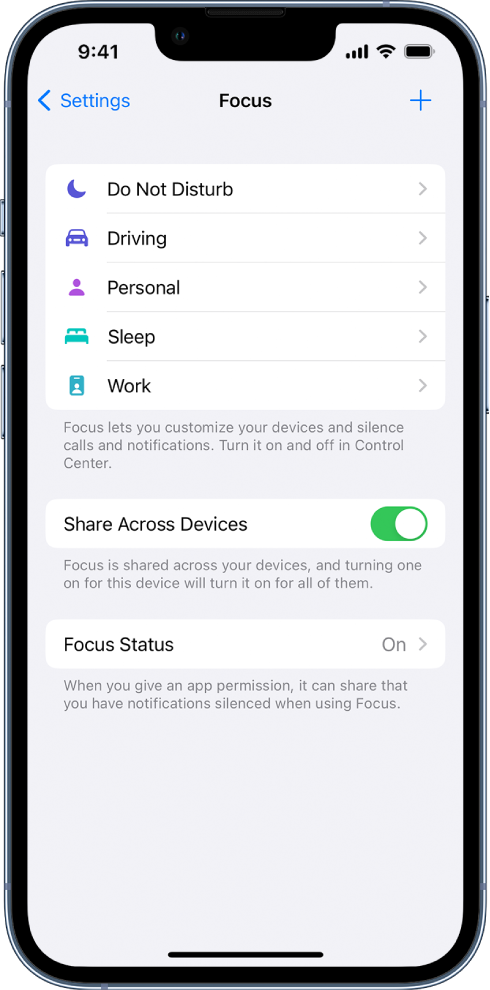
 at the top of the screen., then turn on Share Across Devices (you must be signed in with same Apple ID on all your devices).
After setting up your Focus, you can return to Settings > Focus at any time and change any of the options you chose above.
You can schedule a Focus to turn on automatically or turn it on or off in Control Center.
When you set up a Sleep Focus, you can also change your next bedtime and wake-up time, or adjust your sleep schedule by tapping Set Up Sleep in Health. See Set an alarm on iPhone or Add or change sleep schedules in Health on iPhone.
Add Focus filters
When you set up a Focus, you can add app filters that determine what information apps will show during the Focus. For example, you can choose which mail account or which calendar to use during the Focus.
Create a Custom Focus
If you want to concentrate on an activity that’s different from any of the provided Focus options, you can create a Custom Focus.
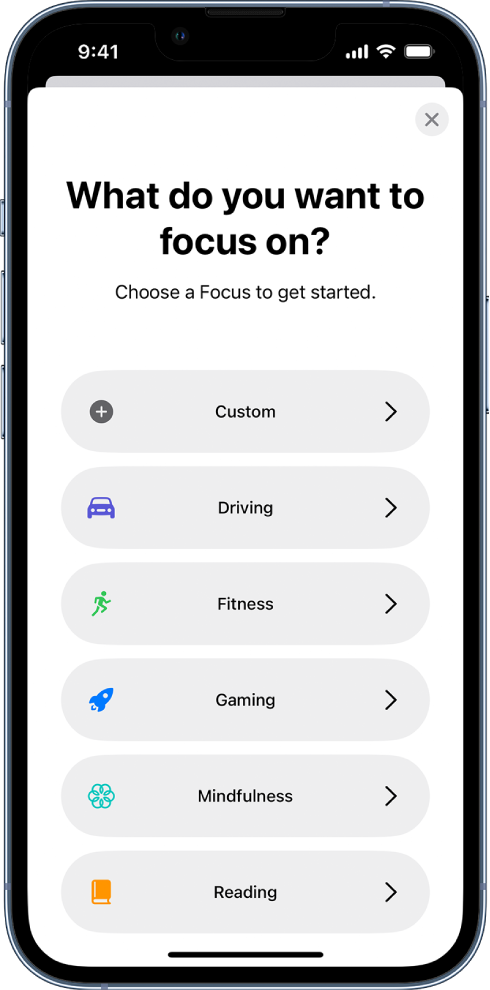
> Focus. at the top right, then tap Custom.
Keep your Focus settings up to date across all your Apple devices
You can use the same Focus settings on all your Apple devices where you’re signed in with the same Apple ID.
Go to Settings > Focus, then turn on Share Across Devices.
Note: Focus filters don’t get synced across devices—they’re only on the device where you set them up."
Let us know if you have any questions.
Thank you for using Apple Support Communities.
Take care!
Hello susan-kay,
Welcome to Apple Support Communities!
If we understand your post correctly, you want to know how to open and change an item in Focus. We're here to help!
"Focus is a feature that helps you reduce distractions and set boundaries. When you want to concentrate on a specific activity, you can customize one of the provided Focus options—for example Work, Personal, or Sleep—or create a custom Focus. You can use Focus to temporarily silence all notifications, or allow only specific notifications—ones that apply to your task, for example—and let other people and apps know you’re busy.
When a Focus is linked to your Lock Screen, you can turn it on by simply swiping to the corresponding Lock Screen.
Likewise, you can customize a Home Screen page that has only apps related to a Focus and make that page your Home Screen during that Focus. iPhone also suggests Home Screen pages with apps and widgets that are relevant to the Focus you’re setting up.
Tip: To quickly silence all notifications, open Control Center, tap Focus, then turn on Do Not Disturb.
Set up a Focus
> Focus, then tap a Focus—for example, Do Not Disturb, Personal, Sleep, or Work. at the top of the screen., then turn on Share Across Devices (you must be signed in with same Apple ID on all your devices).After setting up your Focus, you can return to Settings > Focus at any time and change any of the options you chose above.
You can schedule a Focus to turn on automatically or turn it on or off in Control Center.
When you set up a Sleep Focus, you can also change your next bedtime and wake-up time, or adjust your sleep schedule by tapping Set Up Sleep in Health. See Set an alarm on iPhone or Add or change sleep schedules in Health on iPhone.
Add Focus filters
When you set up a Focus, you can add app filters that determine what information apps will show during the Focus. For example, you can choose which mail account or which calendar to use during the Focus.
Create a Custom Focus
If you want to concentrate on an activity that’s different from any of the provided Focus options, you can create a Custom Focus.
> Focus. at the top right, then tap Custom.Keep your Focus settings up to date across all your Apple devices
You can use the same Focus settings on all your Apple devices where you’re signed in with the same Apple ID.
Go to Settings > Focus, then turn on Share Across Devices.
Note: Focus filters don’t get synced across devices—they’re only on the device where you set them up."
Let us know if you have any questions.
Thank you for using Apple Support Communities.
Take care!
How do I enter focus?

