Renaming iPod Classic

For some reason, when I connect my iPod classic and click on its name in devices on the sidebar, nothing happens and I am unable to rename it. Is there a trick to this or another way to rename my iPod? Any help is appreciated.

iPod Classic

Posted on Nov 29, 2022 6:38 PM

Reply
Question marked as Top-ranking reply

Posted on Dec 2, 2022 10:16 AM

Thank you. First in Finder use the menu option Finder > Settings > Sidebar and make sure there is a tick against CDs, DVDs and iOS Devices. You should now find the iPod shows up once or twice in the sidebar, once with an iPod icon, and again with a generic disk icon if disk use is enabled. Select the first one and click into the name of the device just next to the image of it. This is an editable field.
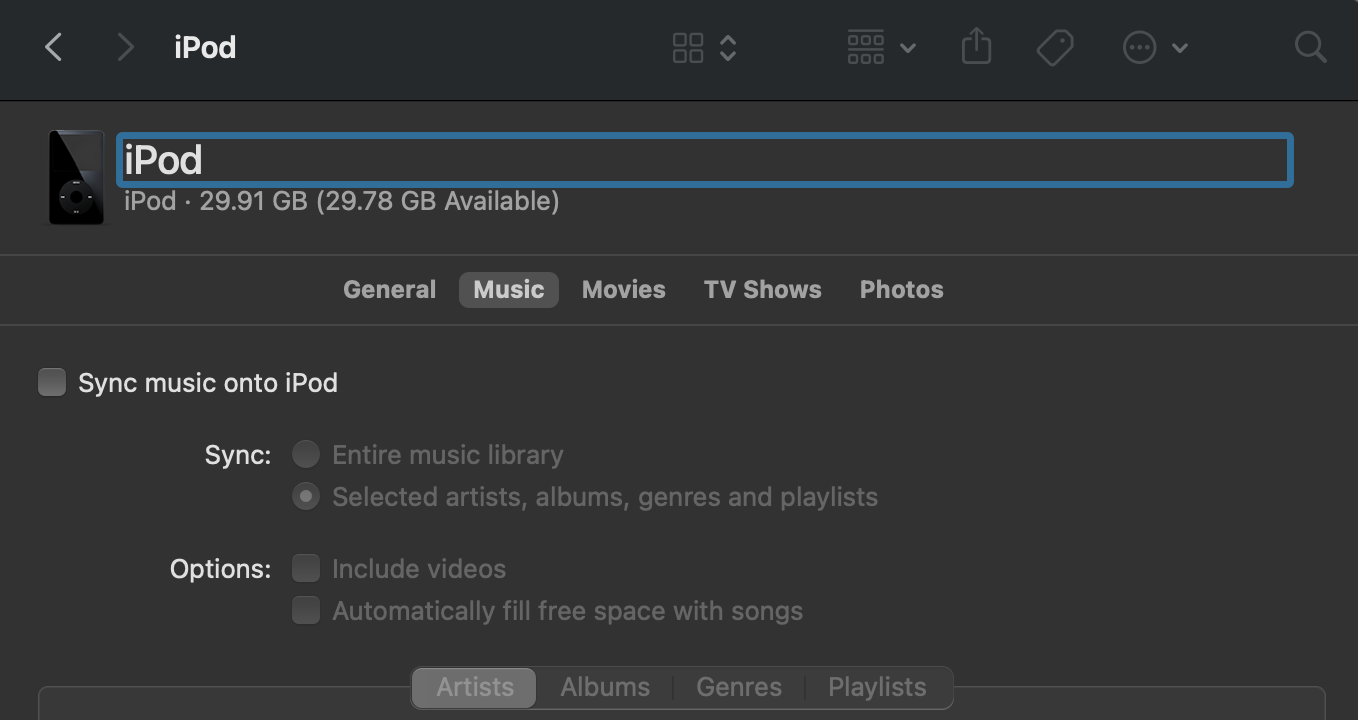


When I've tried renaming my iPod the second entry, which is all in caps, didn't change automatically. It may be best to right click on this entry, click rename, and then type in the chosen name which will be converted to all caps, and may drop certain characters, just to remain consistent with how things used to work.


tt2

9 replies
Question marked as Top-ranking reply

Dec 2, 2022 10:16 AM in response to jbenegar

Thank you. First in Finder use the menu option Finder > Settings > Sidebar and make sure there is a tick against CDs, DVDs and iOS Devices. You should now find the iPod shows up once or twice in the sidebar, once with an iPod icon, and again with a generic disk icon if disk use is enabled. Select the first one and click into the name of the device just next to the image of it. This is an editable field.


When I've tried renaming my iPod the second entry, which is all in caps, didn't change automatically. It may be best to right click on this entry, click rename, and then type in the chosen name which will be converted to all caps, and may drop certain characters, just to remain consistent with how things used to work.


tt2

Dec 1, 2022 9:09 PM in response to turingtest2

Thanks for the suggestions. Unfortunately, I can't get the current iPod name highlighted in devices on the sidebar or in the Finder to rename it. And now, when I connect my iPod to iTunes, it isn't syncing changes to the music anymore. It just charges the unit but nothing else. Do I need to restore iPod to original settings and start over again?

This thread has been closed by the system or the community team. You may vote for any posts you find helpful, or search the Community for additional answers.

Renaming iPod Classic

Welcome to Apple Support Community
A forum where Apple customers help each other with their products. Get started with your Apple Account.