
CarPlay - How do you add and delete On Split Screen
I have 3 positions on the split Home Screen. I want to remove one of the items and replace it with my calendar. How do I do that?
iPhone XR
I have 3 positions on the split Home Screen. I want to remove one of the items and replace it with my calendar. How do I do that?
iPhone XR
Good afternoon Mylisa53,
To view the Calendar app in CarPlay, try setting it as one of the top three apps as outlined in the resource below:
"While using CarPlay, the display in your car will display your available apps. To add, remove or rearrange the order of the apps on your iPhone:
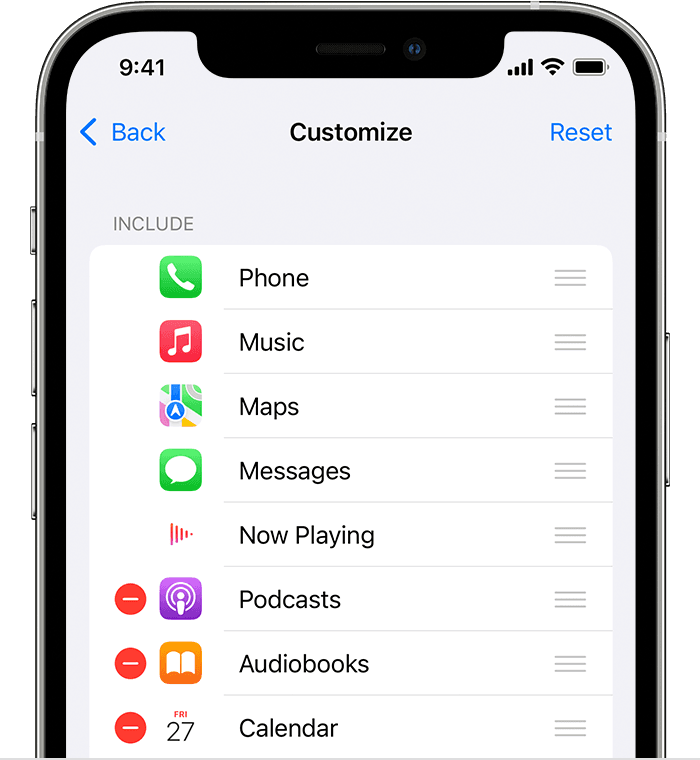
 or Delete button
  to add and remove apps. Tap and drag an app to change the order the apps appear in.
The next time you connect your iPhone to CarPlay, the new order of your apps should appear on the display. Only apps that are supported by CarPlay will appear on your display.
Also, try asking Siri to open Calendar while the Maps app is open.
Use your vehicle’s built-in controls to control CarPlay
Take care.
Good afternoon Mylisa53,
To view the Calendar app in CarPlay, try setting it as one of the top three apps as outlined in the resource below:
"While using CarPlay, the display in your car will display your available apps. To add, remove or rearrange the order of the apps on your iPhone:
or Delete button to add and remove apps. Tap and drag an app to change the order the apps appear in.The next time you connect your iPhone to CarPlay, the new order of your apps should appear on the display. Only apps that are supported by CarPlay will appear on your display.
Also, try asking Siri to open Calendar while the Maps app is open.
Use your vehicle’s built-in controls to control CarPlay
Take care.
Hello Mylisa53,
Welcome to Apple Support Communities.
We understand that you want to be able to view your Calendar with CarPlay. We are happy to help.
These steps may help. Please use the steps as listed here: View your Calendar with CarPlay - Apple Support
Use Siri or open Calendar in CarPlay to view events, appointments, and meetings.
Siri: Say something like: “Do I have a meeting at 10?” or “Where is my 3:30 meeting?” Learn how to use Siri.
Upcoming events appear in CarPlay Dashboard. You can also use your vehicle’s built-in controls to open Calendar in CarPlay to view upcoming events.
Note: If you’re viewing CarPlay Dashboard, tap  to see pages of all of your CarPlay apps, including Calendar.
To see more information about an event, select it. Options may allow you to get directions to the event or phone into it.
Let us know if you have further questions.
Take care.
What I would like to do is in the SPLIT screen view (see below picture)that shows the map on the left I would like to have my upcoming activity on my calendar to be there on the right. That means without having to go into the app tiles as you pictured. Sometimes the calendar event is there and it disappears or sometimes it’s not there at all as exhibited in the attached picture. When it appears it’s under where “now playing” is located. Also, how do I get the top right to stop picking arbitrary destinations as it did in this picture? Thank you for your help.
But I want it the calendar event for the day to show up on the split screen with the map. I don’t want to have to go to the apps page to see it even if I set it as one of the top 3 items on the list.
Is there a way to set the items that you see in the split screen as viewed in my picture above. In the picture you can see that the calendar event for the day is on on that screen. I want to be able to put it there. Is there a way to do that?
Hey Mylisa53,
It is possible for you to adjust what you see on the split screen. Please connect with Apple Support directly for additional assistance with this matter here: Apple Support
Kind regards.
Hello Mylisa53,
What you're explaining you want in Split View is possible. Have you checked to see if there are any firmware updates to your car stereo? You can find how to update it in your User Manual.
Thanks!
Yes I updated the car myself. They only release an update 2 times a year and the next one is in the spring of 2023.
what I don’t understand is that sometimes the calendar event is there and sometimes it’s not. Sometimes the Google’s map picks my home location for direction and sometimes it’s some other location that’s displayed in the split screen.
so what your telling me is that in CarPlay I can’t chose what is displayed on the split screen as in my picture above.
CarPlay - How do you add and delete On Split Screen




