
Select "Family Setup / Standalone" Apple Watch as primary find-my location source for contact

I set up a Family Setup (standalone) Apple Watch S4 with cellular - I'd like it's location to be the primary location source for the family member (under People in Find My App), however the contact location seems to default to another iOS device using that family members AppleID, and not the watch.


There was a previous thread about this with no satisfactory answer - sounds like it might require a feature suggestion and Family Setup feature update: Change default device for find my location - Apple Community


Apple Watch Series 4

Posted on Dec 2, 2022 7:02 AM

Reply

Similar questions

4 replies

Dec 5, 2022 4:28 PM in response to 3rdparty


Hello 3rdparty,


From the looks of the article here: Set up Find My on all your devices - Apple Support


It says: "You can use your iPhone, iPad, or iPod touch to share your location."


From that, it does not seem that a watch can be used to share the location. If can be found in Find my, but not sharing location. If you wish to leave feedback for this change later, please do so here: www.apple.com/feedback/


Thanks.

Dec 5, 2022 1:37 PM in response to 3rdparty

Hello 3rdparty,


Just to clarify, is the issue that the location is incorrect when your family member shares their location with you?


Please check out the following link, which outlines information on Family Setup options, and how to enable Location Services, so we can make sure that's not part of the issue: Set up Apple Watch for a family member


How it works

With Family Setup, your family member who doesn't have their own iPhone can use their Apple Watch to do things like make phone calls, send messages, and share their location with you.

After you set up a watch for a family member, you can use your iPhone to manage some of the watch's capabilities.

Note that some Apple Watch features depend on having a companion iPhone, and aren't available on an Apple Watch that you pair using Family Setup.

Family Setup is not available in Italy, Korea, and more. Learn what's available in your country or region.


Please also check out this link, which has more information on finding a friend's location with Apple Watch, and may help: View a friend’s location with Apple Watch


Find out where your friends are

1. Open the Find People app  on your Apple Watch to see a list of your friends, with each friend’s approximate location and distance from you. Turn the Digital Crown to see more friends.
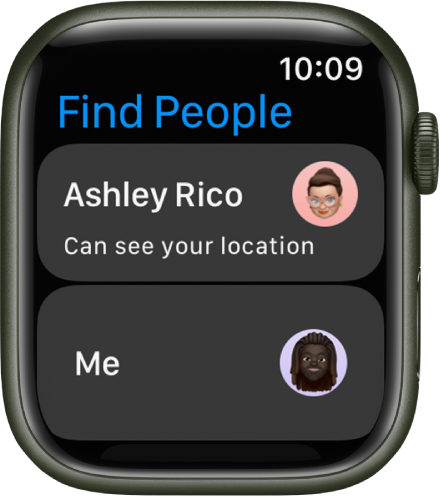
2. Tap a friend to see their location on a map and an approximate address.
3. Tap < in the top-left corner to return to your friends list.

A screen showing two entries—one for you and another for a person you’ve shared your location with.

Or use Siri. Say something like, “Where is Julie?”

Note: If your friend is wearing an Apple Watch with cellular and is sharing their location, but they don’t have their iPhone with them, their location will be tracked using their Apple Watch.


Thanks!

Dec 5, 2022 1:45 PM in response to Brittany1416

no, the issue is that the primary location for the family member AppleID in "People" tab of Find My app is defaulting to the iPad / (older) iPhone using the same AppleID and not the Apple Watch as desired. When I open the Find My app on the iPad, I can only select it to use the iPad as the location source, not the Apple Watch.


I believe because the watch was set up in standalone Family Setup mode, I can't select it as the primary location source for that AppleID. This seems counterintuitive as the standalone watch should be able to be selected as the location source.


My last attempt may be to set up a newer iPhone with the same AppleID to see if a newer version of iOS will allow it to specify the Watch as the primary location source, but I'm doubtful.

This thread has been closed by the system or the community team. You may vote for any posts you find helpful, or search the Community for additional answers.

Select "Family Setup / Standalone" Apple Watch as primary find-my location source for contact

Welcome to Apple Support Community
A forum where Apple customers help each other with their products. Get started with your Apple Account.