I am trying to add my first premier credit card to my apple wallet
I want to add my first premier credit card to my apple wallet
iPhone 13 Pro Max, iOS 16
I want to add my first premier credit card to my apple wallet
iPhone 13 Pro Max, iOS 16
Hello Tashaandtisha,
If you want to add a card to the Wallet app to use with Apple Pay, please check out the following link, which will guide you through how to do that, and should be helpful: Set up Apple Pay
To use Apple Pay, you need:
• A compatible device with the latest version of iOS or iPadOS, watchOS, or macOS.
• A supported card from a participating card issuer.
• An Apple ID signed in to your Apple device.
Learn if your country/region supports Apple Pay. To check if your card is compatible with Apple Pay, contact your card issuer.
How to add a debit or credit card on your iPhone
1. In the Wallet app, tap the Add button.
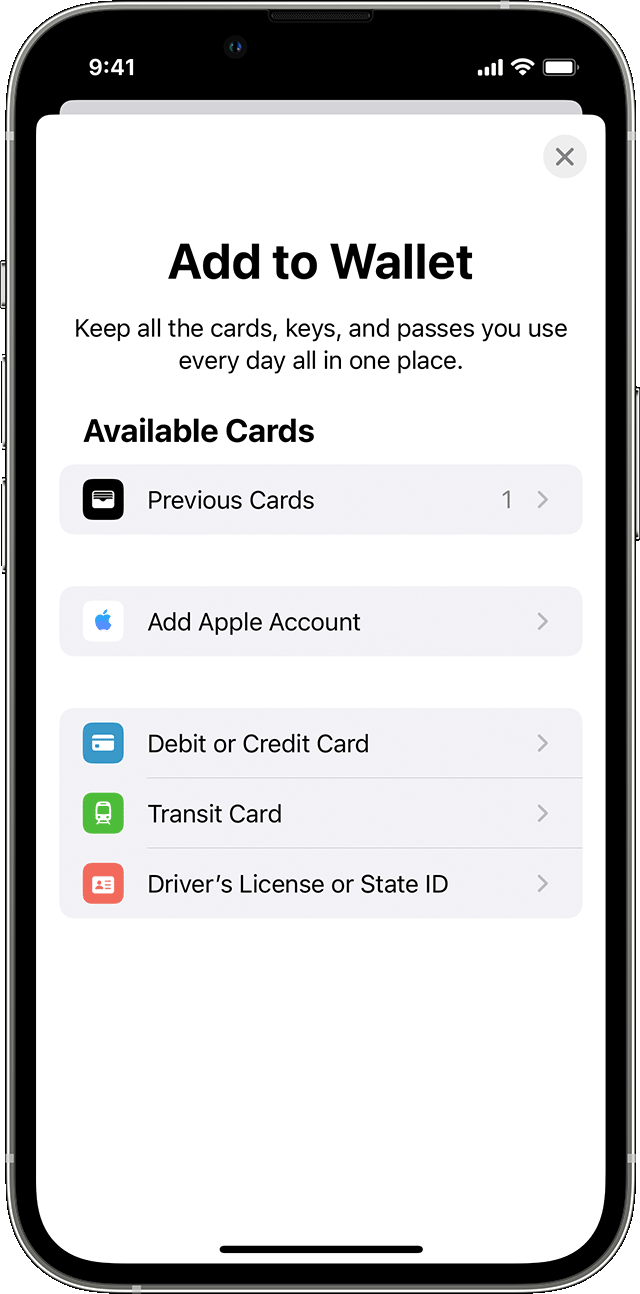
• Tap Debit or Credit Card to add a new card.
• Tap Previous Cards to add a card that you used previously.
2. Tap Continue.
3. Follow the steps on the screen to add a new card.
4. Verify your information with your bank or card issuer. They might ask you to provide more information or to download an app before approving your card for use with Apple Pay.
5. If you have a paired Apple Watch, you have the option to also add the card to your watch.
To remove a card from the Previous Cards screen, tap Edit > Remove button> Delete. Then, tap Delete Card to confirm and remove the card from all your devices.
Thanks!
Hello Tashaandtisha,
If you want to add a card to the Wallet app to use with Apple Pay, please check out the following link, which will guide you through how to do that, and should be helpful: Set up Apple Pay
To use Apple Pay, you need:
• A compatible device with the latest version of iOS or iPadOS, watchOS, or macOS.
• A supported card from a participating card issuer.
• An Apple ID signed in to your Apple device.
Learn if your country/region supports Apple Pay. To check if your card is compatible with Apple Pay, contact your card issuer.
How to add a debit or credit card on your iPhone
1. In the Wallet app, tap the Add button
• Tap Debit or Credit Card to add a new card.
• Tap Previous Cards to add a card that you used previously.
2. Tap Continue.
3. Follow the steps on the screen to add a new card.
4. Verify your information with your bank or card issuer. They might ask you to provide more information or to download an app before approving your card for use with Apple Pay.
5. If you have a paired Apple Watch, you have the option to also add the card to your watch.
To remove a card from the Previous Cards screen, tap Edit > Remove button
Thanks!
I am trying to add my first premier credit card to my apple wallet