I dropped my iPad and it won’t start
I dropped my iPad and it won’t start
iPad, iPadOS 15
I dropped my iPad and it won’t start
iPad, iPadOS 15
Hi Sameee1,
Thanks for posting in Apple Support Communities.
With your iPad not starting, you can try a force restart to power it on.
On your iPad without a Home button
1. Press and quickly release the volume button closest to the top button.
2. Press and quickly release the volume button farthest from the top button.
3. Press and hold the top button until the device begins to restart.
4. If your iPad doesn't turn on, follow these steps to check your hardware and charge your device. You might need to charge for up to an hour.
5. If your iPad still doesn't turn on, contact Apple Support.
On your iPad with a Home button
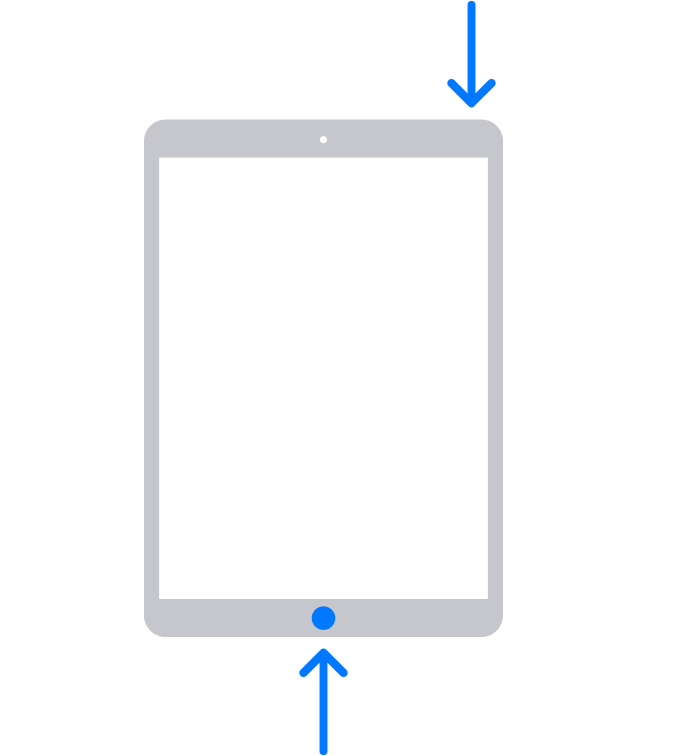
1. Press and hold both the Home button and the top button until you see the Apple logo.
2. If your iPad doesn't turn on, follow these steps to check your hardware and charge your device. You might need to charge for up to an hour.
3. If your iPad still doesn't turn on, contact Apple Support.
You can find these steps in If your iPad won't turn on or is frozen.
You can contact Apple for service options or you can find a nearby Apple Authorized Service Provider.
Contact - Official Apple Support
Regards.
Hi Sameee1,
Thanks for posting in Apple Support Communities.
With your iPad not starting, you can try a force restart to power it on.
On your iPad without a Home button
1. Press and quickly release the volume button closest to the top button.
2. Press and quickly release the volume button farthest from the top button.
3. Press and hold the top button until the device begins to restart.
4. If your iPad doesn't turn on, follow these steps to check your hardware and charge your device. You might need to charge for up to an hour.
5. If your iPad still doesn't turn on, contact Apple Support.
On your iPad with a Home button
1. Press and hold both the Home button and the top button until you see the Apple logo.
2. If your iPad doesn't turn on, follow these steps to check your hardware and charge your device. You might need to charge for up to an hour.
3. If your iPad still doesn't turn on, contact Apple Support.
You can find these steps in If your iPad won't turn on or is frozen.
You can contact Apple for service options or you can find a nearby Apple Authorized Service Provider.
Contact - Official Apple Support
Regards.
I dropped my iPad and it won’t start