Disable alarm sound in Apple Watch

I have medication that needs to be taken at certain times throughout the day. I have those times set in As alarms on my iPhone, but I have them set to no sound – haptics only. My watch is set to mirror my iPhone. But the audible alert on the watch continues. What am I missing…?

Apple Watch Series 7, watchOS 9

Posted on Dec 5, 2022 5:51 PM

Reply
Question marked as Top-ranking reply

Posted on Dec 7, 2022 5:24 PM

Hello lindafromfolsom,


To receive only haptic notifications for alarms, you'll want to use the steps below to enable Silent Mode on your Apple Watch:


1. Touch and hold the bottom of the watch face. Wait for Control Center to show, then swipe up.
2. Tap the Silent Mode button Silent Mode icon. This turns on Silent Mode. You can still receive haptic notifications. 
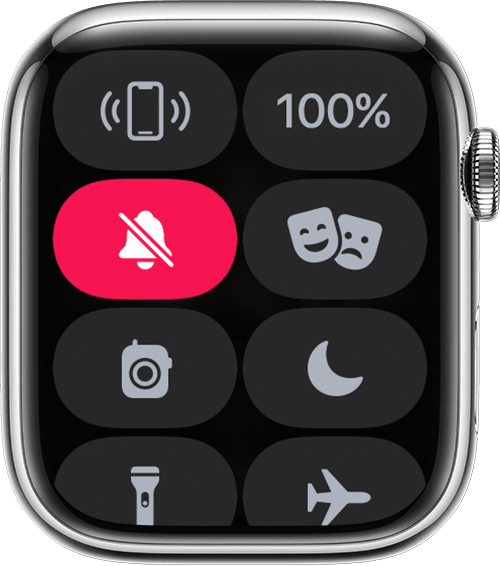
Apple Watch showing the Mute button in Control Center


You can also find those steps in this resource: Change the audio and notification settings on your Apple Watch - Apple Support


Hopefully that addresses your inquiry.


Take care.

Similar questions

1 reply
Question marked as Top-ranking reply

Dec 7, 2022 5:24 PM in response to lindafromfolsom

Hello lindafromfolsom,


To receive only haptic notifications for alarms, you'll want to use the steps below to enable Silent Mode on your Apple Watch:


1. Touch and hold the bottom of the watch face. Wait for Control Center to show, then swipe up.
2. Tap the Silent Mode button Silent Mode icon. This turns on Silent Mode. You can still receive haptic notifications. 
Apple Watch showing the Mute button in Control Center


You can also find those steps in this resource: Change the audio and notification settings on your Apple Watch - Apple Support


Hopefully that addresses your inquiry.


Take care.

This thread has been closed by the system or the community team. You may vote for any posts you find helpful, or search the Community for additional answers.

Disable alarm sound in Apple Watch

Welcome to Apple Support Community
A forum where Apple customers help each other with their products. Get started with your Apple Account.