iPhone SE ringer. iOS 16.
I updated the software on my iPhone SE. Now, the ringer rings even though the ringer is switched off. I’m constantly being woken up and no matter what I do the ringer rings. Can anyone help?
iPhone SE
I updated the software on my iPhone SE. Now, the ringer rings even though the ringer is switched off. I’m constantly being woken up and no matter what I do the ringer rings. Can anyone help?
iPhone SE
Hi there MikikoMiauMiau,
If your iPhone is ringing no matter what, let's first ensure that silent mode is enabled using this information from How to put your iPhone on vibrate, ring, or silent mode:
Use Silent mode
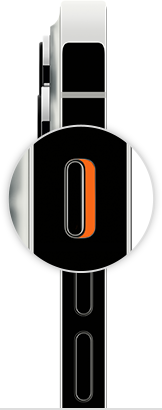
To put your iPhone in Silent mode, move the switch so that orange is showing.
If this continues and your iPhone still rings when a call comes in, then follow the 'Set sound and vibration options' section next here to manually adjust the ringer volume: Change iPhone sounds and vibrations - Apple Support
Cheers!
iPhone SE ringer. iOS 16.