Hello AppleCrayCray,
We'd recommend checking to see if your subscription is still active by completing the steps listed here: If you want to cancel a subscription from Apple - Apple Support that are also listed below.
- "Open the Settings app.
- Tap your name.
- Tap Subscriptions."
If it shows active, then we'd recommend making sure you have the Apple One Premier subscription that includes Apple News+. More info on what is included can be found here: Bundle Apple subscriptions with Apple One - Apple Support
Lastly, you can request a refund by completing the steps listed here: Request a refund for apps or content that you bought from Apple - Apple Support that are also listed below.
"How to request a refund
- Sign in to reportaproblem.apple.com.
- Tap or click "I'd like to," then choose "Request a refund."
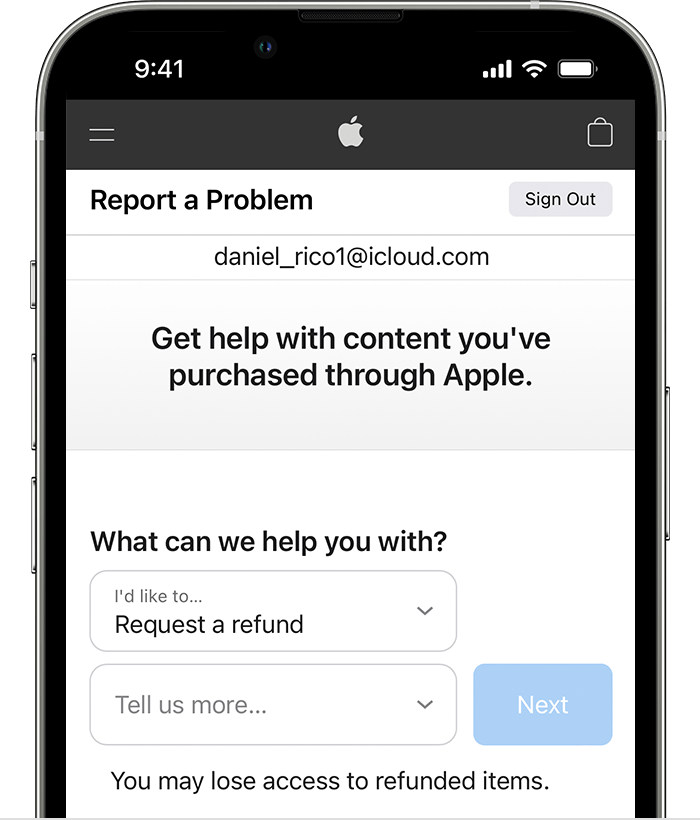
3. Choose the reason why you want a refund, then choose Next.
4. Choose the app, subscription, or other item, then choose Submit. If you were charged for a subscription that you no longer want, you can also cancel the subscription."
Best regards.



