Repeat in music app

Hey. I understand that the repeat feature can be adjusted on the music app. The only issue is that I have to wait till the song is playing to change the repeat, or playlist feature.


So what I’m currently dealing with, is everytime my phone is plugged into my car for charging, the same song plats automatically as the first song. So it’s not repeating, it’s just repeatedly always the first song that plays. It seems to play the songs in alphabetical order starting with A. And I can only change it after it’s already started the same first song,


if there’s anyway to change it to where it starts at a random song each time that would be so amazing because I really like Sarah Mclachlan’s Adia but it would be nice to hear something different each time I plug my phone in.


any help would be great thanks


Eugenia

Posted on Dec 7, 2022 4:49 PM

Reply
Question marked as Top-ranking reply

Posted on Dec 10, 2022 7:58 PM

Hey Eugenia,


Have you tried to use the shuffle Music feature in Music on your iPhone? If not, see this helps.

How to shuffle all songs or albums in your library
1: Open the Apple Music app.
2: At the bottom of your screen, tap Library.
3: Tap Songs or Albums.
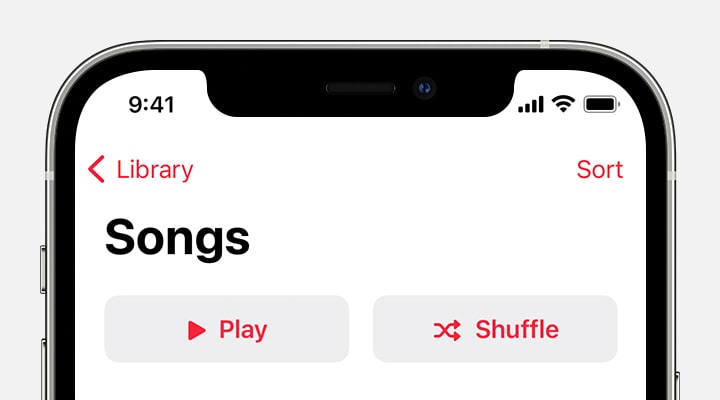
4: At the top of Songs or Albums, tap the Shuffle button.
iPhone showing the Shuffle button at the top of Songs in Library.
You can't turn off shuffle from here. Learn how to turn off shuffle.

If this doesn't help, let us know which iPhone you have and the software version showing installed when you go to Settings > General > About.


Take care!

1 reply
Question marked as Top-ranking reply

Dec 10, 2022 7:58 PM in response to eugenia240

Hey Eugenia,


Have you tried to use the shuffle Music feature in Music on your iPhone? If not, see this helps.

How to shuffle all songs or albums in your library
1: Open the Apple Music app.
2: At the bottom of your screen, tap Library.
3: Tap Songs or Albums.
4: At the top of Songs or Albums, tap the Shuffle button.
iPhone showing the Shuffle button at the top of Songs in Library.
You can't turn off shuffle from here. Learn how to turn off shuffle.

If this doesn't help, let us know which iPhone you have and the software version showing installed when you go to Settings > General > About.


Take care!

This thread has been closed by the system or the community team. You may vote for any posts you find helpful, or search the Community for additional answers.

Repeat in music app

Welcome to Apple Support Community
A forum where Apple customers help each other with their products. Get started with your Apple Account.