AIR DROP
Iphone and Imac do not see each other on Air Drop. Phone SE 2020 mdl, Imac is running OSX El Capitan.
iMac, OS X 10.11
Iphone and Imac do not see each other on Air Drop. Phone SE 2020 mdl, Imac is running OSX El Capitan.
iMac, OS X 10.11
Hey oki al,
We'd be happy to help out. If your devices aren't seeing each other via AirDrop, the first place to start would be to make sure that both are fully updated to the latest compatible software available for them.
Your iPhone SE 2020 is compatible with the latest version of iOS, iOS 16.1.2. Without knowing your iMac model it's harder to say, but you'll find help updating it here: Update macOS on Mac - Apple Support
Specifically be sure to follow the steps here within the above resource:
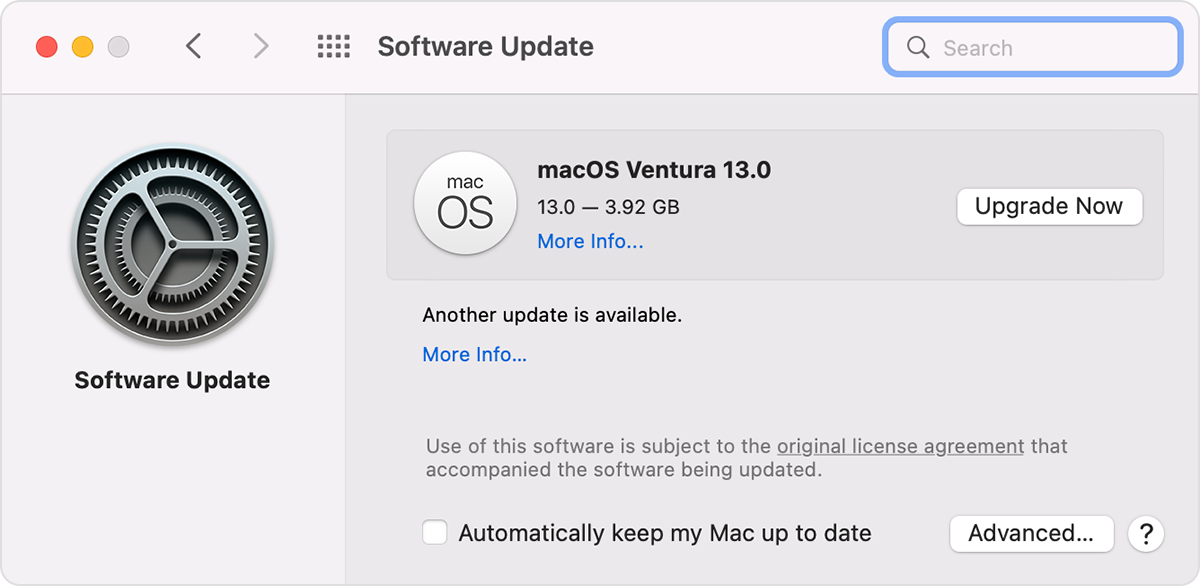
Use Software Update
Before installing new software, it's a good idea to back up your Mac.
1. From the Apple menu in the corner of your screen:
• Choose System Settings. Then click General in the sidebar, and Software Update on the right.
• Or choose System Preferences. Then click Software Update.
2. If Software Update finds new software, click the Update Now or Upgrade Now button to install it.
3. Enter your administrator password, if asked. During installation, your Mac might restart, and you might see a progress bar or blank screen several times.
If Software Update says that your Mac is up to date, then no new software is currently available for your Mac model. Software Update shows only updates and upgrades that are compatible with your Mac.
If the issue persists after updating, be sure you're using the following steps and meeting the requirements necessary as outlined here: How to use AirDrop on your iPhone or iPad - Apple Support
We hope this helps out.
Take care!
Hey oki al,
We'd be happy to help out. If your devices aren't seeing each other via AirDrop, the first place to start would be to make sure that both are fully updated to the latest compatible software available for them.
Your iPhone SE 2020 is compatible with the latest version of iOS, iOS 16.1.2. Without knowing your iMac model it's harder to say, but you'll find help updating it here: Update macOS on Mac - Apple Support
Specifically be sure to follow the steps here within the above resource:
Use Software Update
Before installing new software, it's a good idea to back up your Mac.
1. From the Apple menu in the corner of your screen:
• Choose System Settings. Then click General in the sidebar, and Software Update on the right.
• Or choose System Preferences. Then click Software Update.
2. If Software Update finds new software, click the Update Now or Upgrade Now button to install it.
3. Enter your administrator password, if asked. During installation, your Mac might restart, and you might see a progress bar or blank screen several times.
If Software Update says that your Mac is up to date, then no new software is currently available for your Mac model. Software Update shows only updates and upgrades that are compatible with your Mac.
If the issue persists after updating, be sure you're using the following steps and meeting the requirements necessary as outlined here: How to use AirDrop on your iPhone or iPad - Apple Support
We hope this helps out.
Take care!
We appreciate you letting us know, oki al.
We do suggest that you install the latest updates for both devices using AirDrop. If the devices don't see each other, the troubleshooting steps outlined here may help: Use AirDrop on your Mac
"If you can't see the other device in AirDrop
Make sure that both devices are within 30 feet (9 meters) of each other and have Wi-Fi and Bluetooth turned on.
Choose Go > AirDrop from the menu bar in the Finder, then check the ”Allow me to be discovered by” setting in the AirDrop window. iPhone, iPad, and iPod touch have a similar setting. If set to receive from Contacts Only, both devices must be signed in to iCloud, and the email address or phone number associated with the sender's Apple ID must be in the Contacts app of the receiving device.
Install the latest software updates for your Mac and other devices.
Make sure that incoming connections aren't blocked in firewall settings:
 and enter your administrator password when prompted. Click Firewall Options, then make sure that “Block all incoming connections” is deselected."
You can also use iCloud to access photos on all your devices that are signed in with the same Apple ID as outlined here: Set up iCloud Photos on all your devices
We hope this helps.
Cheers!
My apology for not identifying my iMac. It is a vintage model, manufactured in 2009 and is identified as a mid-year model? Software version is 10.11.16 OSX El Capitan, 24" early 2009.
I do have and used Facetime and Messages and do have the Air Drop icon as well. But, when I approached my computer with my iPhone to download pictures the iMac was not visible on the phone for me to connect.
I thought this strange, as I could as mentioned above use Facetime & Messages and I could not understand why Air Drop, although installed and displayed on the iMac was not seen by my phone.
I did note on one website, someone stated that any iMac prior to 2012 cannot use Air Drop. Having use of Facebook and Messages and not Air Drop sort of had me question that premise. So, is it possible to have the use of both Facetime and Messages and not Air Drop? I hope the description of my iMac that I inadvertently omitted in my original query will help determine this issue.
Tx
AIR DROP