i can’t delete my snapchat from settings can you help me about this please
iPhone 7 Plus, iOS 15
iPhone 7 Plus, iOS 15
Hi ajla241,
From what you described in your original post, here is what we recommend: Delete apps on your iPhone, iPad, and iPod touch - Apple Support
Next, we’d like to show you how to perform the recommended troubleshooting steps via the link above. Please click to open the link, then read through the steps in the section titled "How to delete an app."
1) Touch and hold the app.
2) Tap Remove App.
3) Tap Delete App, then tap Delete to confirm.
Keep in mind that some built-in Apple apps can't be deleted from your device, so you might not see the option to delete an app. Here’s a list of built-in Apple apps you can delete from your device. If you can't delete an app that's not made by Apple, disable parental controls, then try deleting the app again.
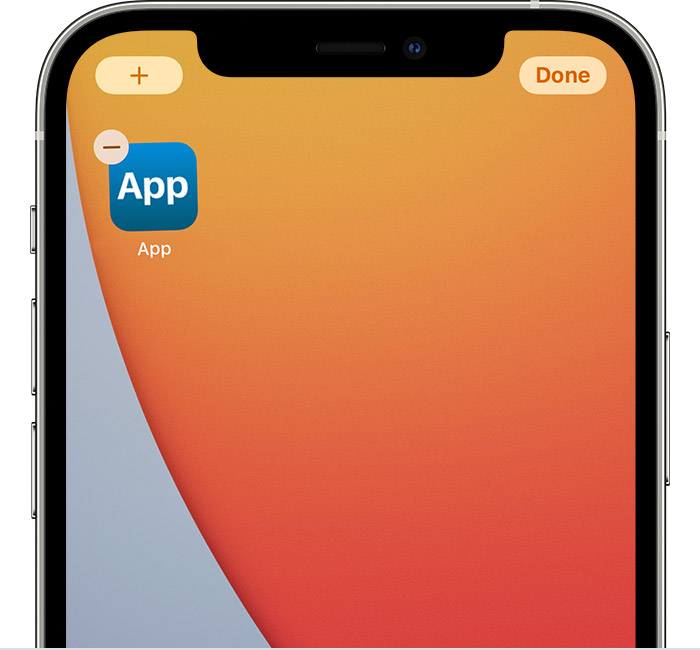
If you touch and hold an app from the Home Screen and the apps start to jiggle:
1) Tap the Remove iconin the upper-left corner of the app.
2) Tap Delete App, then tap Delete to confirm.
3) Tap Done.
The reason why we are recommending the steps above is because they will show you how to delete apps on your iPhone.
If you’re still experiencing the same issue, then give the steps here a try: Restart your iPhone - Apple Support
If the original problem persists after trying the previous steps, please provide us with specifics on what you see for more help, and we will continue from there.
Thanks for using the Apple Support Communities.
Cheers!
Hi ajla241,
From what you described in your original post, here is what we recommend: Delete apps on your iPhone, iPad, and iPod touch - Apple Support
Next, we’d like to show you how to perform the recommended troubleshooting steps via the link above. Please click to open the link, then read through the steps in the section titled "How to delete an app."
1) Touch and hold the app.
2) Tap Remove App
3) Tap Delete App, then tap Delete to confirm.
Keep in mind that some built-in Apple apps can't be deleted from your device, so you might not see the option to delete an app. Here’s a list of built-in Apple apps you can delete from your device. If you can't delete an app that's not made by Apple, disable parental controls, then try deleting the app again.
If you touch and hold an app from the Home Screen and the apps start to jiggle:
1) Tap the Remove icon
2) Tap Delete App, then tap Delete to confirm.
3) Tap Done.
The reason why we are recommending the steps above is because they will show you how to delete apps on your iPhone.
If you’re still experiencing the same issue, then give the steps here a try: Restart your iPhone - Apple Support
If the original problem persists after trying the previous steps, please provide us with specifics on what you see for more help, and we will continue from there.
Thanks for using the Apple Support Communities.
Cheers!
i can’t delete my snapchat from settings can you help me about this please