
Your phone is currently unpairing Apple Watch. This may take awhile. Process stops and it does the same thing over
Your phone is currently unpairing Apple Watch. This may take awhile. Process stops and it does the same thing over
Your phone is currently unpairing Apple Watch. This may take awhile. Process stops and it does the same thing over
Hello L_BROCK,
Thank you for reaching out to Apple Support Communities.
Are you unpairing from your iPhone? If so, let's try to unpair from the watch itself using these steps:
"How to erase your Apple Watch if you don't have your iPhone
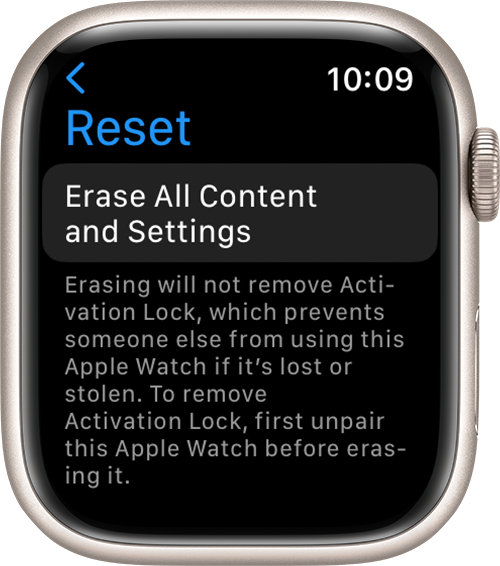
4.Tap Erase All to confirm. This resets your Apple Watch to the factory settings.
Now you can set up your Apple Watch again. You'll need the Apple ID and password associated with the watch turn off Activation Lock."
More details can be found here: Unpair and erase your Apple Watch
If the issue persists, can you provide a few more details? Which Apple Watch and watchOS version are you currently using? How are you unpairing your Apple Watch? Also, why are you unpairing your Apple Watch? This will help us further isolate the issue.
Cheers!
Hello L_BROCK,
Thank you for reaching out to Apple Support Communities.
Are you unpairing from your iPhone? If so, let's try to unpair from the watch itself using these steps:
"How to erase your Apple Watch if you don't have your iPhone
4.Tap Erase All to confirm. This resets your Apple Watch to the factory settings.
Now you can set up your Apple Watch again. You'll need the Apple ID and password associated with the watch turn off Activation Lock."
More details can be found here: Unpair and erase your Apple Watch
If the issue persists, can you provide a few more details? Which Apple Watch and watchOS version are you currently using? How are you unpairing your Apple Watch? Also, why are you unpairing your Apple Watch? This will help us further isolate the issue.
Cheers!
Your phone is currently unpairing Apple Watch. This may take awhile. Process stops and it does the same thing over

