
tesco bank app on apple watch does not work

Does Tesco bank app work on Apple Watch 7. I have the icon but when I try to open it it says “Something went wrong. Check your mobile app settings”

Have checked settings deleted and re installed on watch and iPhone still the same

Apple Watch Series 7, watchOS 9

Posted on Dec 14, 2022 2:15 AM

Reply
1 reply

Dec 15, 2022 5:37 PM in response to PatButt

Hi PatButt,


Thanks for posting here in Apple Support Communities. We understand that the app isn't working on your Apple Watch at this time. It's recommended that you connect with the app developer for additional support regarding this matter for possible tips on how to resolve this issue. You can see how to do so here: How to contact an app developer


Contact the developer of an iOS, iPadOS, or watchOS app
1. Open the App Store on your iPhone or iPad.
2. Search for the app, then tap it. If you can't find it, tap the account button  or your photo at the top of the screen, tap Purchased, tap "Not on this [device]," then tap the app.
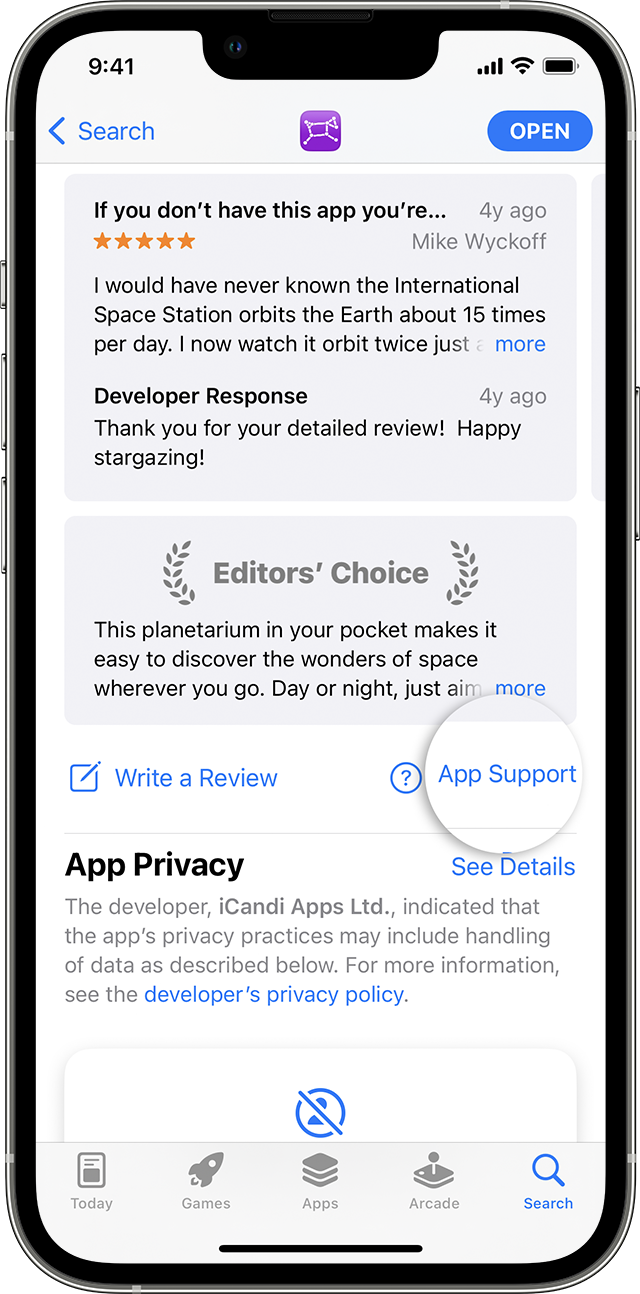
3. The app's product page appears. Scroll to the Ratings & Reviews section, then tap App Support. If you don't see App Support, make sure that you're signed in with the correct Apple ID.
In the App Store on iPhone, you can find the App Support button below the reviews.


For apps on your Apple Watch
Use the iPhone that's paired with your Apple Watch and follow the steps for iPhone.


Kind regards.

This thread has been closed by the system or the community team. You may vote for any posts you find helpful, or search the Community for additional answers.

tesco bank app on apple watch does not work

Welcome to Apple Support Community
A forum where Apple customers help each other with their products. Get started with your Apple Account.